
HDMI to Component Converter
4.0Editor score
HDMI input to YPbPr output
Supports 1080P resolution
Includes R/L audio output
This guide compares the top HDMI to Component converters for connecting modern devices to older TVs with detailed specs and expert advice.
Connecting modern HDMI devices to older component TVs requires a reliable converter. This guide helps you choose the right adapter for seamless video and audio performance.
We evaluated ten top-rated converters based on compatibility, resolution support, and user feedback. Each product offers unique features for different setup needs.
Every pick highlights key specs, pros, and cons. Prices fluctuate frequently, so check current listings before purchasing to ensure you get the best value today.
4.0Editor score

4.2Editor score

4.3Editor score
This table provides a side-by-side comparison of all ten converters. Review key specs like resolution support, included cables, and special features to find the right match.




This converter is a budget-friendly solution for connecting Component sources to HDMI displays. It supports up to 1080P and works well with older consoles and DVD players.
We may earn a commission when you buy through this link, at no additional cost to you.
It complies with HDMI V1.4 and supports HDCP 1.4, ensuring smooth integration into modern home theaters. Users appreciate the straightforward setup and reliable performance.
The lack of reverse compatibility means it cannot convert HDMI to Component. This limitation is acceptable for those focused on connecting older devices to newer TVs.
Ideal for users seeking an affordable adapter without advanced features. It delivers solid performance for basic connectivity needs.
This converter offers an cost-effective way to bridge the gap between old and new devices.
It works with a variety of devices including DVD players and gaming consoles.
We may earn a commission when you buy through this link, at no additional cost to you.
Portta offers a reliable Component to HDMI converter with support for 1080P 60Hz. It ensures high-quality video and audio transmission for older devices.
We may earn a commission when you buy through this link, at no additional cost to you.
The converter supports HDCP 1.2/1.3 and uncompressed 2 Channel LPCM audio. It features a robust design and comes with a 5-year warranty for peace of mind.
It lacks a scaling function, so input resolution must match the display. This limitation is minor for most users with compatible setups.
Recommended for those seeking a durable solution with strong warranty support. It delivers consistent performance for standard connectivity tasks.
The 5-year warranty provides excellent protection against potential issues.
Support for uncompressed LPCM ensures clear and accurate sound.
We may earn a commission when you buy through this link, at no additional cost to you.
This HDMI to Component converter is a top budget pick for connecting modern devices to older TVs. It supports up to 1080P input and includes R/L audio output.
We may earn a commission when you buy through this link, at no additional cost to you.
It features OSD for input and output resolutions, ensuring users can verify settings. The design is straightforward and easy to install with no extra drivers.
The lack of scaling means input resolution must match display capabilities. This is manageable for most users with compatible setups.
Perfect for users seeking an affordable HDMI to Component adapter. It delivers reliable performance for basic connectivity needs.
This converter offers excellent value for those on a tight budget.
On-Screen Display helps users verify resolution settings easily.
We may earn a commission when you buy through this link, at no additional cost to you.
Portta offers a Component to HDMI converter that comes with an HDMI cable for convenience. It supports up to 1080P 60Hz and works with a wide range of devices.
We may earn a commission when you buy through this link, at no additional cost to you.
The adapter supports HDCP 1.2/1.3 and uncompressed audio. It ensures high-quality video and audio transmission for older devices.
It lacks a scaling function, so input resolution must match the display. This limitation is minor for most users with compatible setups.
Ideal for users seeking a complete package with included cables. It delivers consistent performance for standard connectivity tasks.
The included HDMI cable adds convenience and value to the purchase.
Support for 1080P 60Hz ensures crisp and clear video quality.
We may earn a commission when you buy through this link, at no additional cost to you.
This 1080P Component to HDMI converter features a compact and portable design. It works seamlessly with devices that have female component connectors and maintains original resolution.
We may earn a commission when you buy through this link, at no additional cost to you.
The adapter is engineered for versatility and ensures vibrant colors and smooth playback. It features a plug-and-play setup for easy installation.
The male component input limits compatibility to devices with female ports. This is manageable for most standard setups.
Perfect for users seeking a portable solution without scaling needs. It delivers reliable performance for basic connectivity.
This adapter is designed for convenience and easy transport.
It maintains the original resolution of your content for accurate playback.
We may earn a commission when you buy through this link, at no additional cost to you.
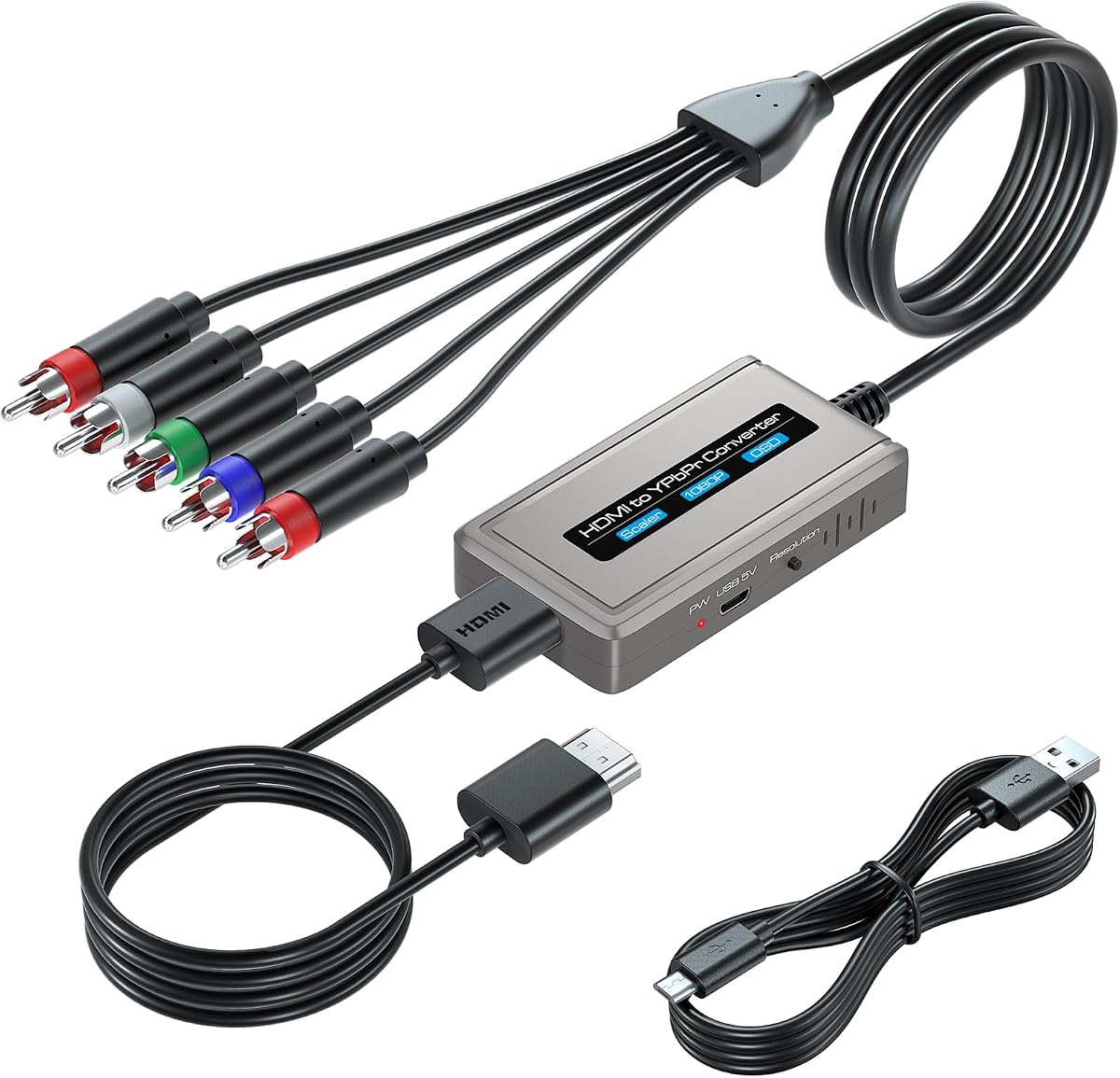
This HDMI to Component converter features a built-in scaler function for resolving resolution mismatches. It comes with HDMI and component cables for a complete solution.
We may earn a commission when you buy through this link, at no additional cost to you.
The scaler allows users to select the most suitable output resolution using a switch button. It supports OSD for input and output resolutions.
The included cables add value and eliminate the need for extra purchases. This makes it an ideal choice for hassle-free setups.
Top choice for users needing resolution scaling and all-in-one package. It delivers high-quality performance for diverse needs.
The scaler engine solves display problems when source resolution exceeds the display.
Includes HDMI and component cables for a ready-to-use experience.
We may earn a commission when you buy through this link, at no additional cost to you.
This RCA to HDMI converter is a simple solution for connecting AV devices to HDMI displays. It supports 1080P output and works with various formats.
We may earn a commission when you buy through this link, at no additional cost to you.
The adapter is plug and play and powered by an external USB cable. It ensures smooth video transmission from VHS and DVD players.
It does not support HDMI to AV conversion. This limitation is minor for those focused on analog to digital conversion.
Perfect for users seeking a straightforward AV to HDMI adapter. It delivers reliable performance for basic needs.
This converter offers an easy and straightforward setup for users.
It supports multiple TV formats for versatile compatibility.
We may earn a commission when you buy through this link, at no additional cost to you.
This HDMI to Component converter features a premium aluminum housing and a built-in scaler function. It supports up to 1080P input and offers versatile output options.
We may earn a commission when you buy through this link, at no additional cost to you.
The scaler engine up-scales or down-scales signals to match display resolution. It supports OSD for verifying current input and output resolutions.
The aluminum design provides durability and heat dissipation. This ensures consistent performance over time.
Top pick for users seeking a premium build and scaling features. It delivers high-quality performance for diverse needs.
The aluminum housing provides durability and better heat management.
The scaler engine solves display problems when source resolution exceeds the display.
We may earn a commission when you buy through this link, at no additional cost to you.
Choosing the right converter depends on your setup needs. Consider direction, resolution support, and included accessories for the best results.
Converters are directional: HDMI to Component or Component to HDMI. Identify your source device and display type before buying.
Always verify the converter direction matches your setup to avoid compatibility issues.
Look for converters that support 1080P resolution for clear video. Ensure input and output resolutions match your devices.
Higher resolution support ensures better image quality on your display.
Some converters include a scaler to adjust resolutions. This is useful if your source and display resolutions differ.
A scaler ensures smooth compatibility between mismatched resolutions.
Check if the converter supports R/L audio output for stereo sound. Some models integrate audio into HDMI while others output separately.
Separate audio output ensures better sound quality for your setup.
Some packages include HDMI or Component cables. This adds value and eliminates the need for separate purchases.
Included cables save time and ensure you have everything needed.
Aluminum housings offer better durability and heat dissipation. This ensures consistent performance over time.
Higher build quality reduces risk of failure and extends lifespan.
Look for converters with warranty coverage. A longer warranty period indicates manufacturer confidence.
Good support ensures help if you encounter issues after purchase.
Easy installation without drivers saves time. Most modern converters are plug and play.
Plug and play functionality ensures quick and hassle-free setup.
Connect the converter to your source device using the appropriate cables. Ensure the power adapter is plugged in for devices requiring external power.
Connect the output cables to your display. Verify all connections are secure before turning on devices.
Use the resolution switch if available to match output. Monitor device settings to verify the correct resolution is selected.
Most HDMI to Component converters work with the PS4 for output. Ensure the converter supports the specific resolution your console uses.
Some packages include HDMI and Component cables. Check the product details to see what is included before purchasing.
Audio support varies by model. Some include R/L audio output while others integrate audio into HDMI. Check the product specs for details.
Converters are directional and cannot be reversed. You need a different model for the opposite direction of conversion.
Some converters require external USB power while others draw from HDMI. Check the product requirements to ensure proper setup.
Most converters support up to 1080P. If you need higher resolution, ensure the product explicitly states 4K support.
If your TV has Component inputs, the converter should work. Verify your TV input type before purchasing to ensure compatibility.
We highlighted ten top converters for different needs and budgets. The HDMI to Component Scaler options offer great value for complex setups.
Prioritize direction, resolution support, and included accessories. These factors ensure smooth integration into your existing system.
Always check current pricing and availability before buying. Models may change over time, so verify details on the product page.