
Rongta Bluetooth Shipping Label Printer
4.0Editor score
Affordable Price Point
Wireless Bluetooth Support
Compact Portable Design
Compare the top 10 Dhl Label Printer models for 2026. We review features, compatibility, speed, and value to help you choose the right shipping solution.
Finding the right shipping solution is crucial for any business handling packages. A reliable Dhl Label Printer ensures your shipments move smoothly through logistics networks. This guide highlights models designed for efficiency and ease of use.
We evaluated ten top-rated thermal printers based on connectivity, print quality, and software support. Our analysis focuses on how well each device integrates with major platforms like DHL and other carriers. This ensures you get seamless operation.
Each pick below details specific strengths and ideal use cases for your workflow. We include tips on setup and maintenance to maximize printer lifespan. Please note that product availability and pricing may change over time.
4.0Editor score

4.6Editor score

4.1Editor score
This side-by-side comparison highlights key specifications across all ten reviewed models. Use this table to quickly identify which printer fits your specific budget and connectivity needs.






The Rollo USB Shipping Label Printer stands out as a top choice for businesses needing reliable performance. It offers a robust build and high-speed printing suitable for demanding environments. Users praise its ability to produce clear labels consistently.
We may earn a commission when you buy through this link, at no additional cost to you.
Its direct thermal technology ensures labels are printed at 150mm/s with 203 DPI resolution. This speed and clarity make it ideal for high-volume shipping operations. The printer supports various platforms including DHL and major marketplaces.
While it lacks wireless connectivity, the USB connection provides a stable and interference-free link. The cost of ownership is low due to the lack of ink or toner. This trade-off is acceptable for stationary office setups.
Businesses prioritizing speed and durability should consider this model. It delivers professional results with minimal maintenance. The included Rollo Ship app adds value for those seeking discounted shipping rates.
The commercial-grade build ensures this printer withstands heavy daily use without failure.
It works seamlessly with major e-commerce and shipping platforms for smooth workflows.
We may earn a commission when you buy through this link, at no additional cost to you.
The Rongta Bluetooth Shipping Label Printer is an excellent entry-level option for small businesses. It combines wireless convenience with a low cost to meet basic needs effectively. Its compact design fits easily on any desk.
We may earn a commission when you buy through this link, at no additional cost to you.
Users benefit from automatic label detection which simplifies the loading process significantly. The printer supports iOS and Android devices via a dedicated app. It also works with Windows and Mac systems through drivers.
While the print resolution is lower than premium models, it remains functional for standard shipping. The price point makes it accessible for startups or occasional shippers. You may need to ensure labels are compatible.
This printer is ideal for those needing mobility and affordability. It handles DHL labels efficiently without complex setup. For basic shipping needs, it offers strong value compared to more expensive units.
Its compact size allows you to move the printer between rooms or offices easily.
You save money upfront while still getting essential thermal printing capabilities.
We may earn a commission when you buy through this link, at no additional cost to you.
The Rollo Wireless Shipping Label Printer brings premium connectivity to thermal printing. It supports AirPrint allowing direct printing from iPhones and Macs. This removes the need for Bluetooth pairing or drivers entirely.
We may earn a commission when you buy through this link, at no additional cost to you.
Its high-speed performance matches the USB model while offering greater flexibility. You can print from any device connected to your network without cables. The build quality ensures longevity in busy commercial environments.
The cost is higher but justified for businesses needing multi-device access. Network setup can take time but once connected it works seamlessly. This model is perfect for modern offices with wireless standards.
Choose this if you need the most convenient wireless solution. It handles high volumes without compromising on quality. The elimination of drivers makes it easier for diverse device ecosystems.
AirPrint support means you can print directly from Apple devices without extra steps.
Wi-Fi connectivity allows multiple users to print from different devices simultaneously.
We may earn a commission when you buy through this link, at no additional cost to you.
JADENS offers a solid thermal printer with a high-quality Japanese print head. It delivers crisp labels at 203 DPI ensuring scan accuracy. The printer is easy to set up using the included U-Disk resources.
We may earn a commission when you buy through this link, at no additional cost to you.
It supports wireless printing on Windows and Mac via Bluetooth. For mobile users, a dedicated app is required to facilitate printing. This ensures you can manage labels from different devices effectively.
The printer works with many popular platforms including DHL and eBay. While it lacks Wi-Fi, the Bluetooth and USB options cover most needs. Its reliable performance makes it a strong contender for small businesses.
This model is great for those needing high quality on a budget. It balances cost with performance effectively. The included support resources make troubleshooting straightforward for new users.
The Japanese thermal head ensures sharp text and accurate barcodes every time.
Video tutorials and drivers help you get started quickly without frustration.
We may earn a commission when you buy through this link, at no additional cost to you.
The NULLTONEX printer uses direct thermal technology for efficient and clean printing. It features a matte finish and compact design suitable for small offices. The package includes labels so you can start immediately.
We may earn a commission when you buy through this link, at no additional cost to you.
It connects via Bluetooth or USB providing flexibility for different setups. The dedicated app supports templates and offline capability for better workflow. Speed reaches 72 labels per minute for decent throughput.
Users appreciate the overheat protection which ensures stable long-run performance. While it lacks Wi-Fi, the dual connectivity options are robust. It is a practical choice for high-volume small businesses.
This printer is ideal for those prioritizing efficiency and setup ease. The included accessories add significant value to the purchase. It handles major shipping platforms seamlessly without issues.
Energy-saving features reduce costs while maintaining high output speeds.
Included labels and cables mean you have everything needed to start shipping.
We may earn a commission when you buy through this link, at no additional cost to you.
KNAON provides a stylish portable printer for versatile labeling needs. It connects wirelessly to mobile devices via Bluetooth and an app. The compact design makes it easy to store or move around.
We may earn a commission when you buy through this link, at no additional cost to you.
The FlashLabel Pro app offers extensive templates and customization options. This allows for personalized shipping or inventory labels with ease. It supports Windows, Mac, and Linux systems effectively.
While it relies on an app for Bluetooth pairing, the workflow is smooth. The speed and resolution are sufficient for daily business tasks. It is a good option for creative or small businesses.
This model suits those needing a lightweight solution without sacrificing features. It integrates well with major platforms like Etsy and Amazon. The aesthetic design adds a modern touch to any workspace.
Thousands of templates and icons let you design unique labels for your brand.
Its small size allows you to print labels directly where packing occurs.
We may earn a commission when you buy through this link, at no additional cost to you.
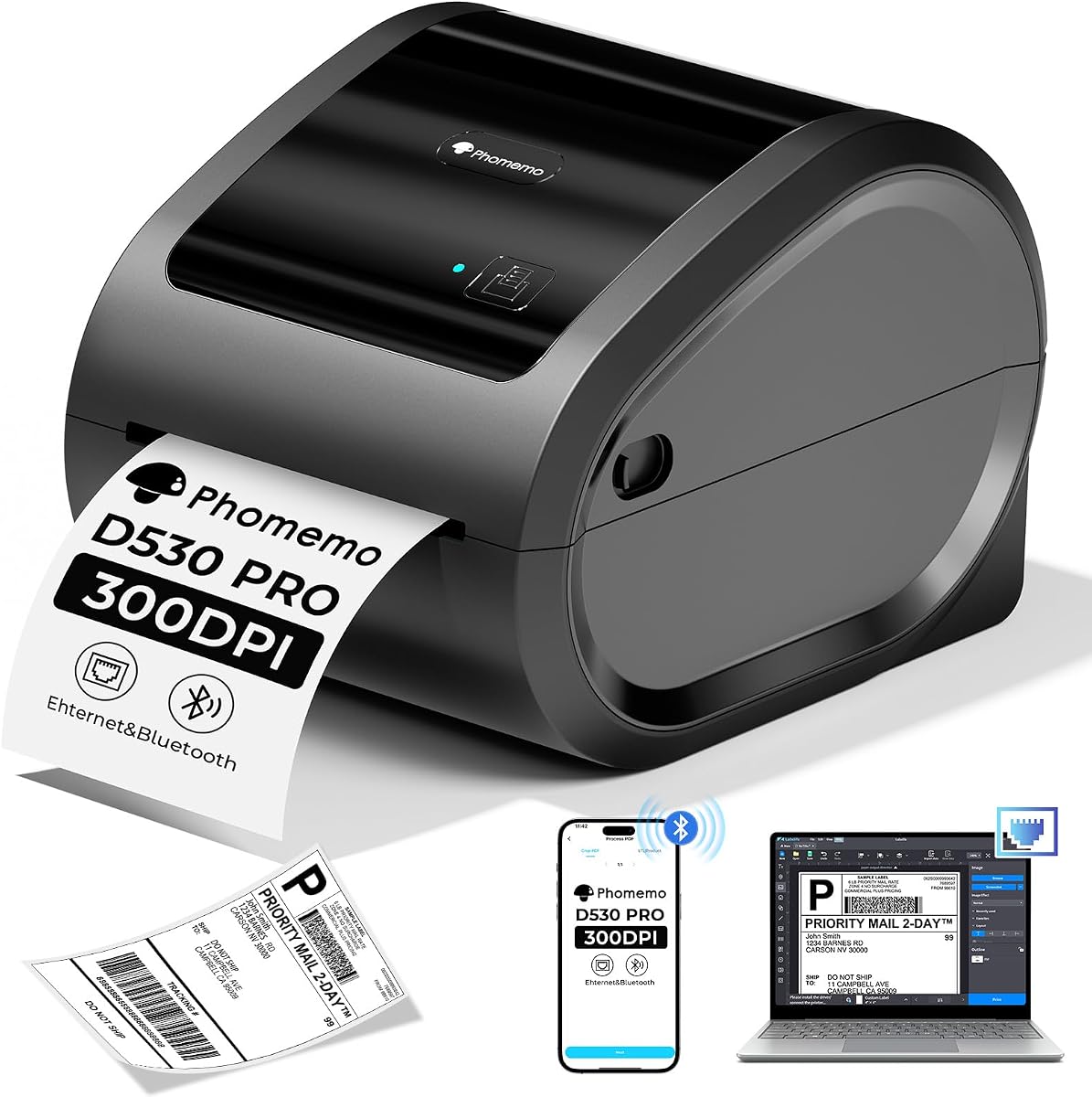
The Phomemo printer stands out with 300 DPI resolution for crisp output. It supports Ethernet Bluetooth and USB connecting offering great flexibility. A built-in bin holds rolls neatly for a tidy workspace.
We may earn a commission when you buy through this link, at no additional cost to you.
It connects easily to various operating systems including Android iOS Windows and Mac. The return to paper towel function helps reduce material waste effectively. This adds to the overall efficiency of the device.
Users value the clarity which ensures barcodes scan reliably every time. While the price is higher, the feature set justifies the cost. It works well with major platforms like DHL and Amazon.
This model is best for those needing high-quality labels and stability. The built-in bin saves extra space on your desk. It provides a professional finish for all shipping and product labels.
300 DPI resolution ensures every detail is sharp and easy to read.
The built-in paper bin keeps your desktop clean and organized.
We may earn a commission when you buy through this link, at no additional cost to you.
MUNBYN uses a 4-inch DAC chip for auto-calibration and precise alignment. This reduces jams and ensures consistent label placement every time. It operates at 60 dB which is quieter than typing.
We may earn a commission when you buy through this link, at no additional cost to you.
Its professional engineering supports a high label count lifespan and minimal waste. The design is compact yet powerful for daily shipping tasks. It connects via Bluetooth to provide wireless convenience.
Users appreciate the quiet performance in shared or home office spaces. While you need an app for Bluetooth pairing, it works smoothly. The build quality suggests long-term reliability for active businesses.
Choose this if noise reduction and precision are priorities. It handles labels efficiently without annoying disruptions. The advanced tech features set it apart from standard models.
The DAC chip ensures flawless alignment reducing errors and wasted labels.
Low noise levels make it suitable for quiet office or home environments.
We may earn a commission when you buy through this link, at no additional cost to you.
Nelko offers a straightforward thermal printer with Bluetooth and USB support. It is designed to save costs through efficient thermal technology. The compact design fits easily on small desks or counters.
We may earn a commission when you buy through this link, at no additional cost to you.
You can print via Bluetooth on iOS Android or Windows computers. Mac users may need to use USB depending on their setup. The printer works with most major shipping platforms effectively.
Users value the ease of setup and clear print output. The 203 DPI resolution ensures readable labels for all packages. It is a practical choice for small businesses seeking value.
This model is ideal for those balancing cost and functionality. It provides reliable performance without unnecessary complexity. For basic shipping, it delivers all needed features simply.
Drivers and guides help you get started without technical hassle.
Compact build ensures it fits in small workspaces effectively.
We may earn a commission when you buy through this link, at no additional cost to you.
The DYMO LabelWriter 550 is designed for specific label needs. It uses only authentic DYMO labels to ensure compatibility and quality. This reduces waste and simplifies the printing process.
We may earn a commission when you buy through this link, at no additional cost to you.
Its direct thermal technology eliminates ink or toner needs completely. The automatic recognition helps you avoid loading errors. The packaging is plastic-free showing a commitment to sustainability.
Users find it great for home use or small tasks. However, compatibility is limited to branded labels which can be costly. The rating reflects this trade-off between convenience and flexibility.
This printer is best for those who prioritize ease and brand loyalty. If you use DYMO labels, it is a reliable option. For shipping, check if its label sizes meet your needs.
Direct thermal technology means you never need to buy ink again.
FSC certified paper and plastic-free packaging support eco-friendly practices.
We may earn a commission when you buy through this link, at no additional cost to you.
Selecting the right printer involves considering connectivity, speed, and compatibility with your workflows.
Choose between Bluetooth, Wi-Fi, or USB based on your devices. Wi-Fi allows multiple users while USB offers stability. Bluetooth is ideal for mobile printing.
Ensure the printer connects to your computer or phone easily.
Higher DPI like 300 ensures clearer barcodes and text. Standard 203 DPI is often sufficient for shipping labels. Check if your needs require fine detail.
Clear labels prevent scanning errors during shipping.
Verify the printer works with your e-commerce platform. Most support major apps like Shopify and DHL. Drivers should be available for your operating system.
Compatible software ensures seamless label generation and printing.
Speed impacts how fast you process orders. Look for rates around 150mm/s or higher. Faster speeds save time during peak periods.
Quick printing reduces wait times for your orders.
Durable printers withstand daily heavy use. Check lifespan ratings and heat protection features. A robust build reduces downtime.
Reliable hardware ensures consistent business operations.
Ensure it supports 4×6 inch labels or your preferred sizes. Some printers require specific branded labels. Check paper roll compatibility carefully.
Correct label support prevents waste and fitting issues.
Thermal printers save money by not needing ink. Consider the cost of labels and consumables. Total cost of ownership matters over time.
Efficient printing reduces long-term expenses significantly.
Look for brands offering clear guides and warranties. Customer service can help resolve technical issues. Good support ensures a smooth experience.
Accessible help resources make setup and maintenance easier.
Start by downloading the necessary drivers or app for your device. Connect the printer via USB, Bluetooth, or Wi-Fi as instructed. Ensure you use compatible thermal labels for best results.
Load the paper roll carefully to avoid misalignment. Calibrate the printer settings if labels do not print correctly. Regularly update software to maintain compatibility with platforms.
Clean the print head periodically with a soft cloth to avoid debris. Keep the printer in a cool dry place to extend its life. Avoid placing it near direct sunlight or heat sources.
No, thermal printers use heat to create images on special paper. They do not require ink or toner cartridges. This reduces maintenance and costs significantly.
Most thermal printers support standard 4×6 shipping labels used by DHL. You must ensure the printer connects to your shipping platform. Some models may require specific software drivers.
USB is best for stable desktop setups. Bluetooth works well for mobile devices. Wi-Fi is ideal if multiple users need to print from different locations.
Alignment issues often occur if labels are not loaded correctly. Run a calibration test using the app or driver settings. Ensure the paper guides are set to the correct width.
Most printers come with free apps or drivers. These connect to major platforms like Shopify or Amazon. Check product specs for software compatibility details.
Standard shipping labels are 4×6 inches. Some printers support different sizes for returns or inventory. Check your printer's manual for supported dimensions.
Quality printers can last for millions of prints. Proper care like cleaning the head extends life. Lifespan depends on usage frequency and brand quality.
You will need to buy thermal labels regularly. Some models may require cables or adapters. Check if warranty support is included with your purchase.
We reviewed ten top models ranging from budget to premium options. The Rollo USB and Wireless printers lead in performance. The Rongta and JADENS offer great value for smaller needs.
Prioritize connectivity and platform support to match your workflow. Durability and speed matter most for high-volume businesses. Consider your operating system for seamless integration.
Prices and availability change frequently. Always verify current specs before buying. Choosing the right printer ensures smooth shipping and happy customers.