
NOYAFA NF-488 POE Cable Tester
4.5Editor score
Multifunctional network testing
Large LCD backlit screen
Cable continuity checking
This guide compares the top inline POE testers for network professionals, evaluating features, accuracy, and ease of use to help you choose the right tool.
Finding the right inline POE tester is crucial for network professionals who need reliable diagnostics. These tools help verify power delivery and ensure connected devices receive stable electricity without disruption.
We compared ten top models based on their testing modes, display clarity, and compatibility with various PoE standards. Each product was evaluated for its ability to handle real-world troubleshooting scenarios efficiently.
Each pick highlights key strengths and ideal use cases to guide your decision. Note that pricing and availability can fluctuate frequently, so verify current details before purchasing any item listed.
4.5Editor score

4.1Editor score

The following table provides a side-by-side comparison of all ten selected inline POE testers. Review the specifications and features to understand which model best fits your specific networking requirements.



The TRENDnet TC-NTP1 stands out as a reliable tool for professionals requiring government-compliant testing solutions. With a solid rating, it offers essential features for diagnosing PoE issues effectively without needing external power sources.
We may earn a commission when you buy through this link, at no additional cost to you.
Its ability to test T, N, and I modes makes it versatile for various network setups. The clear readouts of voltage, amperage, and wattage help users identify power issues quickly in the field.
While the device is robust, it focuses heavily on standard IEEE compliance which might limit users with older non-standard setups. However, for most modern deployments, this focus ensures accuracy and reliability.
Network engineers working in regulated environments should consider this unit first. Its combination of compliance and practical testing modes makes it a top recommendation for professional installations.
This model meets NDAA requirements which are critical for public sector projects and secure installations.
Users can lock the display to specific readings like wattage for monitoring during active network tests.
We may earn a commission when you buy through this link, at no additional cost to you.
The PoE-T100 offers a premium experience with its bright OLED display that presents all critical data on a single page. It is an excellent choice for technicians who need instant visual feedback in varied lighting conditions.
We may earn a commission when you buy through this link, at no additional cost to you.
Its ability to support three distinct modes including PD simulation and inline testing provides comprehensive coverage for modern network needs. This allows for deep diagnostics without needing multiple tools.
Although it is a premium option, the added complexity might be overwhelming for casual users. The detailed data is best appreciated by experienced installers who can interpret power metrics effectively.
For those prioritizing display quality and data depth, this tool is ideal. It streamlines the installation process by providing clear, actionable information directly on the device.
The OLED screen ensures readability even in dark server rooms or outdoor installation environments.
PD Mode allows users to test switches without physically attaching a powered device which saves time.
We may earn a commission when you buy through this link, at no additional cost to you.
The PoE Texas tester focuses on simplicity and reliability by eliminating the need for batteries. It draws power directly from the line making it ready to use at any moment during field work.
We may earn a commission when you buy through this link, at no additional cost to you.
Its ergonomic design makes it comfortable to hold for extended periods while checking connections. The automatic cycling of readings ensures users get all necessary data without extra button presses.
While it lacks some advanced features found in higher-end models, its core functionality is solid. It is a practical choice for technicians who value speed and durability over complex diagnostics.
If you need a tool that is always ready and easy to carry, this is a strong candidate. It reduces downtime by providing quick verification of power status during installations.
The curved body fits naturally in the hand which reduces fatigue during long troubleshooting sessions.
Drawing power from the PoE line means you never have to worry about finding a replacement battery in the field.
We may earn a commission when you buy through this link, at no additional cost to you.
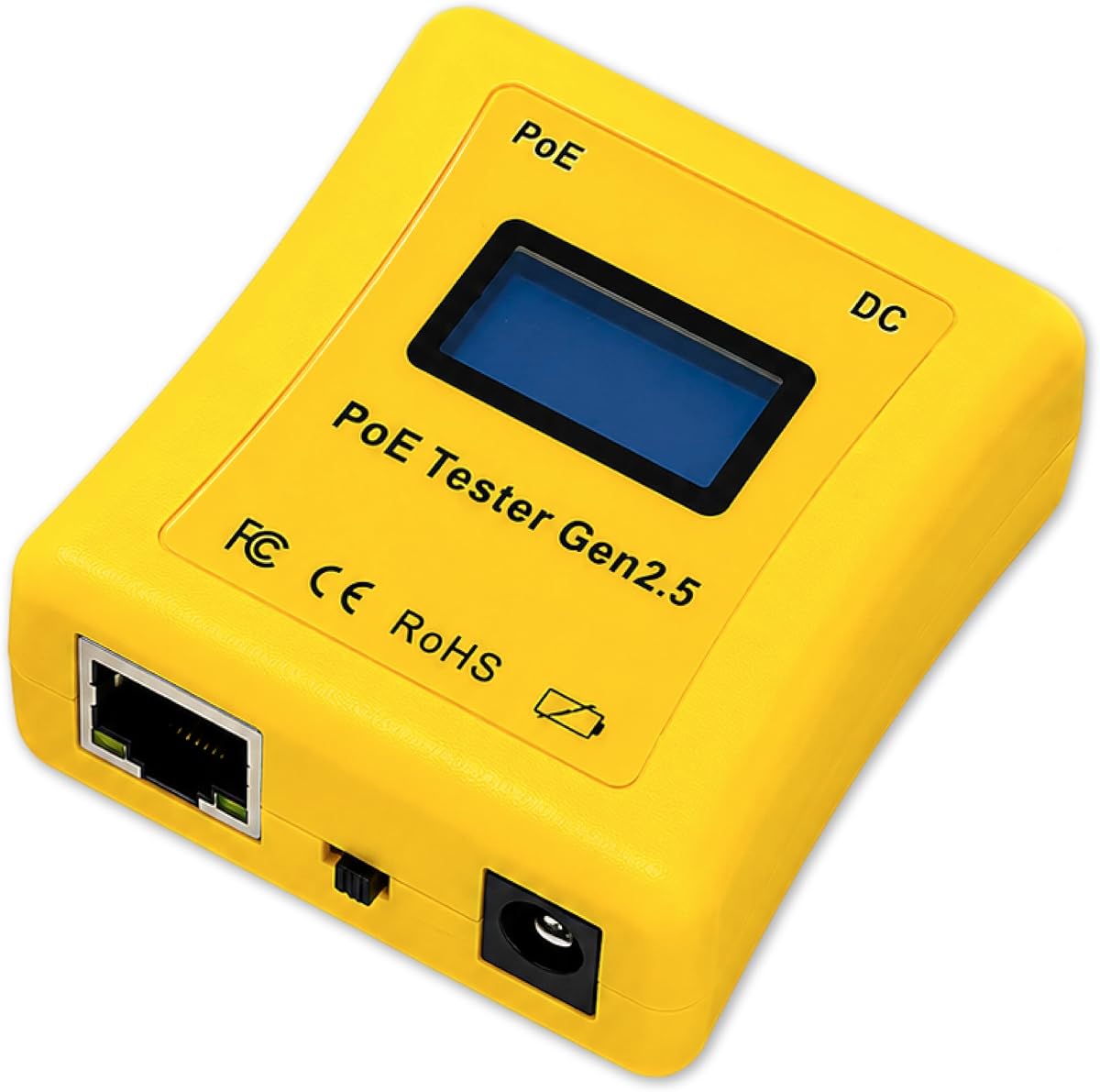
The NOYAFA NF-488 delivers impressive functionality at a budget-friendly price. It combines POE testing with general cable continuity checks making it a versatile tool for general maintenance tasks.
We may earn a commission when you buy through this link, at no additional cost to you.
Its large backlit screen ensures readings are visible even in dimly lit cable closets. This feature alone adds significant value for professionals working in challenging environments.
While it does not offer the depth of premium models, it covers the essentials effectively. The build is sturdy enough for daily use without breaking the bank.
For small businesses or independent contractors, this is an excellent starting point. It balances cost and performance to deliver essential diagnostic capabilities for standard networks.
The backlit interface ensures that you can see results clearly without needing extra lighting equipment.
Checking continuity alongside POE status helps you identify both power and data faults in one step.
We may earn a commission when you buy through this link, at no additional cost to you.
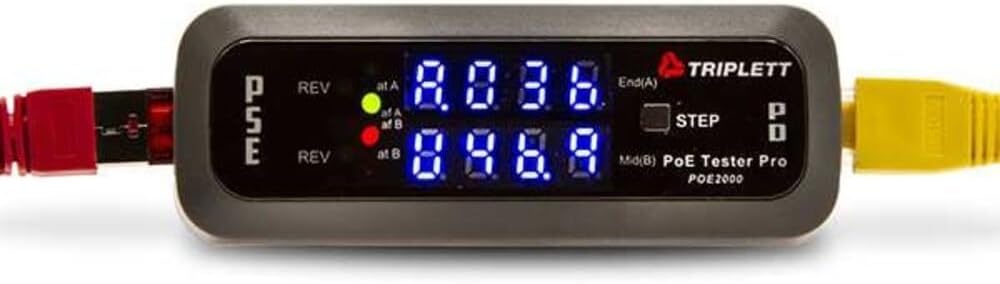
The Triplett POE2000 uses a unique LED system to indicate power sources and polarity. This visual approach allows for quick assessments without needing to interpret complex numerical displays.
We may earn a commission when you buy through this link, at no additional cost to you.
Its ability to distinguish between End Span and Mid Span setups is particularly useful in legacy installations. The step button allows users to focus on specific data points as needed.
Despite its solid utility, the design feels somewhat dated compared to modern competitors. The lower rating suggests some users may find it less intuitive than newer models.
However for those who prefer visual cues over screens, this remains a viable option. It provides essential verification capabilities for standard PoE deployments with reliable performance.
LEDs light up to show exactly where power is coming from which helps with troubleshooting wiring.
Two yellow LEDs specifically alert you to reversed polarity which prevents potential device damage.
We may earn a commission when you buy through this link, at no additional cost to you.
The Triplett POE3000 builds on the success of previous models with enhanced monitoring capabilities. It offers a robust set of features for those who need precise data on power delivery.
We may earn a commission when you buy through this link, at no additional cost to you.
Its visual indicators provide clear status updates which reduce the cognitive load during testing. The step button allows for focused viewing of voltage current or power as required.
While there are fewer reviews available for this model, the core functionality aligns with professional expectations. It is a reliable choice for those who trust the brand's reputation.
For network admins requiring consistent performance in diverse environments, this unit delivers. It balances advanced features with usability to support daily maintenance tasks.
The device provides consistent readings that help in verifying power delivery against expected standards.
Simple controls ensure that even less experienced staff can perform basic checks effectively.
We may earn a commission when you buy through this link, at no additional cost to you.
The Jonard Tools POE-1 comes as a complete kit including remote adapters and batteries. This setup is ideal for comprehensive testing where both cable continuity and power need verification.
We may earn a commission when you buy through this link, at no additional cost to you.
It supports a wide range of standards ensuring compatibility with most modern networking equipment. The battery-free operation ensures it is ready for action whenever you connect it to a live line.
While it includes batteries for testing unpowered cables, the main operation relies on the PoE line. This hybrid approach makes it versatile for various field scenarios.
Techs who prefer getting everything in one box will appreciate this model. It simplifies logistics by providing the necessary accessories alongside the main tester unit.
Having a remote included makes it easier to test connections where physical access is limited.
The lightweight design with belt clip ensures you can keep it handy during active deployment tasks.
We may earn a commission when you buy through this link, at no additional cost to you.
This IEEE compliant tester stands out by offering cable length measurement alongside power testing. This dual function helps verify physical cable integrity before even checking the power delivery.
We may earn a commission when you buy through this link, at no additional cost to you.
Its rechargeable battery ensures you have power for testing even when the line is inactive. This flexibility is a significant advantage over models that rely solely on line power.
High user ratings reflect the reliability and ease of use of this unit. The clear display makes it easy to interpret fault data quickly during installations.
Installers who need to confirm cable distances should consider this option. It reduces the need for separate tools by combining physical and electrical verification in one device.
Knowing the exact cable length helps ensure you are within safety and performance limits.
The rechargeable battery allows for testing passive cables where no power source exists to draw from.
We may earn a commission when you buy through this link, at no additional cost to you.
The Inline Cat5/6 Dvm offers a professional grade interface suitable for complex network diagnostics. Its high voltage capabilities make it a robust choice for industrial or large-scale environments.
We may earn a commission when you buy through this link, at no additional cost to you.
The design supports both CAT5 and CAT6 standards which covers most legacy and modern wiring schemes. This ensures it remains relevant even as older systems are phased out.
While detailed information is limited, the specs suggest a tool built for rigorous testing. It likely appeals to users who need specific voltage readings and detailed electrical data.
For specialized applications requiring precise DVM functions, this model is worth exploring. It caters to niche needs that general testers might not fully address.
The panel style interface suggests durability and robust handling for demanding field conditions.
Detailed voltage measurements help in diagnosing subtle power issues that standard testers might miss.
We may earn a commission when you buy through this link, at no additional cost to you.
The NF-488 Network Cable tester is a solid option for general networking tasks including basic POE checks. It provides a balanced approach to verifying both data and power signals.
We may earn a commission when you buy through this link, at no additional cost to you.
Its loop-back testing capability allows for quick diagnostics of network switches without needing a live connection. This is a handy feature for pre-installation checks to save time.
Users appreciate the built-in LED lamp which helps in dark spaces. Coupled with responsive customer service, it adds a layer of support that is often lacking in budget tools.
For technicians who handle a variety of tasks daily, this model offers good versatility. It ensures that basic cable issues are identified quickly to prevent downstream problems.
Loop-back testing simplifies the process of checking switch ports before connecting expensive devices.
Lifetime friendly customer service ensures that help is available if you encounter any setup issues.
We may earn a commission when you buy through this link, at no additional cost to you.
Selecting the right inline POE tester depends on your specific diagnostic needs and environment. Consider these key factors to ensure you choose a tool that offers both accuracy and reliability.
Ensure the tester supports the necessary PoE standards such as 802.3af, at, or bt. This is crucial for verifying compatibility with modern high-power devices.
Look for devices that explicitly list the supported standards to avoid compatibility issues in the field.
A clear and readable display is essential for interpreting data quickly in various lighting conditions. OLED or backlit LCD screens offer better visibility in dark server rooms.
Prioritize models with high-contrast screens to reduce eye strain during long testing sessions.
Some testers require external batteries while others draw power directly from the PoE line. Battery-free operation provides convenience and ensures the tool is always ready.
If you often test unpowered cables, look for a model that supports internal battery backup for continuity checks.
Check if the device supports the cable types you use most, such as CAT5e or CAT6. Some tools also offer continuity testing which helps identify physical cable faults.
Choose a tester that aligns with your existing cabling infrastructure to maximize its utility across different projects.
For field work, the physical size and weight of the tester matter. Compact designs with belt clips make it easier to carry the tool during installations.
Evaluate the ergonomic features to ensure the device is comfortable to hold and use for extended periods.
Field tools should be built to withstand drops and rough handling. Look for models with anti-slip casings and sturdy connectors to ensure longevity.
Investing in a durable unit reduces the need for frequent replacements and ensures reliable performance over time.
User-friendly interfaces with clear instructions and intuitive buttons reduce the learning curve. Simple navigation helps in getting quick results without extensive training.
Prefer models that offer step buttons or automatic cycling to streamline the data reading process.
Reliable customer support and warranty coverage are vital for professional tools. Check the manufacturer's reputation for technical assistance and replacement policies.
Select a brand that offers clear warranties to protect your investment against unexpected defects.
To start using your inline POE tester, connect one end to the PSE device and the other to the PD. Ensure both ports are securely locked to prevent loose connections during testing.
Observe the display for real-time readings of voltage, current, and power. Use the step button if available to cycle through different metrics for detailed analysis.
After use, disconnect the device carefully and store it in a protective case to prevent damage. Keep the contacts clean and dry to maintain optimal performance over time.
An inline POE tester is used to verify that power is being delivered correctly over Ethernet cables. It helps technicians confirm voltage, current, and power levels to ensure connected devices operate safely.
Many modern inline testers draw power directly from the PoE line so they do not require external batteries. Some models may include batteries for testing unpowered cables or continuity.
Yes most reputable inline testers support both standard and non-standard passive POE. Always check the product specifications to confirm voltage ranges for passive devices.
The display typically cycles through voltage, current, and wattage. Look for a dedicated power or wattage readout to understand exactly how much energy your device is drawing.
Most testers are designed to safely interface with standard switches. Ensure the tester supports your specific switch standards to avoid any risk of electrical damage.
An OLED screen provides better visibility and contrast especially in low-light environments. This makes it easier to read complex data without needing extra lighting.
The TRENDnet Inline PoE Tester, NOYAFA NF-488, and Triplett POE3000 lead the market with distinct advantages. Each offers unique features suited for different professional needs.
When choosing, prioritize compatibility with your network standards and the clarity of your display. Durability and ease of use should also be key factors in your final selection.
Keep in mind that prices and models can change over time. Verify the latest specifications and availability before making your final purchase decision.