
Switch Dock for Nintendo Switch/Switch OLED, Portable TV Docking Station
4.2Editor score
100W PD Input Port
4K@60Hz HDMI Port
USB 3.0 Data Port
Discover the top 10 docks for Nintendo Switch portable play this month. We compare features, compatibility, and value to help you choose the perfect travel
Finding the right dock for Nintendo Switch portable play can transform your gaming experience significantly. Whether you travel often or simply want more flexibility at home, a quality adapter lets you connect to larger screens effortlessly without bulky original hardware.
We compared ten real products based on portability, video output quality, charging speed, and overall build durability. Our analysis focuses on models that support both standard and OLED variants while offering reliable HDMI connections and convenient USB expansion for accessories.
Each pick below highlights key strengths and potential trade-offs to help you make an informed decision. Remember that prices and availability change frequently, so verify current details before purchasing to ensure you get the best value for your specific gaming needs today.
4.2Editor score

4.4Editor score

4.3Editor score
This side-by-side comparison covers all ten selected products to highlight their unique specifications and capabilities. Each entry details core features like video resolution support, charging power, port variety, and physical dimensions to assist your selection process.

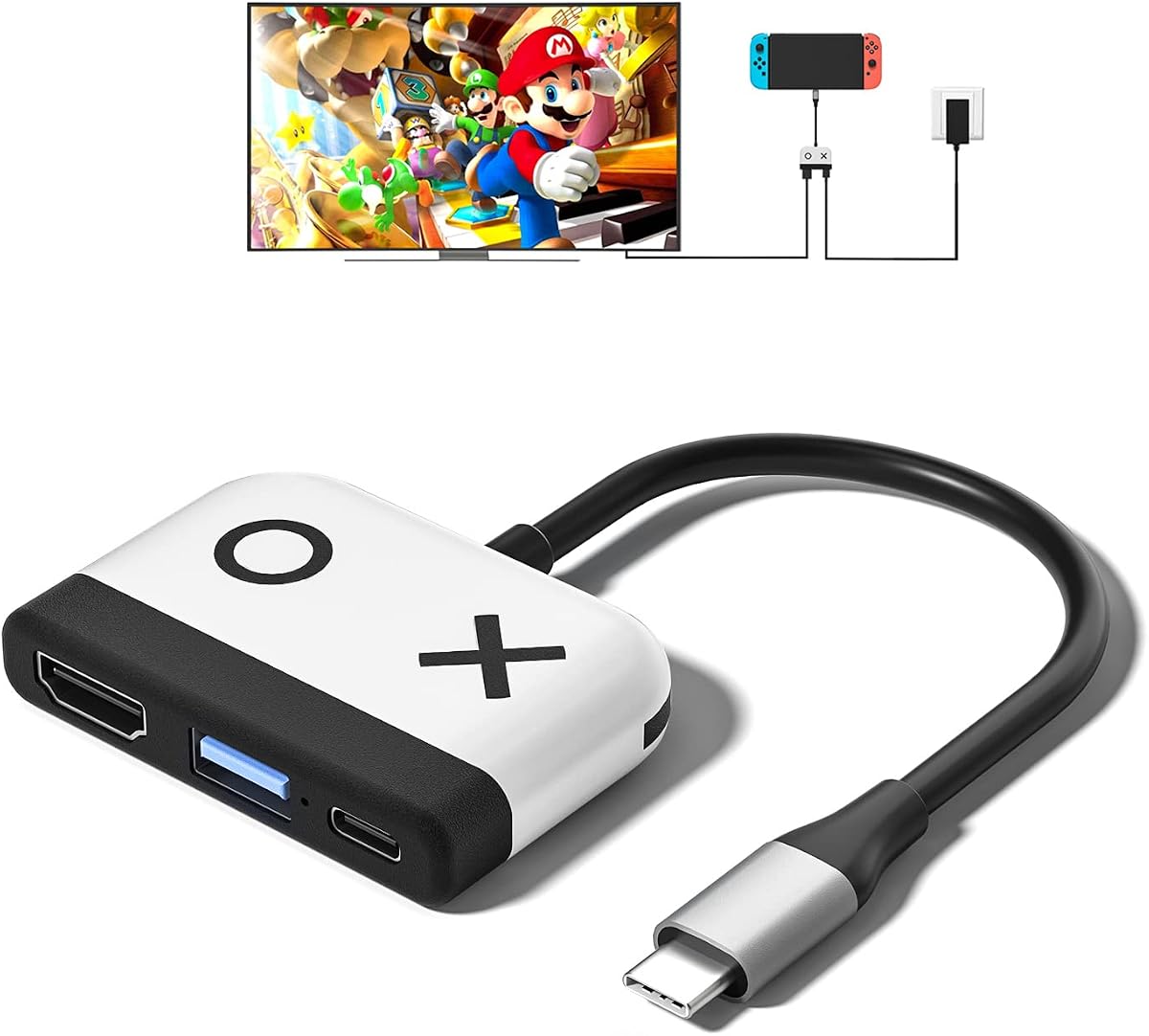


The RREAKA TV Dock stands out as a top choice for portable gaming setups due to its robust feature set and compact form factor. With a solid 4.4 rating from users, it balances high resolution output with practical daily usability. Its aluminum construction ensures durability without adding unnecessary weight to your travel gear.
We may earn a commission when you buy through this link, at no additional cost to you.
This dock supports 4K@60Hz HDMI output, delivering crisp visuals on compatible displays that enhance your gaming experience significantly. The 100W PD charging port allows simultaneous charging while playing, ensuring you never run out of power during intense sessions. Additionally, the USB 3.0 port enables data transfer and peripheral connections seamlessly.
While it offers excellent performance, note that HDMI cables and power adapters are not included in the package, requiring separate purchases. Some users find that specific power requirements must be met to activate TV mode reliably, which adds a small step to setup. However, these minor inconveniences do not detract from its overall value and utility.
If you prioritize performance and portability, this dock is the ideal pick for Switch 1, OLED, and potential future models. It effectively replaces bulky original docks while providing modern connectivity options for monitors and TVs. We recommend it for travelers and home users who need reliable video output with fast charging support.
Supports 4K@60Hz HDMI output for stunningly clear and smooth gameplay on compatible screens.
The 100W PD charging port ensures your device stays powered up during extended play sessions.
We may earn a commission when you buy through this link, at no additional cost to you.
This affordable option delivers strong performance without breaking the bank, making it accessible for budget-conscious gamers. Users appreciate its straightforward plug-and-play functionality that eliminates complicated driver installations. Despite its lower price, it maintains essential features like 4K output and fast charging capabilities.
We may earn a commission when you buy through this link, at no additional cost to you.
The 4K@60Hz HDMI port ensures your games look sharp on modern TVs, while the 100W PD input keeps your console charged. A dedicated USB 3.0 port allows you to connect controllers or storage devices without needing extra hubs. The sleek design fits easily into bags for travel or storage.
Some users note that the build material feels more basic compared to premium aluminum models, which might affect long-term durability. Additionally, because it is a newer brand, customer support reliability may vary compared to established names. However, for casual users, these factors rarely impact daily gameplay sessions.
We recommend this dock for those seeking value and core functionality without unnecessary extras. It works well for occasional TV mode usage and fits various USB-C devices beyond the Switch. If you need a reliable, cost-effective solution for connecting to screens, this model is a smart starting point.
Offers essential high-end features like 4K and 100W charging at a very competitive price.
USB 3.0 port expands functionality by allowing connections to external storage or controllers.
We may earn a commission when you buy through this link, at no additional cost to you.
The Switch 2 Dock combines premium materials with advanced specs to create a robust solution for serious gamers. With a solid 4.3 rating, it consistently delivers reliable performance across various screen types. Its aluminum alloy construction ensures it feels durable and premium in the hand while remaining lightweight for travel.
We may earn a commission when you buy through this link, at no additional cost to you.
It supports HDMI 2.0 4K@60Hz output, providing crisp visuals that enhance your gaming experience on larger screens. The 100W PD charging port keeps your console powered during gameplay, preventing interruptions. A dedicated USB 3.0 port supports high-speed data transfer for peripherals like controllers or flash drives seamlessly.
One drawback is that HDMI cables and power chargers are not included, requiring additional purchases to get started. The price point is higher than budget options, which might not suit everyone seeking basic functionality. However, the build quality and feature set justify the extra cost for frequent users.
If you want a dock that balances premium build quality with powerful performance, this is an excellent choice. It works well with Switch 1, OLED, and future models while supporting other USB-C devices like laptops. We recommend it for users who prioritize durability and high-quality video output.
Constructed from durable aluminum alloy that protects internal components and reduces weight.
Optimized for new hardware while maintaining backward compatibility with existing Switch models.
We may earn a commission when you buy through this link, at no additional cost to you.
This docking station offers versatile compatibility with multiple devices including the Switch and Steam Deck. Users appreciate its lightweight construction that fits easily into travel bags without adding bulk. The inclusion of HDMI 2.0 ensures smooth video output for most modern monitors and TVs.
We may earn a commission when you buy through this link, at no additional cost to you.
It features a USB 3.0 port for high-speed data transfer and a dedicated charging port for simultaneous play and power. The compact design makes it ideal for travelers who need to replace bulky original docks. Setup involves a few steps but ensures a stable connection once properly configured.
Some users report that activating TV mode requires specific charger wattage, which can be tricky if using generic adapters. Additionally, HDMI cables are not included, adding to the initial cost. These minor inconveniences require attention during setup but do not hinder performance once connected.
If you use multiple devices like the Steam Deck or Switch, this hub provides a unified solution for connectivity. It supports various screen resolutions and ensures stable performance for travel. We recommend it for users who value versatility and broad device compatibility over premium branding.
Works with both Nintendo Switch and Steam Deck for a flexible gaming ecosystem.
Lightweight construction ensures you can carry it easily without weight concerns.
We may earn a commission when you buy through this link, at no additional cost to you.
This dock uses high-quality silicone materials to ensure durability and scratch resistance during travel. Users appreciate its compact design that fits into pockets or bags easily for on-the-go gaming. The build quality provides a soft touch while maintaining structural integrity over time.
We may earn a commission when you buy through this link, at no additional cost to you.
It supports HDMI, USB 3.0, and charging ports to offer essential connectivity for most setups. While the Switch itself limits output to 1080P, the dock supports higher resolutions for future devices. You can continue charging your console while playing to extend your session comfortably.
Some users note that while the dock supports 4K output, the Switch hardware limits actual performance to 1080P. Additionally, using the original charger is recommended for stable power delivery during TV mode. These limitations are standard but worth noting when planning your setup.
If you prioritize durability and ease of carrying, this silicone dock is an excellent choice. It replaces bulky original docks effectively and saves space in your travel kit. We recommend it for users who need a reliable, scratch-resistant option for daily commuting.
Silicone construction prevents scratches and damage even in packed travel bags.
Supports play while charging so you can extend your gaming sessions indefinitely.
We may earn a commission when you buy through this link, at no additional cost to you.
This dock features a comprehensive 6-in-1 design with multiple ports for various accessories and peripherals. It includes an overheat protection chip that ensures safe operation during long gaming sessions. The built-in LED light helps you identify status changes easily in dark environments.
We may earn a commission when you buy through this link, at no additional cost to you.
It includes HDMI 2.0 output and USB 2.0 ports for connecting controllers or keyboards. The anti-skid pad base ensures the dock stays stable on surfaces. A dedicated switch button allows you to toggle between TV and tabletop modes quickly.
Some users find the USB 2.0 speed less convenient compared to USB 3.0 for data transfer. Additionally, cables are not included, which adds to the initial setup cost. However, the robust protection features make it reliable for daily use.
If you need multiple ports for your setup, this dock provides a versatile solution. It is particularly useful for users who connect various peripherals to their console. We recommend it for those who value safety features and multiple connectivity options.
Built-in smart chip provides overheat and short circuit protection for safety.
Six ports allow connection to multiple peripherals simultaneously without extra hubs.
We may earn a commission when you buy through this link, at no additional cost to you.
This dock is designed specifically to support upcoming hardware while maintaining compatibility with current Switch models. It features high-definition output capabilities that ensure future-proofing for your gaming setup. The lightweight design makes it easy to carry during travel.
We may earn a commission when you buy through this link, at no additional cost to you.
It supports 100W PD fast charging to keep your console powered during gameplay. The HDMI connection ensures crisp visuals on larger screens. Setup steps are clearly outlined to ensure a smooth initial connection.
Users must ensure they use the correct power adapter to activate TV mode successfully. The exclusion of power chargers requires an additional purchase before first use. These requirements are manageable but need attention during setup.
If you want to prepare for new hardware releases, this dock is a smart investment. It delivers high performance for current models while supporting future features. We recommend it for users who prioritize future-proofing their gaming setup.
Optimized for upcoming hardware while supporting existing models for longevity.
100W PD fast charging ensures your device stays powered during intensive sessions.
We may earn a commission when you buy through this link, at no additional cost to you.
This dock is engineered for extreme portability, fitting easily into handbags or backpacks. Users appreciate its pocket-size design that does not add bulk to travel kits. The lightweight build ensures convenience during daily commutes.
We may earn a commission when you buy through this link, at no additional cost to you.
It includes USB 3.0 and PD charging ports for essential connectivity. The 1080P video output is standard for current console capabilities. Setup involves a few steps to ensure stability during use.
Some users note that the video output is limited to 30Hz which may affect smoothness in fast games. Additionally, power requirements are strict to activate TV mode reliably. These constraints are manageable for casual gaming.
If you prioritize portability above all else, this dock is an ideal choice. It allows you to carry your setup anywhere without heavy equipment. We recommend it for users who travel frequently and need minimal gear.
Compact design ensures you can slip it into any pocket or small bag.
Provides USB 3.0 and PD charging for most daily connectivity needs.
We may earn a commission when you buy through this link, at no additional cost to you.
This dock focuses on providing an upgraded experience with high resolution output and fast charging. It supports various devices including Switch and Steam Deck for flexibility. The lightweight 39g build ensures it is easy to carry.
We may earn a commission when you buy through this link, at no additional cost to you.
It features HDMI 4K@60Hz output for crisp visuals on compatible screens. The 100W PD charging port supports simultaneous charging during play. A dedicated USB 3.0 port allows high-speed data transfer.
Users need to provide their own HDMI cables and power adapters for full functionality. While the dock works with multiple devices, power requirements must be met for TV mode. These minor requirements are standard for third-party hubs.
If you want a lightweight upgrade over bulky stock docks, this is a solid pick. It balances weight and performance effectively for travel or home. We recommend it for users seeking high-quality video with minimal bulk.
Weighs only 39g making it one of the lightest options for travel.
USB 3.0 port supports fast file transfer and accessory connection.
We may earn a commission when you buy through this link, at no additional cost to you.
This dock includes a built-in cooling system to help prevent overheating during long sessions. Users appreciate the flexible spring stand that supports different insertion angles. Multiple USB ports allow connection to various peripherals without extra hubs.
We may earn a commission when you buy through this link, at no additional cost to you.
It supports 4K HDMI video output and allows play while charging for uninterrupted gaming. The compact design fits easily into travel bags. Setup involves sliding the console or plugging in via the spring stand.
Some users report lower satisfaction compared to other models due to build quality concerns. The cooling system is effective but may add slight bulk to the profile. These factors may affect longevity but do not hinder initial performance.
If you need extra cooling features and multiple ports, this dock offers unique value. It is suitable for users who prioritize thermal management and connectivity. We recommend it for those seeking specific functional traits.
Built-in cooling system helps prevent overheating during extended gaming sessions.
Spring stand design allows comfortable insertion and removal of the console.
We may earn a commission when you buy through this link, at no additional cost to you.
Selecting the right dock involves considering several key factors that affect usability and longevity. This guide breaks down what matters most when choosing a portable adapter for your console.
Check if the dock supports 4K@60Hz or limited to 1080P. While the Switch hardware caps at 1080P, future models may benefit from higher resolution support. Ensure compatibility with your current TV or monitor for best results.
Prioritize HDMI 2.0 or higher standards to ensure smooth visual output.
Look for docks with 100W PD charging to keep your console powered during gameplay. Insufficient wattage may fail to activate TV mode or cause battery drain. Always match charger requirements listed in product specs.
Ensure the dock supports play while charging to avoid interruptions during sessions.
Evaluate USB ports for speed and quantity. USB 3.0 is preferred for data transfer and peripherals. Additional ports may allow connecting controllers or storage without extra hubs.
Consider how many devices you need to connect simultaneously to decide on port count.
Durable materials like aluminum alloy offer better protection and heat dissipation. Silicone or plastic may be lighter but less robust over time. Check reviews for long-term durability feedback before purchasing.
Invest in materials that match your travel frequency and handling habits for best longevity.
Compact docks fit easily into backpacks or pockets. Weight should be under 50g for true portability. Check dimensions to ensure it does not add bulk to your travel kit.
Prioritize lightweight options if you plan to carry the dock daily.
Ensure the dock supports your specific console model, including OLED or Switch 2 if applicable. Some docks may not support Switch Lite or older hardware versions. Verify device compatibility before buying.
Choose universal docks if you plan to connect other USB-C devices like laptops.
Some docks come with HDMI cables or adapters while others do not. Factor in the cost of missing accessories when comparing prices. Always check what is included in the box before purchase.
Expect to buy cables separately to save upfront costs on budget models.
Look for built-in chips that protect against overcharging and overheating. These features prevent damage to your console during long sessions. Reviews often highlight stability issues that may indicate poor safety design.
Prioritize docks with explicit protection features to ensure safe operation.
Connect the dock to a power source using an appropriate charger that meets the specified wattage. Ensure your HDMI cable is securely plugged into the output port. Wait for any LED indicators to confirm the dock is powered on.
Plug your console into the dock's USB-C output port. Switch your TV to the correct HDMI input to view your screen. Allow a few seconds for the system to recognize the external display.
Store the dock in a protective case when traveling to prevent scratches or damage. Keep it away from direct sunlight and heat sources to avoid internal component degradation. Regularly check connections for dust or debris buildup.
Most docks do not include HDMI cables, so you will need to purchase one separately. Check the product details to confirm if any cables are included before buying. Standard HDMI cables work well with most adapters and monitors.
Many docks do not support the Switch Lite because it lacks video output capabilities. Always verify device compatibility in the product description before purchasing. If you own a Lite model, look for docks explicitly listed as compatible.
Most docks require a power adapter with at least 60W output to activate TV mode properly. Using insufficient power may cause the dock to fail to switch to TV mode. Always use the recommended charger specs for reliable performance.
Yes, most docks allow simultaneous charging while playing. Look for models with PD charging ports to ensure your device stays powered. This feature is especially useful during long travel or gaming sessions.
While docks may support 4K output, the Switch console itself caps at 1080P. Future hardware may benefit from higher resolution support. Always check both your dock and display compatibility before expecting 4K visuals.
Many docks include at least one USB 3.0 port for high-speed data transfer. Check the product specs to confirm port speed and count. This is important if you need to connect external storage or accessories.
We have reviewed ten top picks that balance performance, portability, and value for your gaming needs. Whether you need high resolution output or compact travel design, there is a model to fit your style.
Prioritize durability and power delivery if you plan to use the dock frequently. For budget options, focus on core features like basic connectivity and compatibility. Consider how often you travel versus use it at home.
Prices and availability change regularly so check current listings before finalizing your purchase. Verify that the model you choose matches your specific device and power requirements. This ensures you get the most value from your investment.