
Tripp Lite BC350R
4.5Editor score
Compact design
Wall mount ready
Simple setup
Affordable price
This guide compares the top battery backup solutions for small offices to ensure uninterrupted power, data safety, and reliable equipment protection during
A reliable battery backup system is essential for any small office that depends on continuous power to keep operations running smoothly. Without one, sudden outages can lead to data loss, hardware damage, and costly downtime that affects productivity and client trust significantly.
We evaluated ten top-rated uninterruptible power supplies based on runtime, outlet count, surge protection, and smart management features. Our analysis focuses on models that offer the best balance of performance, reliability, and value for typical small office setups and workstations.
Each pick below highlights key strengths, ideal use cases, and important limitations to help you make an informed decision. Please note that product availability and pricing can change frequently, so verify current details before purchasing your ideal power protection system.
4.5Editor score

4.5Editor score
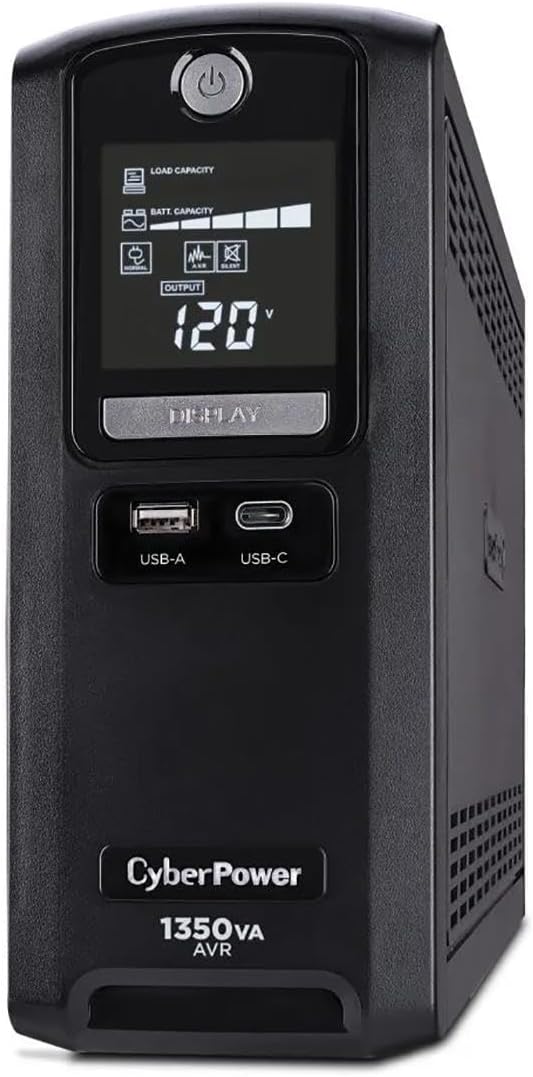
4.9Editor score
The following table provides a side-by-side comparison of all ten models to help you quickly identify the right capacity, outlet configuration, and protection features for your specific office needs.


This model leads our list with a robust 1500VA capacity and true sine wave output, making it ideal for sensitive office equipment like workstations and routers. Its comprehensive feature set includes automatic voltage regulation to handle fluctuations without draining the battery. The color LCD provides clear status updates, ensuring you always know the health of your power protection system.
We may earn a commission when you buy through this link, at no additional cost to you.
The inclusion of six battery-backed outlets and six surge-only outlets offers flexibility for connecting both critical and non-critical devices. USB ports allow you to keep mobile devices charged during an outage, which is essential for communication. The built-in software suite enables remote monitoring, giving you peace of mind when you are away from the office.
While it is priced higher than basic units, the pure sine wave output protects high-end power supplies from damage that simulated waves might cause. The automatic voltage regulation saves battery cycles by correcting minor issues without switching to backup power. This efficiency translates to a longer lifespan for the internal battery and lower maintenance costs over time.
It is the top recommendation for small offices that need reliable protection for desktop computers, network gear, and telecommunications equipment. The combination of capacity, waveform quality, and monitoring tools ensures minimal disruption during power events. Investing in this unit safeguards your data and hardware against the risks of unstable power grids.
This feature ensures sensitive electronics receive clean power identical to grid supply, preventing potential hardware damage during battery mode operation.
AVR corrects high or low voltage conditions without using battery power, extending runtime and battery life for critical backup scenarios.
We may earn a commission when you buy through this link, at no additional cost to you.
With a similar capacity to the top pick, this unit offers a slightly different approach to power management with simulated sine wave technology. It is well-suited for standard office equipment that does not require pure sine wave output for safe operation. The intelligent LCD panel keeps you informed of battery life and load status with clear visual indicators.
We may earn a commission when you buy through this link, at no additional cost to you.
The layout provides twelve outlets, allowing you to connect a desktop, monitor, printer, and router simultaneously. This high density is beneficial for offices with limited power strip space who need all devices plugged into one protected source. Automatic voltage regulation helps maintain stable output, reducing the frequency of battery usage during minor grid fluctuations.
The simulated sine wave design is cost-effective and works well with most switching power supplies found in modern computers and peripherals. However, it may not be the best choice for medical equipment or high-end servers requiring pure sine input. The USB ports offer added convenience for keeping phones and tablets operational during an unexpected power interruption.
Choose this model if you need maximum outlet availability for a standard office setup without the premium cost of pure sine wave technology. It delivers reliable protection and monitoring tools that are essential for maintaining business continuity. The included software allows for proper shutdown procedures to prevent data loss when batteries run low.
The LCD screen provides real-time data on battery capacity and load, helping you manage device connections efficiently.
Twelve outlets mean fewer power strips are needed, simplifying cable management and ensuring all devices get surge protection.
We may earn a commission when you buy through this link, at no additional cost to you.
This unit stands out with its ECO mode, which automatically cuts power to peripherals when the main computer is off or sleeping. This feature significantly reduces energy waste, making it an excellent choice for environmentally conscious offices. The display keeps you updated on system health, ensuring you never lose track of your backup status.
We may earn a commission when you buy through this link, at no additional cost to you.
The design includes six battery-backed outlets and six surge-only outlets, with three of the latter controlled by the ECO feature. This allows you to connect monitors and speakers that should turn off when the PC is idle. Such automation helps lower overall power consumption and extends the battery charge available for the computer itself.
While the wattage is lower than the 1500VA models, it remains sufficient for typical desktop workstations and network hardware. It is ideal for small offices where energy efficiency is a priority alongside reliable backup power. The LCD panel provides a clear view of input voltage and battery condition for quick diagnostics.
Consider this model if you want to reduce energy costs without sacrificing essential backup protection. It balances functionality with green technology, offering a practical solution for daily office use. The included software supports safe shutdowns, ensuring your work is saved even when power is lost unexpectedly.
ECO outlets shut off automatically when the main device sleeps, saving energy and preserving battery charge for critical tasks.
Connecting peripherals to ECO outlets ensures they follow the main device, simplifying your workflow and reducing waste.
We may earn a commission when you buy through this link, at no additional cost to you.
Designed for compact offices, this slim unit delivers essential protection without taking up much desk or floor space. Its high efficiency design reduces power consumption even while operating normally, which is beneficial for smaller rooms. The wide outlet spacing helps accommodate larger power bricks without blocking adjacent sockets.
We may earn a commission when you buy through this link, at no additional cost to you.
With six battery-backed and six surge-only outlets, it offers versatile connectivity for various office tools. This layout allows you to protect critical systems while keeping less critical items like lamps plugged in safely. The built-in high efficiency technology ensures the unit itself does not become a significant energy drain.
The simulated sine wave is suitable for standard electronics and gaming consoles often found in office lounges or creative spaces. It is not intended for heavy industrial equipment but serves well for computers and routers. The included software manages power events effectively, allowing for smooth shutdowns when batteries reach a low level.
Select this option if space is limited but you still need comprehensive outlet coverage. It combines a modern footprint with practical features that support daily office operations. The warranty covers both the unit and internal battery, providing long-term peace of mind for small business owners.
The slim profile fits easily under desks or on shelves, making it ideal for compact workstations.
Outlets are spaced to accept large adapters, ensuring you can plug in everything without interference.
We may earn a commission when you buy through this link, at no additional cost to you.
This premium unit offers an extended runtime and robust data line protection, making it a standout for offices with critical network needs. The 1500 Joule surge rating ensures that equipment is shielded from powerful spikes caused by lightning or grid issues. Its high rating reflects customer satisfaction with its performance and reliability.
We may earn a commission when you buy through this link, at no additional cost to you.
Beyond basic power, it includes coax and network line protection, which is vital for modems and routers. This ensures that internet connectivity remains stable even during storms, supporting remote work and cloud access. The energy efficiency design minimizes power usage, helping to lower electricity bills for your office.
The USB management ports allow for HID compliance, meaning the operating system recognizes the unit as a peripheral. This simplifies software setup for shutdown scripts and monitoring without needing additional drivers. The extended runtime at half load provides ample time to save work gracefully during a power outage.
It is the best choice for offices that cannot afford downtime or data loss due to network interruptions. The combination of power and data protection creates a comprehensive defense against common electrical threats. Investing in this premium model ensures that your digital infrastructure remains resilient and secure.
Integrated network protection prevents surges from damaging modems and routers, keeping internet connections safe.
Longer backup time at partial loads gives you more opportunity to shut down systems properly.
We may earn a commission when you buy through this link, at no additional cost to you.
This model focuses on delivering reliable mid-range protection with an emphasis on data line safety. It includes protection against surges traveling through telephone lines, which is useful for legacy fax machines or dial-up setups. The intelligent LCD panel offers a clear view of system health, making maintenance simple.
We may earn a commission when you buy through this link, at no additional cost to you.
With twelve outlets available, it accommodates multiple devices without the need for extra strips. The automatic voltage regulation corrects minor fluctuations, protecting sensitive electronics from brownouts or overvoltage. This feature helps prolong the life of connected devices by ensuring they receive stable power consistently.
The simulated sine wave output is adequate for most computers and peripherals found in typical small offices. It balances cost and functionality, offering essential features without unnecessary complexity. The included software facilitates proper shutdowns, reducing the risk of corruption during sudden power loss.
Choose this unit if you need straightforward protection with added data line security. It fits well in environments where voice or fax lines are still in use alongside computers. The warranty coverage provides confidence that your investment is protected against defects and wear.
Telephone line protection prevents damage from surges that can enter through traditional phone cords.
AVR ensures your devices run on consistent voltage, reducing stress on internal components over time.
We may earn a commission when you buy through this link, at no additional cost to you.
This compact unit is designed for small setups where floor space is at a premium. Its wall mount capability allows you to free up desk space while keeping power protection accessible. The replaceable battery feature means you can extend the life of the unit by swapping just the battery later.
We may earn a commission when you buy through this link, at no additional cost to you.
With eight outlets, it provides enough connectivity for a desktop, monitor, and router. The wide spacing helps avoid issues with bulky power bricks blocking other sockets. This practical design makes it suitable for home offices or small workstations with limited plug availability.
LED indicators give you immediate feedback on power status without needing to look closely at a screen. The unit remains silent in most modes, ensuring it does not distract from work activities. It is a simple, effective solution for basic power protection needs without extra features.
Ideal for small offices needing to save space or reduce clutter, this model offers essential safety. The ability to mount it vertically adds flexibility to how you organize your workspace. It is a straightforward choice for protecting basic computing gear against common power issues.
Wall mount tabs allow vertical placement, maximizing available space in tight offices.
Replaceable cartridges extend the product life, saving money on full unit replacements over time.
We may earn a commission when you buy through this link, at no additional cost to you.
This entry-level model offers essential protection at a very accessible price point for small offices. Its compact size fits almost anywhere, making it easy to integrate into existing setups. The straightforward design means setup takes only a few minutes, getting you protected quickly.
We may earn a commission when you buy through this link, at no additional cost to you.
While the capacity is lower than larger units, it is sufficient for a single desktop or laptop. The replaceable battery ensures that you can maintain performance over time without buying a new device. Wall mount slots provide options for keeping the unit off your desk to save space.
The audible alarm alerts you when power is lost, giving you notice to save work. It is designed for light office applications like basic PCs and network routers. This simplicity makes it a reliable partner for businesses on a tight budget.
Choose this model if you need basic protection for a minimal setup without high costs. It delivers the core benefits of a UPS in a simple, efficient package. For offices protecting just one critical workstation, it offers excellent value and reliability.
Low initial investment provides essential safety for basic office setups without financial strain.
Plug-and-play design means no complex configuration is needed to get started immediately.
We may earn a commission when you buy through this link, at no additional cost to you.
APC is known for producing reliable power protection gear, and this unit continues that reputation with solid performance. It is designed to keep computers and routers running during short outages, ensuring you stay connected. The seven outlets provide enough ports for most standard office desk configurations.
We may earn a commission when you buy through this link, at no additional cost to you.
One of its standout features is the easy battery replacement process, which saves costs over time. You can swap the internal battery without needing professional help or expensive service visits. The USB port keeps your phone charged, ensuring you have communication during an outage.
This model is ideal for small offices that need dependable protection for a single workstation and router. It lacks some advanced features found in larger models but covers the basics effectively. The design prioritizes ease of use and maintenance for busy professionals.
Select this unit if you want a trusted name with straightforward features. It balances performance and usability well for typical office needs. The included warranty and support add value to your purchase, ensuring you have help if needed.
APC's reputation for reliability means you get a unit designed for long-term performance.
User-friendly battery replacement keeps the system running without needing technical expertise.
We may earn a commission when you buy through this link, at no additional cost to you.
This entry-level model is perfect for protecting a single computer and a few peripherals in small spaces. Its slim profile allows it to fit under desks or on shelves without obstruction. The eight outlets provide a good balance of protected and surge-only connections for varied needs.
We may earn a commission when you buy through this link, at no additional cost to you.
LED indicators offer clear visual status of power and fault conditions, removing guesswork. The high efficiency design ensures the unit itself uses minimal energy while running. It is a practical choice for offices that need essential protection without extra costs.
While it lacks advanced monitoring, it covers the basics well for daily use. It provides a reliable safety net against surges and short outages for essential gear. The simple interface makes it easy for anyone to understand and use.
Choose this if you are on a tight budget but still want safety. It is ideal for small setups where high capacity is not required. This model ensures your equipment is safe without breaking your wallet.
The slim design allows placement in tight spaces, keeping your workspace organized.
LED lights clearly show power status, helping you monitor without looking for details.
We may earn a commission when you buy through this link, at no additional cost to you.
Selecting the right UPS involves understanding your office's power needs and matching them to the capabilities of different models. Below are key factors to consider to ensure you find a reliable and efficient solution.
Capacity is measured in VA (Volt-Amps) and W (Watts). Ensure the total wattage of your connected devices does not exceed the UPS rating. A good rule of thumb is to calculate your load and add 20% headroom for safety.
Choose a model with sufficient capacity to keep your critical gear running for at least 10 to 15 minutes.
Pure sine wave models provide power closest to grid quality, essential for computers with active PFC power supplies. Simulated sine wave is cheaper and works for most basic devices but may not support all hardware.
Select pure sine wave if you have high-end computers or servers to avoid potential damage or instability.
Count the number of devices you need to protect including monitors, printers, and routers. Look for a unit with enough battery-backed outlets for critical gear and surge-only outlets for peripherals.
Ensure the physical layout allows for large adapters without blocking adjacent sockets.
AVR corrects minor voltage fluctuations without using the battery, which preserves its charge for real outages. This is vital in areas where the power grid is unstable or prone to brownouts.
Prioritize units with AVR to extend battery life and maintain performance during grid issues.
Surge protection is measured in Joules. Higher values indicate better protection against powerful spikes from lightning or grid errors. Look for at least 500 Joules for good office equipment protection.
Check that the warranty covers connected equipment to ensure financial protection against damage.
Some models include protection for network or telephone lines. This prevents surges from damaging modems and routers, keeping internet access available during storms.
If you rely on stable internet for business operations, choose a unit with line protection.
Many units come with software that allows for automatic safe shutdowns and battery monitoring. Look for options with USB or network connectivity for easy integration with your office system.
This feature ensures data is saved automatically when power runs low.
Batteries eventually wear out, so check if the unit allows for easy battery replacement. A longer warranty provides peace of mind and reflects the manufacturer's confidence in the product.
Look for units that offer replaceable batteries to reduce long-term costs.
First, identify the critical devices that need backup power and connect them to the battery-backed outlets. Place the UPS in a cool, dry place away from direct sunlight to maximize battery life. Ensure it is plugged directly into a wall outlet rather than a power strip to prevent energy loss.
Regularly test the system to confirm it functions correctly. Most units have a self-test feature or button you can press to simulate an outage. This helps you know that the battery is healthy and ready for use when needed.
Replace the internal battery every three to five years depending on usage and environmental conditions. Many units provide indicators or software alerts when the battery needs changing. Proper maintenance ensures your investment remains reliable when power issues arise.
A battery backup ensures that your computers and network equipment stay online during short power outages. This prevents data loss and allows you time to save work and shut down safely. It also protects sensitive electronics from voltage spikes that can occur during storms.
Runtime depends on the wattage and number of devices connected. Most office units provide 10 to 15 minutes at half load. This is enough time to save your files and exit programs properly before the power is fully exhausted.
It is generally not recommended to plug laser printers into battery backups because they draw a lot of power during warm-up. This can drain the battery quickly or trip the circuit breaker. Plug printers into surge-only outlets instead.
Yes, a UPS provides surge protection that diverts excess voltage away from your devices. It also switches to battery power instantly if the power goes out. This dual protection keeps your equipment safe from both spikes and outages.
Most UPS batteries last between three to five years under normal use. You should replace it if the runtime drops significantly or the unit indicates a fault. Regular testing helps you determine when it is time for a replacement.
Yes, pure sine wave models provide cleaner power that is safer for computers with active PFC power supplies. They prevent potential issues with hardware instability. However, for basic devices, simulated sine wave is often sufficient.
Software is not strictly required to operate the unit but it is helpful for automatic shutdowns. It allows the UPS to signal your computer to save work and close safely when the battery is low. This ensures no data is lost during a long outage.
Many modern models include wall-mount slots for flexible installation. This allows you to free up desk space by hanging the unit securely. Always check the product specifications to confirm if wall mounting is supported.
Selecting the right battery backup depends on your specific equipment and how much runtime you need. The top pick offers a balance of power and protection for most modern office needs. It ensures your critical gear stays running and safe during unexpected power events.
Focus on features like automatic voltage regulation and pure sine wave output if you use high-end hardware. These elements protect your investment and maintain performance over time. Also consider the number of outlets to ensure all your devices are covered.
Remember to verify current prices and availability before making your final purchase. Power protection is an essential investment for any office that values uptime and data safety. With the right choice, you can minimize risks and keep your business running smoothly.