
LeapFrog 2-in-1 LeapTop Touch
4.7Editor score
2-in-1 laptop tablet modes
Role-play activities included
Five learning modes available
This guide compares the best laptop for 5 year old options featuring educational activities, bilingual support, and durable designs for young learners starting
Choosing the right laptop for year year olds requires balancing educational value with engaging design. These devices help build foundational computer skills while keeping playtime fun and safe for growing minds eager to explore technology.
We evaluated ten top-rated models based on activity variety, screen quality, and user feedback. Our comparison highlights bilingual options, realistic keyboards, and offline capabilities to ensure reliable learning experiences without internet dependence.
Each pick showcases key features, pros, and cons to help you decide quickly. Prices and availability change frequently, so verify current details before purchasing to ensure you get the best value for your child’s learning needs.
4.7Editor score

4.5Editor score

4.2Editor score
This table compares key specifications across all ten selected models to help you identify the right fit for your child’s age and learning goals.





This VTech laptop offers a comprehensive learning experience with over 80 activities designed for ages 5+. With a 4.5 rating, it stands out for its realistic design and educational depth without needing internet access.
We may earn a commission when you buy through this link, at no additional cost to you.
The full-size QWERTY keyboard and cursor controller help build early computer skills. Bilingual options in English and Spanish allow kids to explore language naturally. Subjects like math, science, and music are integrated into engaging games.
While it requires four AA batteries and lacks internet connectivity, the offline capability ensures uninterrupted learning. This makes it ideal for travel or areas with limited Wi-Fi, focusing purely on educational play.
Parents seeking a sturdy, curriculum-based toy laptop will find this model excellent. It balances fun and education effectively, making it a top choice for young learners ready to expand their digital literacy skills.
The realistic keyboard and cursor controller simulate real computer use, helping children prepare for future school devices.
Every activity can be played in English or Spanish, fostering early bilingual skills without extra effort.
We may earn a commission when you buy through this link, at no additional cost to you.
Lexibook’s Unicorn laptop combines charm with education, appealing to kids who love creative themes. With a 4.3 rating, it offers English and Spanish activities alongside music and logic games for well-rounded development.
We may earn a commission when you buy through this link, at no additional cost to you.
The ergonomic design fits small hands comfortably, encouraging prolonged engagement. Realistic mouse and keyboard elements help build dexterity. Levels adjust to test knowledge, keeping learning challenging yet accessible for growing minds.
While it runs on batteries that aren't included, the slim profile makes it easy to carry. The focus on logic and music provides variety beyond standard alphabet or number drills.
Ideal for children who need a visually engaging tool to spark interest in learning, this model bridges play and education seamlessly. It’s a solid option for parents prioritizing design and engagement.
Music activities introduce notes and melodies, adding an auditory dimension to standard learning tasks.
Fun activities test logic and memory, reinforcing concepts through play rather than rote memorization.
We may earn a commission when you buy through this link, at no additional cost to you.
This colorful laptop provides a vibrant learning experience with 48 modes covering math, colors, and animals. With a 4.2 rating, it offers a bright screen and realistic keyboard at an affordable price point.
We may earn a commission when you buy through this link, at no additional cost to you.
The 4.3-inch TFT color screen makes visuals engaging and clear for young eyes. Ergonomics mirror real laptops to help kids practice typing while enjoying games that test memory and speed after lessons.
A protective film on the screen needs removal for clarity, which is a minor setup task. The compact design ensures it fits easily into small hands or travel bags.
Perfect for budget-conscious parents seeking a feature-rich toy, this model balances cost with educational value. It’s suitable for daily use, offering hours of structured play and learning.
Vibrant colors on the TFT screen keep kids focused during learning activities.
Compact dimensions make it easy to handle for children aged 5 and older.
We may earn a commission when you buy through this link, at no additional cost to you.
This LeapFrog model earns a 4.7 rating for its 2-in-1 design that converts from laptop to tablet. Kids can pretend to email family, making it engaging for ages 2 to 5 with five distinct modes.
We may earn a commission when you buy through this link, at no additional cost to you.
The keyboard features A-Z letters and numbers 1-10, suitable for beginners. Customization allows parents to input the child’s name, enhancing personal connection. The flip screen adds versatility without compromising sturdiness.
Batteries are required and included only for demo, so replacements are needed for regular use. The screen is basic compared to modern tablets, but it suits early learning objectives well.
Great for toddlers transitioning to tech, this budget-friendly option covers key skills like spelling and counting. It stands out for versatility, making it an ideal first laptop for younger learners.
Emailing Scout helps children understand basic communication concepts through fun role-play.
Switching between keyboard and tablet modes keeps attention high and learning varied.
We may earn a commission when you buy through this link, at no additional cost to you.
With a 4.6 rating, this pink VTech laptop mimics adult designs with 30 leveled activities. It introduces early Spanish words and sounds, alongside logic games and animal sounds for engaging preschool learning.
We may earn a commission when you buy through this link, at no additional cost to you.
Personalization features let kids set their avatar and age, creating a sense of ownership. Activities include identifying letters, sounds, and categorizing foods, fostering early literacy and categorization skills.
Two AA batteries are required, and the limited activity list means content is fixed. However, the high rating reflects satisfaction with the mix of education and play designed for preschoolers.
Parents looking for a personalized learning tool will appreciate this model. It’s ideal for children who enjoy customizing their tech and learning basic concepts in a fun, colorful environment.
Introduction to Spanish words and sounds builds a foundation for future language learning.
Activities teach children to categorize foods and identify shapes, boosting cognitive development.
We may earn a commission when you buy through this link, at no additional cost to you.
This premium LEXiBOOK laptop offers a 10.1-inch HD screen and full Android capabilities. With a 4.2 rating, it provides access to thousands of apps via Google Play and includes robust parental controls for safety.
We may earn a commission when you buy through this link, at no additional cost to you.
Features like 128GB storage and USB-C ports make it a genuine computing tool rather than a toy. Education apps, eBooks, and a 15-language translator support structured learning alongside entertainment options.
The price reflects its advanced features, and internet access is needed for app downloads. However, offline content is available through pre-loaded apps, making it versatile for various learning scenarios.
Ideal for families wanting a real laptop experience for their child, this model bridges the gap between toy and tool. It’s perfect for older kids ready for more complex digital tasks and creativity.
Access to Google Play allows endless educational and creative app downloads tailored to learning goals.
Customizable profiles and Qwant Junior browser ensure a safe browsing experience for children.
We may earn a commission when you buy through this link, at no additional cost to you.
This laptop stands out with a built-in camera and 64 learning modes, earning a 4.6 rating. It combines education with creativity, allowing kids to take photos with filters while learning math and logic.
We may earn a commission when you buy through this link, at no additional cost to you.
The vibrant 4.3-inch TFT screen displays colorful visuals clearly. A realistic keyboard and ergonomic form factor make it comfortable for extended use. Photography features let children express themselves beyond standard learning tasks.
Battery life depends on AA batteries, and the camera is toy-grade. However, these features enhance engagement by merging creativity with education effectively in one device.
Perfect for creative kids, this model encourages artistic expression alongside learning. Parents who value creativity in education will appreciate the unique blend of photography and academic activities.
Photo frames and filters enable kids to capture memories and explore visual creativity.
With 64 modes, kids enjoy a mix of academic lessons and entertaining creative games.
We may earn a commission when you buy through this link, at no additional cost to you.
LeapPad Academy offers over 20 educator-approved apps and a shatter-safe 7-inch screen. With a 4.3 rating, it supports math, reading, and coding skills. A rechargeable battery adds convenience compared to disposable alternatives.
We may earn a commission when you buy through this link, at no additional cost to you.
The stylus helps with handwriting and drawing, encouraging fine motor skills. Parents can set time limits and manage apps through controls, ensuring safe usage. Content expands via the LeapFrog App Center.
A three-month trial of LeapFrog Academy is included, but subscriptions are needed for full access. While it resembles a tablet more than a laptop, its educational depth is unmatched.
This device is ideal for families invested in structured learning paths. Parents seeking a durable, app-based learning tool will find it valuable for long-term educational growth.
Educator-approved apps grow with the child, adapting content to their learning pace.
Shatter-safe screens and bumpers ensure the device withstands typical child play.
We may earn a commission when you buy through this link, at no additional cost to you.
Lexibook’s Barbie laptop features 124 activities in English and Spanish, rated 4.3. It covers math, logic, and music, with a slim design that appeals to fans of the brand while focusing on education.
We may earn a commission when you buy through this link, at no additional cost to you.
Each activity offers multiple levels, allowing kids to test and improve skills progressively. The elegant design mimics real laptops, encouraging proper posture and usage habits. Games like Snake and Puzzle extend fun beyond learning.
Though compact, the size is convenient for travel. Batteries are required but not included. The bilingual focus supports language acquisition alongside core skills like logic and music.
Ideal for Barbie enthusiasts, this model combines themed appeal with serious educational content. Parents seeking a blend of character fun and learning will find this a strong option.
Familiar branding keeps kids engaged longer, turning learning into favorite character play.
Multiple levels per activity ensure children face appropriate challenges as they grow.
We may earn a commission when you buy through this link, at no additional cost to you.
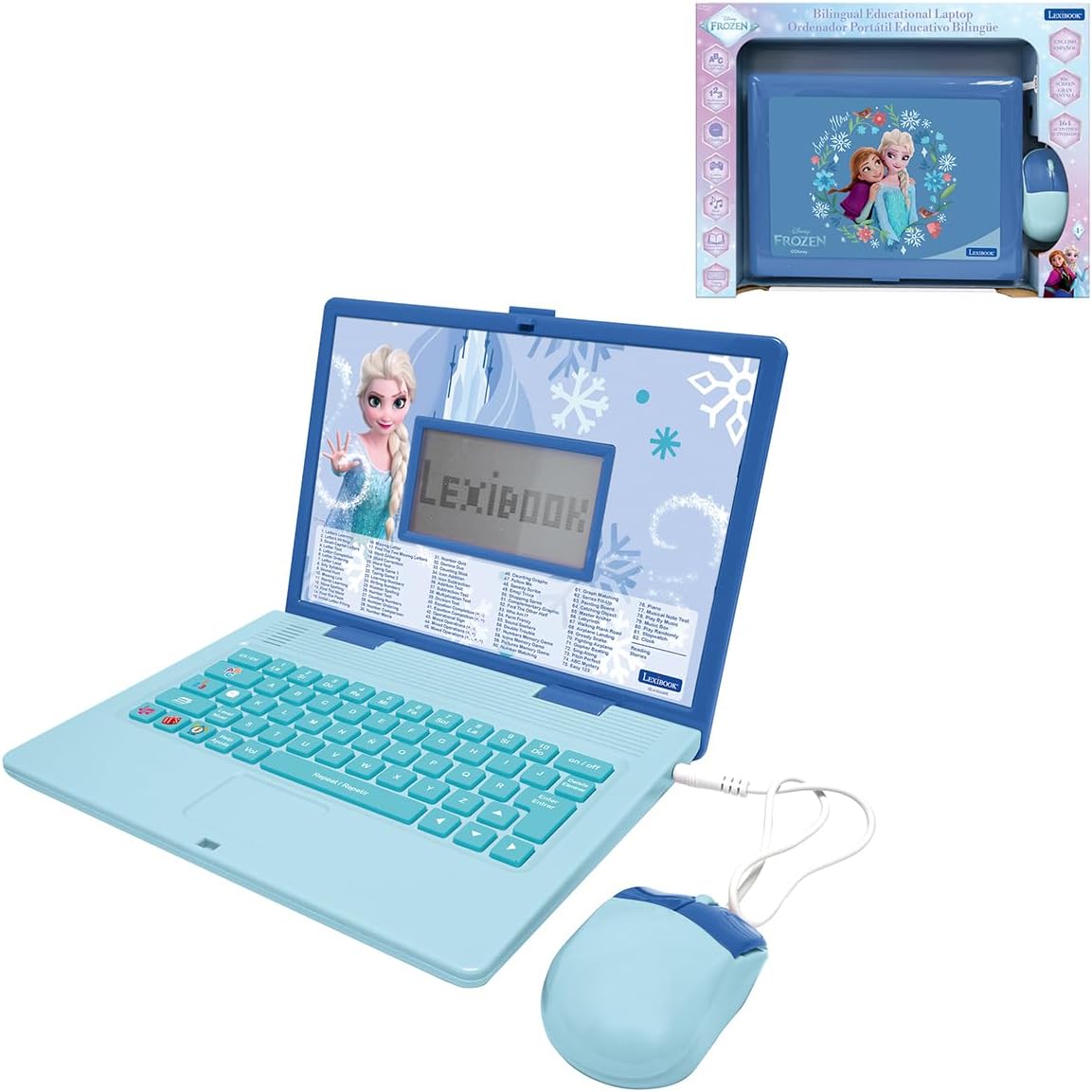
The Frozen-themed LEXiBOOK laptop offers 164 activities in English and Spanish. While ratings are not available, its high activity count and bilingual support make it a solid contender for themed learning.
We may earn a commission when you buy through this link, at no additional cost to you.
Voice guidance helps kids navigate easily, while games and music modes keep sessions enjoyable. The lightweight design makes it easy for small hands to carry around the house or on trips.
Though specific reviews are limited, the brand’s quality suggests reliability. The focus on vocabulary and spelling through themed activities ensures engagement beyond basic drills.
Perfect for fans of Frozen, this model makes learning feel like play. Parents prioritizing character-themed engagement will find it a fun way to introduce educational activities.
Themed content ensures high interest, encouraging consistent use and learning.
Voice guidance and lightweight design make navigation simple for young children.
We may earn a commission when you buy through this link, at no additional cost to you.
Selecting the right laptop involves considering educational features, durability, and safety to ensure a positive learning experience.
Look for laptops with structured learning modes that cover math, language, and logic to ensure comprehensive development. A variety of activities keeps children engaged while building foundational skills.
Prioritize models with multiple difficulty levels to grow with the child's abilities over time.
Bilingual laptops offer English and Spanish modes to foster early language skills. This feature supports cognitive development and exposes kids to new vocabulary naturally.
Choosing a bilingual model can simplify future language learning and support multilingual households.
Check battery requirements: some use disposable AA batteries while others are rechargeable. Rechargeable units reduce long-term costs but may have shorter session times.
Ensure the device offers sufficient playtime between charges or battery replacements for uninterrupted learning.
Laptops for young kids should have rugged designs with reinforced edges to withstand drops and bumps. Plastic materials should be non-toxic and robust for daily use.
Investing in a durable build ensures the device lasts through years of active play and exploration.
Screens between 4 and 10 inches balance visibility and portability. Color TFT or HD displays improve visual engagement without excessive blue light.
A clear screen reduces eye strain and makes interactive content more appealing for young learners.
Offline-capable devices are ideal for travel or limited Wi-Fi areas, ensuring learning can happen anywhere. Online options provide app variety but require parental supervision and internet access.
Consider your household’s internet habits to choose a model that fits your lifestyle and safety preferences.
Realistic keyboard and mouse layouts help children develop proper typing and navigation skills early. Slim, lightweight designs make devices easier for small hands to handle comfortably.
Ergonomic design prevents strain and encourages longer, more comfortable learning sessions.
Models with parental controls allow management of app usage and screen time. Secure browsers or pre-loaded content protect kids from inappropriate material.
Safety features are essential to maintain a secure digital environment tailored for young children.
Begin by inserting fresh batteries or charging the device fully before first use. Follow the on-screen prompts to personalize the profile with your child’s name and avatar for an engaging start.
Encourage regular use by scheduling short learning sessions of 15 to 20 minutes to prevent fatigue. Rotate activities to keep children interested and expose them to various educational topics.
Store the laptop in a cool, dry place away from direct sunlight to maintain screen clarity and battery health. Clean the keyboard and screen with a soft, dry cloth to ensure longevity.
Not necessary, but a toy laptop introduces basic tech skills in a safe way. It prepares children for future devices while offering fun educational activities tailored to their age.
Experts recommend limiting screen time to 20 to 30 minutes per session. Toy laptops should complement outdoor play and physical activities rather than replace them.
Yes, reputable brands use non-toxic materials and rounded edges to ensure safety. Parental supervision further guarantees a secure experience during play and learning.
Most toy laptops have pre-loaded activities that cannot be updated. Premium models with app stores may allow downloads, but basic ones remain static for simplicity and safety.
Rotate learning activities regularly and encourage interactive play like role-playing. Mixing learning games with music or camera features keeps engagement high and diverse.
Toy laptops typically do not connect to the internet, focusing on offline safety. Premium models may offer connectivity but require parental oversight to control access and content.
Choose models explicitly offering English and Spanish modes to support language development. Bilingual laptops provide immersion that helps children learn new words naturally.
Yes, toy laptops introduce basic computer concepts like typing and navigation. They build confidence and foundational skills needed for formal classroom technology use.
The VTech Genio Bilingual JuniorBook, LeapFrog 2-in-1 LeapTop Touch, and LEXiBOOK LAPTAB represent the top picks across categories. Each model offers unique benefits tailored to different learning needs and budgets.
Prioritize educational content and safety features when choosing. Look for durability and ergonomic design to ensure comfortable and safe usage for your child.
Prices and availability change frequently, so verify current details before purchasing. Check the latest ratings and reviews to make an informed decision that suits your child’s learning journey.