
Canon PIXMA TR4720
3.8Editor score
Wireless printing capability
Built-in fax function
Auto document feeder
This guide compares the top ten affordable fax machines for home and business use. Find the best cheap fax machine that meets your specific printing and
Finding a reliable fax machine on a budget can be challenging in today's digital world. Many businesses still require fax capabilities for legal and medical documents. This guide helps you locate affordable options without sacrificing essential functionality or performance quality.
We evaluated ten distinct models based on user reviews, transmission speed, and overall value. Our team analyzed technical specifications to ensure each pick offers genuine utility. We focused on machines that provide clear output and dependable connectivity for everyday tasks.
Each selection below highlights specific strengths like paper capacity or wireless connectivity. Note that product availability and pricing fluctuate frequently across online retailers. Always verify current stock status and warranty details before finalizing your purchase decision for your office.
3.8Editor score

4.0Editor score
3.9Editor score
The following table provides a side-by-side comparison of all ten selected models. We highlight key specifications to help you quickly identify the right fit for your specific office environment and workflow requirements.


The Canon PIXMA TR4720 is a versatile all-in-one device that fits well in home offices. With a solid rating, it offers reliable printing scanning and faxing capabilities for daily tasks. Its compact size ensures it does not clutter your workspace significantly.
We may earn a commission when you buy through this link, at no additional cost to you.
Key strengths include its wireless connectivity which allows printing from smartphones easily. The built-in fax function means you do not need a separate dedicated machine. The front paper tray is simple to load for plain paper documents quickly.
Trade-offs involve slower print speeds compared to laser models. The control panel is minimal which might require app usage for complex settings. However for basic home use these limitations are acceptable for most users.
This model is ideal for small businesses or home users needing fax without high costs. We recommend it for those prioritizing space efficiency and wireless convenience over heavy-duty volume.
Connect your devices via Wi-Fi to print documents directly without cables. This feature saves space and improves workflow efficiency in tight areas.
Send and receive faxes directly from the machine using plain paper. This eliminates the need for a separate fax-only device entirely.
We may earn a commission when you buy through this link, at no additional cost to you.
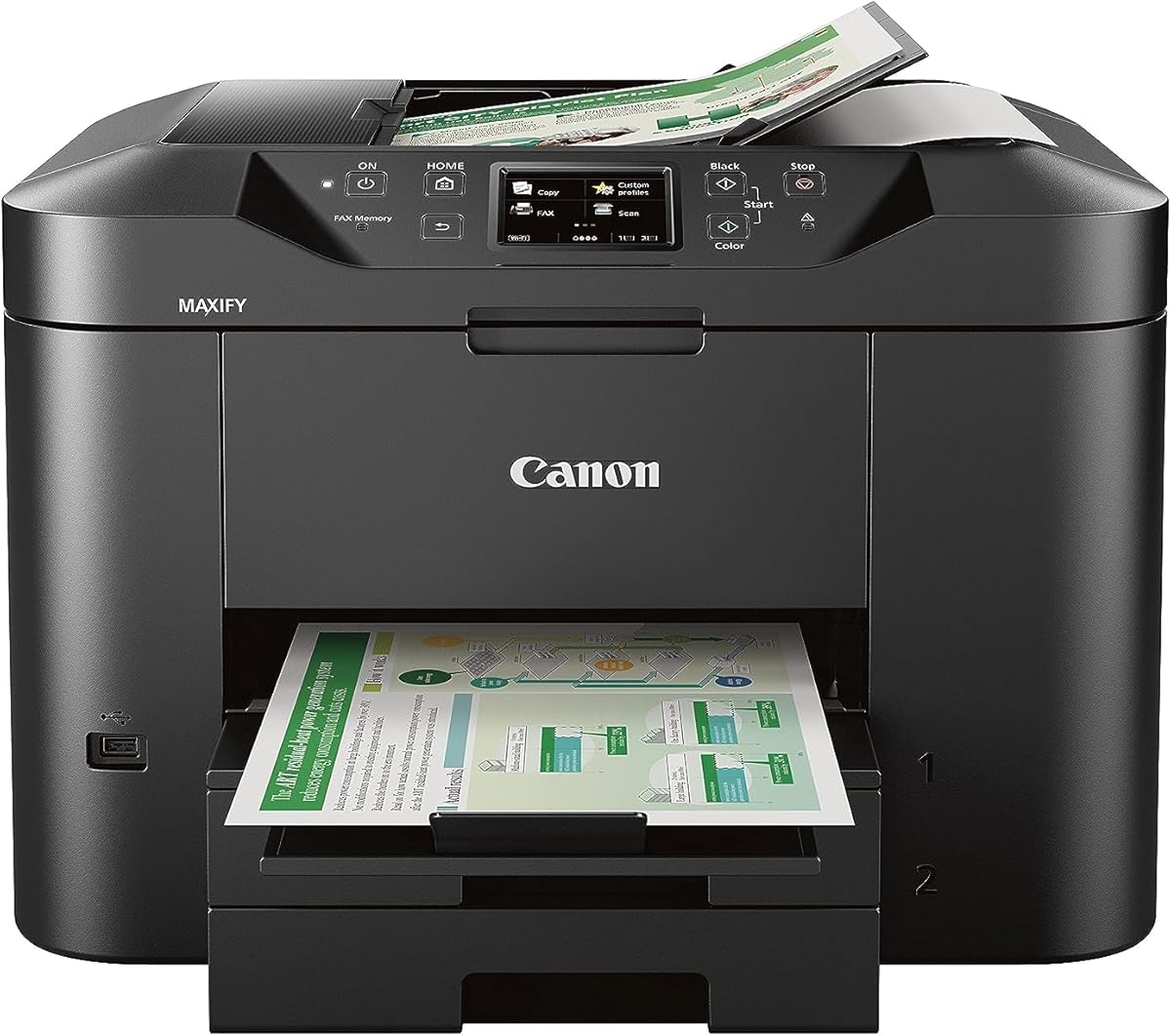
The Canon MAXIFY MB2720 targets users requiring robust performance for busy environments. Its high duty cycle ensures longevity even with frequent usage throughout the day. Users appreciate the reliability for professional document production needs.
We may earn a commission when you buy through this link, at no additional cost to you.
Strengths include the 500 sheet capacity which reduces refill frequency significantly. The Dual Resistant High Density inks prevent smudging and highlighting on printed reports. Mobile scanning allows quick digitization of documents directly to cloud services.
The larger physical size requires dedicated desk space which may not suit small home offices. Initial investment is higher than entry-level models though long-term value is strong. Consider your monthly volume before committing to this tier.
Businesses with heavy printing needs will find this model highly efficient. It balances speed capacity and ink quality effectively for professional use cases.
Built to handle up to 20000 pages monthly without performance degradation. This reliability ensures consistent output during peak business hours.
The DRHD inks ensure sharp text that remains clear over time. This is crucial for contracts and reports requiring long-term readability.
We may earn a commission when you buy through this link, at no additional cost to you.
This model stands out for its integration with smart home ecosystems via Alexa. The 4 rating reflects user satisfaction with its versatility and ease of use. It offers a modern approach to traditional fax and printing tasks.
We may earn a commission when you buy through this link, at no additional cost to you.
Key features include voice printing which simplifies operations for busy professionals. Auto two-sided printing saves paper and reduces waste effectively. The dual paper sources allow mixing paper types for specific document needs easily.
Setting up Alexa integration requires some initial configuration but pays off in convenience. Ink costs can be higher depending on print volume and usage habits. Budgeting for supplies is recommended before purchase for ongoing costs.
Smart homes benefit significantly from the voice command capabilities. It is an excellent choice for those wanting tech-forward office equipment without premium pricing.
Use simple voice commands to print documents or check ink levels. This hands-free approach enhances accessibility and workflow efficiency.
Automatically print on both sides to save paper and time. This feature is standard for efficient office resource management.
We may earn a commission when you buy through this link, at no additional cost to you.
The Brother FAX-575 offers a classic solution for users preferring standalone fax functions. Its high memory capacity allows storage of up to 25 pages for sending later. This makes it ideal for offices with consistent fax traffic.
We may earn a commission when you buy through this link, at no additional cost to you.
Strengths include the 400 x 400 dpi resolution ensuring clear and sharp copies. The 9600 BPS modem speed provides efficient transmission times for documents. Users appreciate the straightforward operation without complex digital setups.
The design is bulkier compared to modern all-in-one units. It relies on older technology which may not support mobile features. However for pure fax needs it remains dependable and functional.
Traditional offices needing a dedicated fax machine will find this suitable. It is best for users who prefer physical controls over apps.
Store up to 25 pages in memory to send later. This allows batch processing during low network activity times.
The high dpi resolution ensures readable copies for official documents. This clarity is essential for archiving legal or medical records.
We may earn a commission when you buy through this link, at no additional cost to you.
This model features useful memory capabilities that handle paper jams efficiently. The out-of-paper memory stores pages until paper is replaced. This prevents data loss during unexpected interruptions in fax transmission.
We may earn a commission when you buy through this link, at no additional cost to you.
Key features include caller ID and distinctive ring detection for managing calls. The 30 speed dial presets simplify sending to frequent contacts regularly. Inkjet technology provides color capability if needed for specific documents.
The rating is lower due to older interface limitations. It uses a corded handset which limits flexibility compared to cordless options. Consider this if memory reliability is your priority over modern features.
Offices needing robust memory protection against interruptions should consider this unit. It is a practical choice for environments where fax reliability is critical.
Retain sent faxes even if paper runs out unexpectedly. This ensures no communication is lost during critical business hours.
Program 30 frequent contacts for quick one-touch sending. This saves time for high-volume outgoing fax users.
We may earn a commission when you buy through this link, at no additional cost to you.
The HP DeskJet 2955 brings modern AI features to basic home printing. It supports faxing via the HP App which connects with the machine effectively. The 3-month Instant Ink trial helps manage supply costs initially.
We may earn a commission when you buy through this link, at no additional cost to you.
Strengths include AI that optimizes layouts to prevent wasted pages. Wireless connectivity ensures easy access from multiple devices around the home. The sustainable design aligns with environmentally conscious purchasing decisions.
Faxing relies on the app rather than a dedicated fax menu which might confuse some users. Print speeds are modest for larger document volumes. Check compatibility with your workflow before buying.
Home users wanting smart features will enjoy the AI integration. It is suitable for light office needs mixed with personal printing tasks.
HP AI removes unwanted content from web pages automatically. This ensures clean prints without extra whitespace or ads.
Subscribe to get ink delivered before you run out. This helps avoid unexpected downtime during critical print jobs.
We may earn a commission when you buy through this link, at no additional cost to you.
This model uses laser technology for faster and sharper text output. With speeds of 21 ppm it handles high-volume transmission effectively. The laser engine ensures crisp black text suitable for legal documents.
We may earn a commission when you buy through this link, at no additional cost to you.
Key strengths include lower cost per page compared to inkjet systems. The resolution is sufficient for professional and clear communication. It is designed for durability and consistent performance in daily tasks.
It lacks network readiness which limits multi-user access in an office. Features are basic compared to all-in-one multifunction units. However for standalone faxing it performs robustly.
Users prioritizing speed and sharp text should consider this laser option. It is best for offices needing a dedicated fax without extra bells and whistles.
Transmit documents at 21 pages per minute for efficiency. This significantly reduces wait times for large batches of faxes.
Toner yields more pages than inkjets for cost savings. This is ideal for high-volume business communication needs.
We may earn a commission when you buy through this link, at no additional cost to you.
This renewed unit offers a cost-effective way to handle fax needs. It uses thermal transfer which simplifies the internal mechanism for reliability. The Energy Star rating ensures it consumes less electricity during use.
We may earn a commission when you buy through this link, at no additional cost to you.
Strengths include the compact size which fits on small shelves easily. The 10 sheet ADF allows quick scanning of multi-page documents. A solid memory capacity supports sending multiple pages at once.
Thermal paper can be more expensive than plain paper over time. The resolution might not suit high-detail document requirements strictly. For basic business use it remains functional and affordable.
Users looking for a reliable and efficient unit should consider this. It is a practical solution for budget-conscious faxing needs.
The Energy Star label indicates lower power consumption. This helps reduce overall utility costs for your office.
Load up to 10 sheets to fax them sequentially. This automation saves time when handling multi-page files.
We may earn a commission when you buy through this link, at no additional cost to you.
This unit uses plain paper which is generally more durable for archiving. The Caller ID compatibility helps you identify senders before answering. It integrates with answering machine interfaces for combined phone functions.
We may earn a commission when you buy through this link, at no additional cost to you.
Key features include a 6-month warranty with an exchange program. This provides some peace of mind regarding hardware reliability issues. The design prioritizes basic utility over advanced digital features.
The lower rating suggests potential reliability concerns for some users. The modem speed is standard but not the fastest available today. Check user reviews carefully before deciding.
If you prefer standard paper for longevity this model fits that need. It is suitable for environments where basic phone and fax integration matters.
Use standard paper that does not fade over time. This is crucial for important legal or medical record storage.
The exchange program offers support if issues arise early. This helps maintain uptime during initial setup phases.
We may earn a commission when you buy through this link, at no additional cost to you.
This renewed version offers the same features as the new unit at a lower price. It retains the high memory and easy operation users expect. The rating reflects satisfaction with its continued performance.
We may earn a commission when you buy through this link, at no additional cost to you.
Key benefits include the cost savings while maintaining the original capabilities. The 512 KB memory ensures you can store up to 25 pages. The copy resolution remains sharp for clear document reproduction.
Being renewed means it may show minor cosmetic signs of prior use. Warranty terms are typically shorter than brand-new units. Verify the seller return policy before buying.
Budget shoppers who want proven reliability should consider this renewed option. It is a strategic choice for those maximizing value without sacrificing function.
Renewed units provide significant discounts compared to new ones. This allows you to acquire premium features for less.
Used models have often been tested for basic function. This ensures core operations work as expected out of the box.
We may earn a commission when you buy through this link, at no additional cost to you.
Selecting the right fax machine involves weighing cost against essential features. This guide breaks down the key factors to consider for your specific workflow.
A machine with higher paper capacity reduces the frequency of refills. Look for models offering at least 50 to 100 sheets for consistent operation.
Prioritize capacity if you handle large batches of daily fax documents.
Faster transmission speeds save time for urgent business communications. A standard modem speed of 9600 bps is acceptable for most tasks.
Ensure the speed matches the volume of faxes you send monthly.
Internal memory stores documents when paper runs out or the line is busy. A minimum of 512 KB allows for storing multiple pages effectively.
Choose models with ample memory to prevent data loss during interruptions.
Modern machines may offer wireless or app-based faxing instead of phone lines. Decide if you need traditional phone line compatibility or wireless convenience.
Wireless options provide flexibility for home offices without dedicated phone lines.
Inkjet machines are cheaper upfront but may have higher long-term ink costs. Laser machines offer faster printing and cheaper toner for high volume.
Calculate the cost per page to determine the most economical choice over time.
A higher duty cycle indicates the machine can handle frequent daily use. For home offices, look for models rated for at least 1000 pages monthly.
Invest in durability to avoid frequent replacements and downtime.
All-in-one models combine printing scanning and faxing to save desk space. Dedicated fax machines might be more specialized for heavy fax-only workflows.
Select the form factor that matches your current office space constraints.
Adequate warranty coverage ensures you are protected against defects. Check if the brand offers reliable customer support channels for troubleshooting.
Verify warranty terms especially when purchasing renewed or refurbished units.
Always place the machine on a stable surface away from direct sunlight and moisture. Proper placement prevents paper jams and extends the internal mechanism's lifespan.
Load paper into the tray according to the manufacturer's guidelines. Adjust the paper guides to fit the width of your documents to ensure smooth feeding.
Clean the glass scanner surface regularly with a soft lint-free cloth. Dust and debris on the glass can cause streaks on your scanned faxes.
Traditional fax machines require a standard telephone line to send and receive signals. However, many modern all-in-one printers offer Wi-Fi faxing options. Check the specifications to confirm if your preferred model supports IP faxing if you lack a phone line.
Plain paper uses ink or toner similar to standard printers and does not fade over time. Thermal paper uses heat-sensitive coating and is cheaper but less durable. Most office documents should be printed on plain paper for long-term storage.
Use digital fax services if you send few pages to avoid hardware maintenance. For frequent sending, choose a machine with a high duty cycle and low cost per page. Regular maintenance also prevents costly mechanical issues.
Many modern all-in-one models allow you to scan directly to email without a PC. This feature requires setting up your email address in the machine settings. It streamlines workflows by avoiding the need for a computer to transmit files.
Transmission errors often result from poor phone line quality or incorrect number entry. Check the cables and ensure the line is active and free of static. If using digital services, verify your internet connection is stable.
Renewed machines can offer significant savings if they come with a warranty. They are often tested to ensure basic functionality before resale. Verify the return policy and seller reputation to avoid potential issues with used electronics.
We highlighted ten models ranging from dedicated units to versatile all-in-one solutions. The Canon PIXMA TR4720 offers the best value for home offices needing basic fax features. The MAXIFY MB2720 remains the top pick for heavy business volume.
Prioritize memory and paper capacity if you handle frequent document exchanges. Wireless connectivity is also a key factor for modern setups lacking phone lines. Balance these needs with your budget to find the right fit.
Always check current pricing and availability before making a purchase decision. Models may change in stock or price regularly on online marketplaces. Selecting the right tool ensures smooth communication for your business needs.