
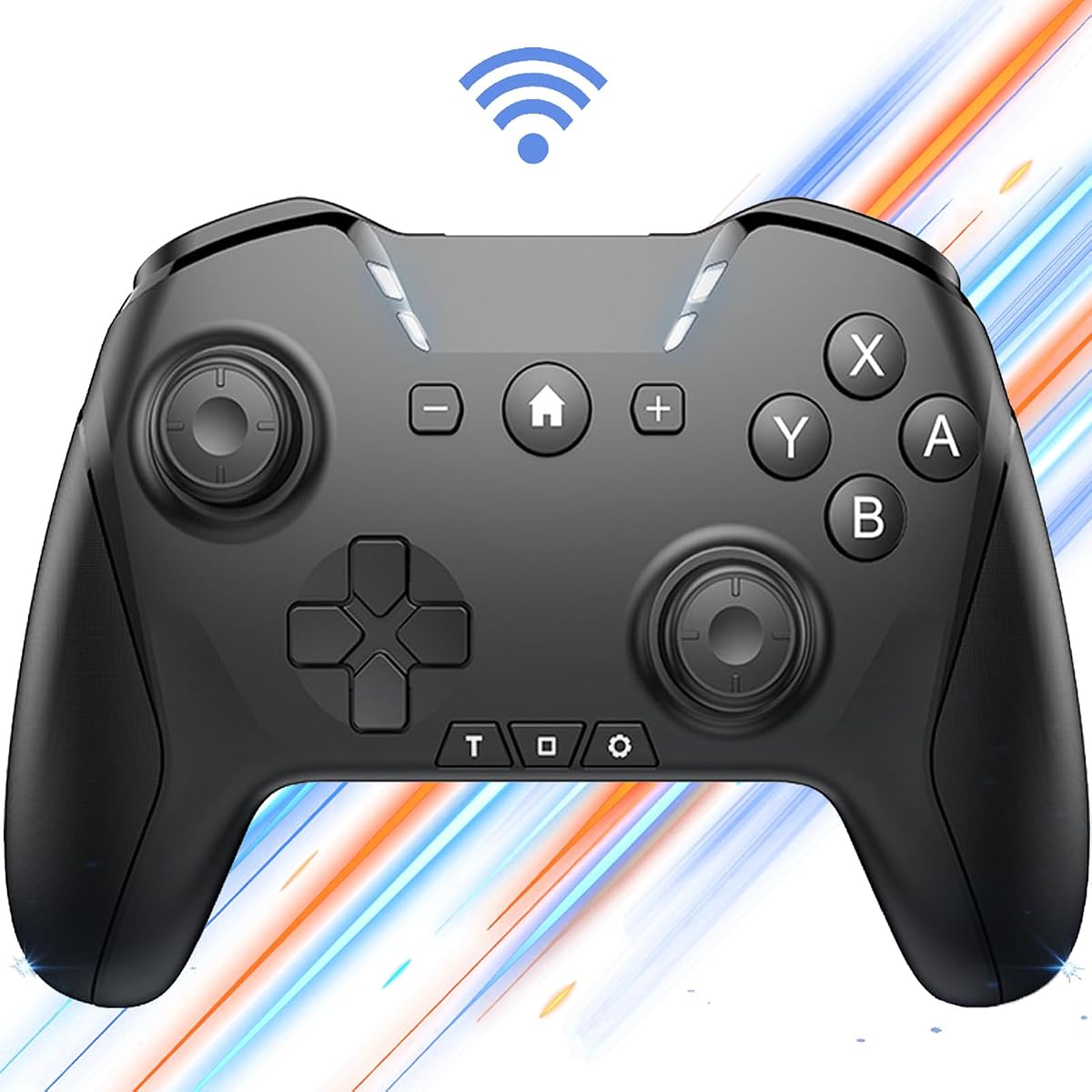
VOYEE Switch Controllers
4.4Editor score
RGB lighting effects
One-key wake up
3 speed turbo modes
This guide compares the top gaming controller for Apple TV options available in October 2026 to help you find the perfect match for your streaming setup.
Finding the right gaming controller for Apple TV can transform your living room into an immersive entertainment hub. With so many wireless options available, choosing one that balances comfort, battery life, and compatibility is essential for a smooth gaming experience.
We evaluated ten leading controllers based on their connection stability, ergonomic design, and support for iOS and tvOS ecosystems. Our analysis focuses on real-world performance metrics to ensure every recommendation delivers reliable gameplay without latency or connectivity issues.
Each pick in this list highlights specific strengths like battery endurance, button responsiveness, and platform versatility. Please note that prices and availability may change over time, so checking the latest listings before purchasing is always a smart move.
4.4Editor score

4.7Editor score

4.0Editor score
The following table provides a side-by-side overview of the ten controllers selected for this guide. It highlights key specifications and features to help you quickly identify which model aligns best with your specific gaming needs and device ecosystem.



This versatile Bluetooth controller ranks highly for its ability to handle diverse gaming needs across multiple platforms including Apple TV. With a solid 4.0 rating from users, it offers advanced features like macro programming and turbo adjustments that elevate standard gameplay experiences.
We may earn a commission when you buy through this link, at no additional cost to you.
Its standout quality lies in the deep customization options allowing players to set operations up to 30 seconds long or interchange stick and D-PAD functions. The 650mAh battery ensures extended play sessions without frequent interruptions, making it ideal for long gaming nights.
Trade-offs include a slightly steeper learning curve for mastering macro settings and a design that might feel larger for smaller hands. However these are acceptable given the extensive functionality and robust connectivity options provided by the device.
Gamers seeking a feature-rich controller that bridges the gap between console and mobile gaming will find this model compelling. Its support for Black Myth: Wukong and MFi games confirms its versatility for serious enthusiasts.
Users can program loop operations with intervals and long presses to automate complex inputs during gameplay.
Support for both Bluetooth and USB ensures stable connections across PC, Mac, and Apple TV setups.
We may earn a commission when you buy through this link, at no additional cost to you.
As an officially licensed device, the SteelSeries Nimbus+ guarantees seamless integration with Apple TV and other iOS products. Users appreciate its reliable wireless connection and the inclusion of a physical mount that stabilizes phones during mobile gaming sessions.
We may earn a commission when you buy through this link, at no additional cost to you.
The controller boasts an impressive battery life exceeding 50 hours on a single charge which is rare in this category. Tactile D-pad buttons and clickable joysticks add precision control that enhances competitive gaming performance across various titles.
While the price is higher than generic alternatives, the build quality and official certification justify the cost for Apple users. Updating via SteelSeries Engine ensures optimal compatibility though it adds a minor setup step initially.
For those prioritizing seamless ecosystem integration and long-lasting power, this premium choice stands out. Its design respects the Apple aesthetic while delivering pro-level controls for tvOS gaming.
Official licensing ensures zero connection hiccups with tvOS and supports all Apple certified games.
With over 50 hours of playtime, you can game for days between charges.
We may earn a commission when you buy through this link, at no additional cost to you.
Offering exceptional value, the VOYEE controller delivers a polished experience at a budget-friendly price point. With a 4.4 rating, it proves that affordability does not mean sacrificing essential features like RGB lighting and responsive motion controls.
We may earn a commission when you buy through this link, at no additional cost to you.
Its turbo system supports three speed bursts to simplify complex combos while the 6-axis gyro enhances sports and action games. The ability to wake up the console with a single button press adds convenient usability for quick gaming sessions.
The main trade-off is that PC compatibility is limited to wired connections which might deter some users. However for Apple TV or Switch gaming, the wireless performance remains solid and lag-free for most casual and competitive players.
Budget-conscious gamers who want stylish lighting and solid performance will find this model ideal. It serves as a reliable entry point into wireless controller gaming without breaking the bank.
Four RGB light modes let you match the controller look to your setup style.
6-axis gyro sensor ensures accurate aiming and movement in supported games.
We may earn a commission when you buy through this link, at no additional cost to you.
The 8Bitdo SN30 Pro stands out with its classic retro aesthetic and modern internal upgrades like Hall Effect joysticks. Rated 4.7 by users, it is explicitly confirmed to work with Apple TV, making it a perfect fit for nostalgia-driven gaming sessions.
We may earn a commission when you buy through this link, at no additional cost to you.
Its Hall Effect sensors eliminate stick drift issues ensuring precise input detection that outperforms standard magnetic sticks. The button layout and tactile feedback mimic traditional consoles while maintaining Bluetooth compatibility with tvOS devices.
While the ergonomic grip is smaller than modern full-sized controllers, this fits well for retro titles and handheld use. The higher price is justified by the premium materials and official support for Apple platforms.
Retro enthusiasts and users wanting a reliable Bluetooth option for Apple TV will love this controller. Its combination of style and substance sets a high bar for third-party gaming peripherals.
Hall Effect sensors provide drift-free input for years of smooth gaming.
Officially supported on Apple TV for plug-and-play setup without adapters.
We may earn a commission when you buy through this link, at no additional cost to you.
Opting for a renewed version of the SteelSeries Nimbus+ offers a cost-effective way to access premium features. While the rating sits at 3.6, the Amazon Renewed program ensures the device has been inspected and tested to meet quality standards.
We may earn a commission when you buy through this link, at no additional cost to you.
It retains the core strengths of the original model including long battery life and seamless connectivity with Apple TV. For those comfortable with refurbished electronics, this presents a practical solution to save money without losing functionality.
The lower rating may reflect individual variations in used units or cosmetic imperfections. However the functional performance remains consistent with the standard model which is reliable for most users.
Eco-conscious buyers or those on a strict budget should consider this option. It provides the same essential gaming experience as the new version at a more accessible price point.
Professionally inspected and tested units ensure a reliable experience for users.
Significantly lower price point compared to brand new units.
We may earn a commission when you buy through this link, at no additional cost to you.
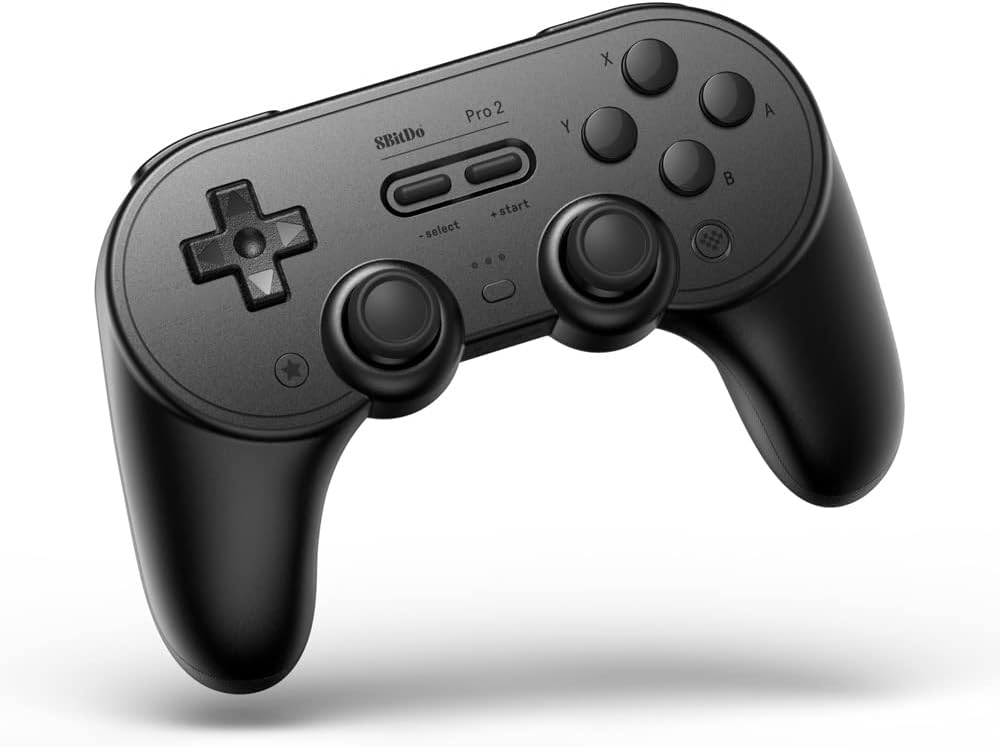
The 8BitDo Pro 2 is a powerhouse for gamers who switch between multiple devices including Apple TV and PCs. With a 4.5 rating, it balances robust features with solid performance, making it a top choice for dedicated enthusiasts.
We may earn a commission when you buy through this link, at no additional cost to you.
Its two programmable back buttons add significant depth for mapping complex moves in competitive games. The mode switching button allows quick toggling between profiles so you can use the same controller for different setups effortlessly.
iOS software support for custom profiles is improving but still lags slightly behind PC capabilities. Despite this, the hardware features like back buttons and grip enhancements make it highly usable on Apple TV.
If you want one controller to rule all your devices without sacrificing customization, this is the pick. Its versatility and build quality justify the investment for serious players.
Two programmable shoulder buttons add pro-level control for complex inputs.
Switch between different player profiles instantly with dedicated hardware buttons.
We may earn a commission when you buy through this link, at no additional cost to you.
This version of the SteelSeries Nimbus+ continues to deliver classic reliability with a solid 4.1 rating. While it may lack some newer software tweaks, its hardware remains robust and fully compatible with Apple TV environments.
We may earn a commission when you buy through this link, at no additional cost to you.
Users appreciate its straightforward setup and dependable wireless connectivity which ensures minimal lag during gameplay. The rechargeable battery and ergonomic design make it a comfortable choice for extended sessions.
The main drawback is that it lacks the latest advancements found in newer iterations like extended battery or updated tactile feedback. However, for those seeking proven performance without the premium cost, it serves well.
Gamers wanting a no-nonsense controller that just works without complex configurations will find this model dependable. It remains a staple in the Apple ecosystem for good reason.
Trusted by millions of users for consistent performance and stability.
Designed specifically for iOS and tvOS compatibility without extra drivers.
We may earn a commission when you buy through this link, at no additional cost to you.
The AceGamer Aurora II impresses with Hall Effect joysticks typically found on more expensive controllers. Rated 4.2 by users, it brings precision and durability to the table while supporting a wide range of platforms including iOS devices.
We may earn a commission when you buy through this link, at no additional cost to you.
Its 1000mAh battery ensures long playtime and the programmable back buttons offer extra flexibility for mapping actions. The rotary motors add haptic variety which enhances immersion in compatible games.
Note that Xbox support is not available and the setup process can be detailed with multiple steps to connect properly. However once configured, the performance is solid and consistent for most gaming needs.
Tech-savvy users who value sensor accuracy and battery life should consider this option. It provides advanced features at a competitive price for the current market.
Hall Effect sensors prevent drift and improve precision for aiming.
Large 1000mAh battery supports extended gaming without interruptions.
We may earn a commission when you buy through this link, at no additional cost to you.
Designed by Amazon for the Luna cloud service, this controller delivers a streamlined experience for streaming. With a 4.4 rating, users praise its low latency connection and ability to switch between devices like Fire TV and Apple TV easily.
We may earn a commission when you buy through this link, at no additional cost to you.
Its offset thumbsticks and accessible bumpers are tailored for long cloud sessions providing comfort and precision. The ability to pause on one screen and resume on another adds a layer of convenience for mobile gamers.
While optimized for Luna, it functions as a standard Bluetooth controller for other Apple devices which expands utility. However its specific tuning for cloud streaming might not match the feel of local gaming controllers.
Fans of cloud gaming who want seamless transitions between devices will find this model useful. It bridges the gap between streaming services and hardware effectively.
Designed for low-latency performance during cloud streaming sessions.
Supports switching between multiple screens without disconnecting.
We may earn a commission when you buy through this link, at no additional cost to you.
The GMBACK controller offers unique macro functionality that allows recording and looping sequences for repetitive tasks. Rated 4.1 by users, it brings practical automation tools to the Apple TV ecosystem which few competitors offer.
We may earn a commission when you buy through this link, at no additional cost to you.
Features like one-click home wake up and customizable vibration levels enhance usability across different game types. The 800mAh battery provides a solid 15 to 20 hours of playtime for extended sessions.
Learning to program macros might be complex for casual users but provides significant benefits for grinding or farming in games. This feature sets it apart from standard controllers in the same price range.
Gamers interested in automation features will appreciate this model. Its broad compatibility and unique tools make it a standout choice for those wanting more control.
Record and loop custom sequences to automate repetitive gameplay actions.
Power on compatible consoles instantly with a dedicated home button feature.
We may earn a commission when you buy through this link, at no additional cost to you.
Selecting the right controller involves assessing factors like battery life, ergonomics, and platform compatibility. This section breaks down the most critical features to consider before making a purchase.
Battery life is crucial for uninterrupted gameplay sessions. Look for models offering at least 10 to 15 hours on a single charge to avoid frequent recharging during play. Some premium options exceed 50 hours which ensures reliability for long-term use.
Prioritize controllers with high capacity batteries or replaceable options to keep your gaming going without interruption.
Comfort is key for extended play sessions. A well-designed controller should fit naturally in your hands with balanced weight and reachable buttons. Ergonomic grips reduce strain and improve control accuracy over time.
Choose a model that matches your hand size and playing style to prevent fatigue during long sessions.
Ensure the controller explicitly supports tvOS and your specific devices. Some models require firmware updates or software to function correctly with Apple TV. Official licenses often guarantee smoother integration and better support.
Check the product description to confirm seamless connectivity with your current Apple TV setup.
Bluetooth is the standard for wireless controllers but some also support USB cables for wired play. Ensure the connection type is stable and offers low latency for responsive inputs during competitive games.
Select a controller with Bluetooth that has proven stability across iOS devices for the best experience.
Advanced features like macro programming or back buttons can enhance gameplay efficiency. These tools allow for automated sequences or extra inputs that standard controllers lack. Evaluate if these features align with your gaming habits.
Consider customization options if you need extra functionality for complex games or repetitive tasks.
Durable materials and sturdy construction ensure the controller withstands regular use. Look for models with high ratings regarding longevity and resistance to wear. Quality components contribute to consistent performance over years.
Invest in a controller made with premium materials to ensure it lasts through many gaming sessions.
Balance your budget with the features you need. Budget models may lack advanced sensors but still perform well for casual play. Premium options offer better build quality and official support which justify higher costs for enthusiasts.
Assess your needs to find a controller that offers the best value for your specific gaming requirements.
Haptic feedback adds immersion to gameplay by simulating in-game actions. Look for controllers with adjustable vibration levels or dual motors to tailor the experience. Quality feedback enhances the sense of presence in games.
Choose a model with adjustable vibration to customize the feedback intensity for different game genres.
To pair your controller, open Bluetooth settings on your Apple TV and put the controller in pairing mode by holding the designated button until it blinks. Select it from the list of available devices to establish a secure connection.
Maintain battery health by charging the controller when the battery indicator shows low levels. Avoid leaving it connected to chargers for extended periods once fully charged to preserve the lifespan of the battery.
Clean the controller regularly using a soft cloth to remove dust and oils from the surface. Ensure the charging ports are free of debris and store it in a dry place when not in use to prevent damage.
Most modern controllers work natively with tvOS without needing additional apps. However some specific brands may offer companion apps to customize buttons or update firmware for better performance on Apple TV.
Apple TV supports many Bluetooth Xbox controllers including the Series X and S models. Pair them via the Apple TV Bluetooth menu just like any other supported wireless controller to start playing.
To reset a controller, usually hold the pairing or power button for about 10 to 15 seconds until the lights flash. Then re-pair it with your Apple TV from the Bluetooth settings menu.
Wired controllers offer zero latency but lack convenience. Wireless models have improved significantly and provide excellent performance for most gaming scenarios including on Apple TV.
Yes, many mobile controllers are designed to be compatible with Apple TV if they support Bluetooth. Check product specs to confirm tvOS compatibility before purchasing.
Gaming controller batteries usually last between 10 to 50 hours depending on the model and usage. Rechargeable models generally provide enough power for several gaming sessions per charge.
Choosing the best gaming controller for Apple TV depends on balancing performance, budget, and features. The SteelSeries Nimbus+ offers premium integration for Apple enthusiasts while the VOYEE Switch delivers excellent value for budget seekers.
Focus on battery life and official compatibility to ensure a smooth and frustration-free experience. Whether you prioritize customization or ergonomics, there is a model in this guide to meet your needs.
Always verify the latest price and availability on the product pages before buying. These factors can change frequently so checking current listings ensures you get the best deal possible.