
HP 14 inch Laptop 2027 Edition
4.5Editor score
Intel N150 Processor
4GB DDR5 RAM
Windows 11 with 365
Remote work and virtual meetings have become standard in modern professional life. Finding the right laptop for Zoom calls ensures you stay clear and connected during every important session.
We evaluated various models based on processor speed, camera quality, and audio features. Our list includes both affordable options and powerful machines suited for heavy daily use.
Each pick highlights specific strengths to help you choose quickly. Prices and availability change often, so check current listings before making your final purchasing decision.
4.5Editor score

5.0Editor score
4.6Editor score
As an Amazon Associate we earn from qualifying purchases.
This side-by-side comparison highlights the key specifications and features of each top-rated device and accessory to help you decide quickly.





The NIMO 15.6 Copilot AI-Laptop stands out as the top choice for professional video conferencing needs. With a perfect 5.0 rating, this device offers robust performance tailored for daily virtual meetings and heavy multitasking.
We may earn a commission when you buy through this link, at no additional cost to you.
Powered by the Intel N150 Quad Core processor, it handles twenty browser tabs alongside simultaneous 1080P Zoom calls without lag. The 16GB RAM ensures smooth switching between apps, while the 512GB SSD provides rapid file access and quick boot times.
While it is slightly heavier than ultra-portable laptops, the 15.6 inch Full HD screen offers superior visibility for shared documents. The 8.5 hour battery life supports full workdays without needing a power outlet.
If you prioritize performance and screen real estate for remote work, this laptop is the ideal investment. It balances power and portability effectively for students and professionals alike.
The 16GB RAM allows seamless transition between video calls, spreadsheets, and communication tools without freezing or lag.
A crisp 1920×1080 screen ensures text remains sharp and video feeds are clear during extended meeting sessions.
We may earn a commission when you buy through this link, at no additional cost to you.
The HP 14 inch Laptop offers an affordable entry point for remote workers seeking reliable connectivity. It scores a solid 4.5 rating, reflecting its capability to handle standard video conferencing tasks efficiently.
We may earn a commission when you buy through this link, at no additional cost to you.
Its Intel N150 processor and 4GB DDR5 RAM manage basic Zoom calls and web browsing smoothly. The inclusion of Microsoft 365 and 1TB Cloud Storage adds significant value for document management without needing extra hard drives.
Although the local storage is limited to 128GB, the cloud integration compensates for this. The lightweight 3.24 lb chassis makes it easy to transport between home offices and coffee shops.
This laptop is perfect for users who need essential tools without breaking the bank. Its balance of features and cost makes it a top contender for budget-conscious buyers.
Included Microsoft 365 subscription provides access to Word, Excel, and Teams immediately upon setup.
Slim profile and low weight ensure comfort during long commutes or travel days.
We may earn a commission when you buy through this link, at no additional cost to you.
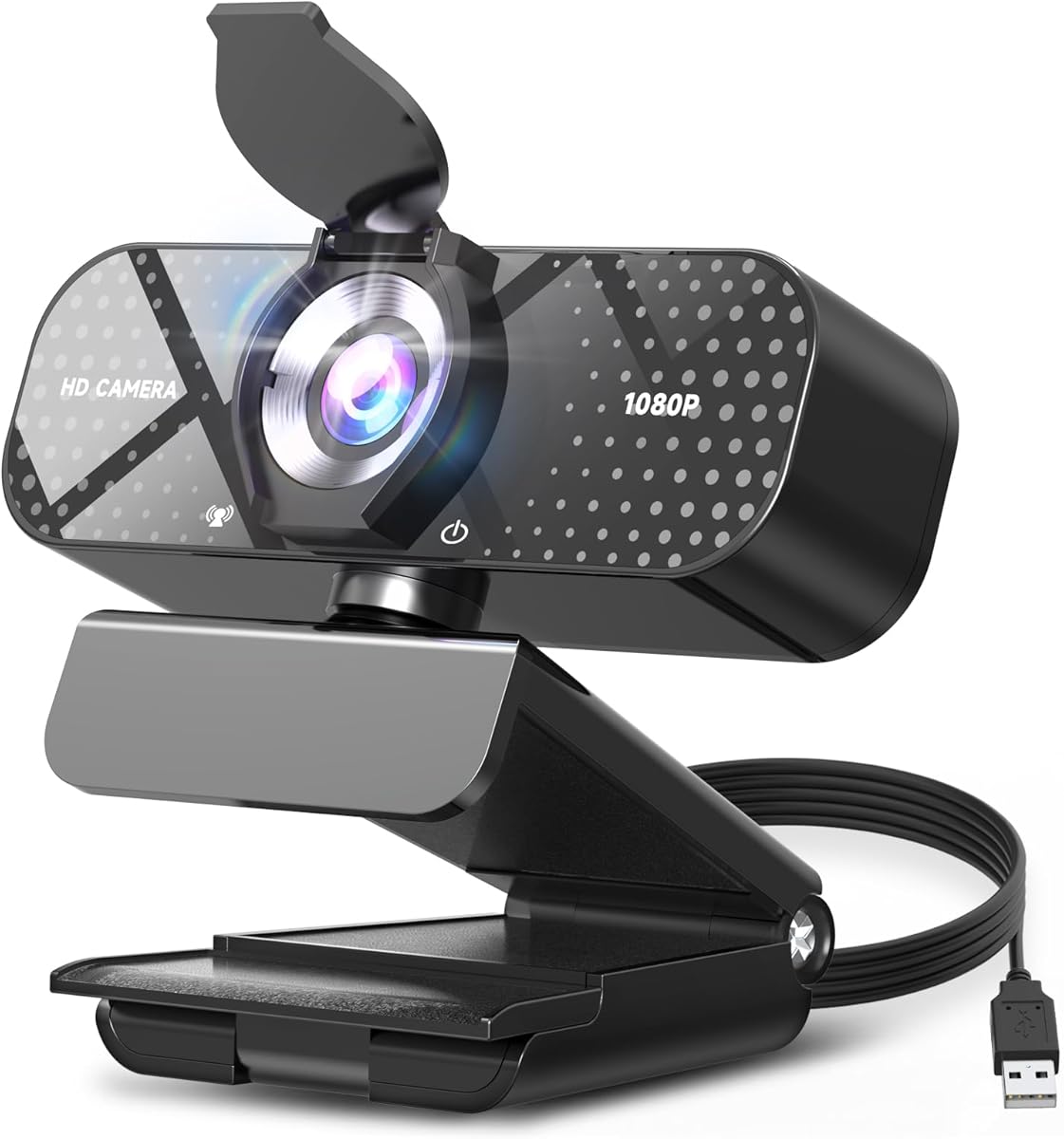
For those needing to upgrade their video presence, the TRAUSI 1080P FHD Webcam is a standout accessory. It boasts a 4.6 rating due to its exceptional clarity and advanced audio features for professional communication.
We may earn a commission when you buy through this link, at no additional cost to you.
Its wide-angle lens captures sharp details while the noise-canceling microphone ensures your voice is heard clearly. Auto light correction dynamically adjusts to room conditions, guaranteeing you look your best even in low light.
The included privacy cover adds an essential layer of security when the camera is not in use. Setup is effortless with plug-and-play compatibility across Windows and Mac systems.
This webcam is an ideal upgrade for existing laptop setups where built-in cameras fall short. It transforms standard calls into high-definition professional interactions effortlessly.
1080P resolution delivers crisp video feeds that help maintain engagement during long meetings.
Physical privacy cover offers peace of mind by blocking the lens when not actively in use.
We may earn a commission when you buy through this link, at no additional cost to you.
The HP Everyday Slim Laptop is designed for users prioritizing mobility without sacrificing core meeting functionality. It holds a perfect 5.0 rating for its reliability in handling daily video conferences.
We may earn a commission when you buy through this link, at no additional cost to you.
Its Intel N150 processor provides efficient power for standard workloads. The dedicated Copilot key simplifies navigation, while the multi-touch pad offers precise control during presentations.
Battery life is a strong point here, ensuring you stay powered through long remote shifts. The slim chassis makes it effortless to carry between different work environments.
This device is best for mobile workers who need a lightweight, reliable tool for daily tasks. It balances essential features with portability effectively.
Lightweight design reduces shoulder strain during extended carrying periods or travel.
Built-in software integration streamlines workflow without needing additional configuration.
We may earn a commission when you buy through this link, at no additional cost to you.
Lighting plays a critical role in video meetings. The Cyezcor Video Conference Lighting Kit improves facial visibility with flexible brightness settings. It earns a 4.3 rating for its practical design.
We may earn a commission when you buy through this link, at no additional cost to you.
With three color temperatures, you can match your environment from cool to warm. The clip-on design attaches securely to monitors without cluttering your desk.
The 48 LED beads provide even light distribution without creating harsh shadows. USB power means you can run it directly from your laptop.
This accessory is perfect for home office setups where natural light is limited. It quickly upgrades the professionalism of your video feed.
Adjust color and brightness to suit different times of day and room conditions easily.
Stable clip ensures the light stays in place even if you move your monitor frequently.
We may earn a commission when you buy through this link, at no additional cost to you.
The Zoom Lighting for Computer offers a robust solution for desk-based video calls. Its adjustable design allows precise positioning for ideal facial lighting. The unit is rated 4.4 for its versatile build.
We may earn a commission when you buy through this link, at no additional cost to you.
The height ranges from 22 to 32.5 inches, accommodating various monitor setups. The metal base ensures stability and protection for your desktop surface.
Edge-lit technology provides even coverage without glare. It works as both a desk lamp and a meeting light, reducing eye strain.
Ideal for static office setups, this light ensures consistent quality in your video. It is a solid choice for daily professional use.
Adjustable height reduces neck strain while ensuring light reaches the face effectively.
Non-slip pads keep the light secure during typing or movement on the desk.
We may earn a commission when you buy through this link, at no additional cost to you.
This ring light is designed for remote workers needing immediate lighting improvements. It scores 4.4 for its high color rendering index that makes faces look natural. It is an effective tool for Zoom calls.
We may earn a commission when you buy through this link, at no additional cost to you.
The 6-inch circular design fits most monitor bezels securely. High CRI ensures accurate colors, avoiding the washed-out look of poor lighting.
Ten dimming levels allow fine-tuning for different tasks. Its small footprint saves space while delivering significant visual benefits.
For budget-conscious professionals, this accessory delivers strong performance. It is an easy upgrade that instantly boosts your video presence.
High CRI ensures skin tones appear natural and vibrant on camera.
Small design saves desk space while providing essential illumination.
We may earn a commission when you buy through this link, at no additional cost to you.
This HP Business Laptop comes with essential accessories for immediate use. It scores 4.1, offering a complete setup right out of the box. The included earphones simplify audio setup for calls.
We may earn a commission when you buy through this link, at no additional cost to you.
The 14-inch display with anti-glare coating helps reduce eye strain. Multiple ports allow connection to various peripherals without needing extra dongles.
While storage is limited, it handles core tasks well. The inclusion of Office 365 adds significant value for business users.
It is a solid choice for small business users needing a ready-to-go system. The bundled accessories save time and additional purchase costs.
Includes PLUSERA Earphones to ensure clear audio during meetings immediately.
Reduces reflections and strain during long work sessions in bright environments.
We may earn a commission when you buy through this link, at no additional cost to you.
This HP model focuses on endurance and software integration. It holds a 3.3 rating, reflecting mixed user feedback on performance. The battery life supports long days of streaming and video calls.
We may earn a commission when you buy through this link, at no additional cost to you.
It includes Microsoft Office 365 and 1TB Cloud Storage, ensuring productivity software is always available. The lightweight design facilitates easy transport.
While the processor is basic, it suits lighter users. The Copilot key adds modern workflow assistance for daily tasks.
Best for students needing all-day power without carrying a charger. It prioritizes battery and software over raw processing speed.
Up to 11 hours of playback ensures you stay working throughout the day.
1TB cloud storage reduces need for local hard drive space.
We may earn a commission when you buy through this link, at no additional cost to you.
The yAyusi Dual-lamp lighting offers a unique dual-bar configuration. It scores 4.2 for its ability to provide wider coverage than single lights. This is useful for larger screens.
We may earn a commission when you buy through this link, at no additional cost to you.
It supports both remote and touch control for flexibility. The two light bars can be rotated to match your desk setup.
Three color modes help you adapt to different environments. Installation is quick, taking under a minute to set up.
This kit is ideal for content creators or those who need wide illumination. It adds a professional touch to your video setup.
Dual bars cover a wider area, perfect for larger monitors and desks.
Remote control allows you to adjust lighting without reaching for the device.
We may earn a commission when you buy through this link, at no additional cost to you.
Selecting the right equipment requires balancing performance, audio, and visual clarity to ensure meetings run smoothly.
Your laptop needs enough power to handle video processing without freezing. Look for at least a Quad Core processor and 8GB of RAM to manage multiple apps alongside your call.
Sufficient RAM ensures seamless switching between your video window and other work tools.
Video quality is crucial for professional communication. Ideally, choose a laptop with a 1080p camera or plan to upgrade to an external one for sharper detail.
Higher resolution ensures your colleagues can see you clearly in various lighting conditions.
Clear audio is just as important as clear video. Look for dual-array microphones that reduce background noise and pick up your voice distinctly.
Noise-canceling technology helps eliminate distractions like typing or street noise.
A larger screen helps you see all participants and shared content without strain. A Full HD display ensures text remains legible during presentations.
Size matters for multitasking when you need to view multiple windows at once.
Long battery life is essential for working away from power outlets. Aim for a device that offers at least eight hours of active use.
This ensures you won't be interrupted by a dying battery during an important meeting.
Your laptop should have enough ports for your peripherals. USB-C and HDMI ports allow you to connect external displays or headsets easily.
Good connectivity reduces the need for extra dongles and adapters.
If you travel often, a lightweight chassis is beneficial. A lighter machine reduces strain when carrying it daily to co-working spaces.
Balance weight with screen size to find the right fit for your needs.
Sometimes a laptop needs support to reach full potential. Consider adding lighting or external cameras if the built-in options are weak.
These small additions can significantly boost your professional presentation.
Start by updating your drivers and operating system to ensure compatibility. This prevents connection issues during critical meetings.
Position your camera at eye level to maintain a natural posture. Use books or a stand to adjust the laptop height if necessary.
Keep your device clean by wiping the screen and cooling vents regularly. Dust buildup can cause overheating which slows performance.
While Zoom can run on 4GB, we recommend 8GB or more for smooth performance. This allows you to run other apps simultaneously without lag.
It depends on your built-in camera. If it is 720p, a 1080p external webcam significantly improves your image quality for professional settings.
Battery life is critical if you move between locations. Aim for at least 8 hours of battery to ensure uninterrupted work during travel.
Yes, desktops often offer more power and better audio options. They are great if you do not need to move your work station frequently.
Soft, frontal lighting works best. A ring light or desk lamp facing you eliminates shadows on your face and improves visibility.
Windows 11 includes better security and app integration. It runs Zoom efficiently, offering a smoother experience for modern workflows.
Prioritize RAM for performance during calls. Storage can be supplemented with cloud services if you need more space for files.
The NIMO 15.6 Copilot AI-Laptop leads the list for its balanced performance and display quality. It is the top pick for professionals needing reliability.
Consider your budget and specific needs when selecting a model. Accessories like the TRAUSI Webcam can transform an older laptop into a powerful tool.
Always check current prices and availability before buying. The market changes quickly, and deals can vary by retailer and season.