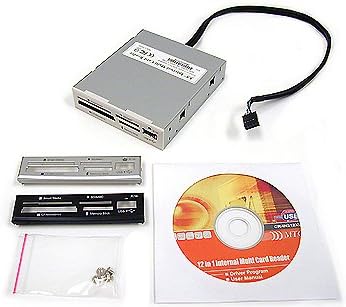
MTG CR-IN212XU-1 22-in-1 USB 2.0 Internal Card Reader
4.0Editor score
Supports 22 card formats
USB 2.0 connection
3.5 inch bay fit
This guide compares the top internal media card reader options for desktop computers, evaluating speed, compatibility, and build quality to help you choose the
Finding the right internal media card reader can transform how you manage files on your desktop computer. These devices offer convenient front-panel access to various memory card formats without needing external hubs or cables that clutter your workspace.
We evaluated ten top-rated models based on connection speed, supported card types, build quality, and ease of installation. Our analysis focuses on devices that deliver reliable performance for photographers, videographers, and general users needing quick data transfer.
Each selection highlights specific strengths like USB 3.0 support or wide format compatibility. Prices and availability may fluctuate, so check current listings before purchasing to ensure you get the best value for your specific computing needs today.
4.0Editor score

4.5Editor score

3.8Editor score
The following comparison table outlines key specifications for each of the ten selected internal media card readers. Reviewing these details helps you match device capabilities with your specific memory card formats and transfer speed requirements.



This MTG internal card reader offers an affordable entry point for desktop users needing basic memory card access. With a rating reflecting solid reliability, it supports 22 different card formats directly from the front panel.
We may earn a commission when you buy through this link, at no additional cost to you.
Its metal case provides durability while fitting standard 3.5 inch bays easily. The hot swappable feature allows quick card changes without shutting down your system for daily workflow efficiency.
Users should note the USB 2.0 limitation may slow large file transfers compared to newer USB 3.0 models. However for occasional use this speed remains acceptable for most standard photos and documents.
Choose this model if you prioritize cost savings and basic functionality over high-speed data transfers. It remains a practical solution for general home or office desktop setups requiring occasional card access.
Ideal for users on a tight budget who need reliable basic card access without extra features.
Supports a broad range of legacy and modern card types reducing the need for multiple adapters.
We may earn a commission when you buy through this link, at no additional cost to you.
The StarTech internal reader stands out with USB 3.0 and UHS-II support for fast data transfers from modern cards. Its strong rating highlights reliability and professional-grade build quality for demanding environments.
We may earn a commission when you buy through this link, at no additional cost to you.
Simultaneous slot access allows copying files between different card types at once improving workflow efficiency significantly. The front facing USB 3.0 port provides convenient access for connecting additional drives or peripherals directly.
Installation requires connecting a 20-pin motherboard header which may complicate setups for beginners. The price reflects these advanced features making it better suited for professionals needing robust performance.
This model is the top choice for videographers and IT professionals requiring speed and versatility. Its TAA compliance and two year warranty add value for institutional or government procurement needs.
USB 3.0 and UHS-II compatibility ensures rapid transfers essential for high resolution video and photo files.
Simultaneous card access reduces time spent moving files between different memory card formats.
We may earn a commission when you buy through this link, at no additional cost to you.
This media dashboard consolidates card reading audio connectivity and USB expansion into one front panel unit. Its comprehensive feature set appeals to PC builders wanting a clean customized workstation interface.
We may earn a commission when you buy through this link, at no additional cost to you.
The inclusion of eSATA and USB 3.0 hub ports expands connectivity options significantly beyond basic card reading. Front audio jacks eliminate the need to reach behind the chassis for headphones or microphones.
Users need a 5.25 inch drive bay which is less common in modern mid-tower cases. Installation involves multiple cables for power data and audio making it complex for casual users.
Select this dashboard if you value a centralized control panel for various functions and aesthetics. It delivers a premium experience for enthusiast builds despite the higher installation complexity.
Combines card reader USB hub and audio outputs to reduce front panel clutter.
Perfect for custom builds where functionality and clean aesthetics take priority over simplicity.
We may earn a commission when you buy through this link, at no additional cost to you.
The SABRENT reader offers an impressive range of support covering 74 different memory card formats directly. This makes it an ideal choice for users dealing with diverse legacy and niche card types.
We may earn a commission when you buy through this link, at no additional cost to you.
An included USB 2.0 port adds minor expansion capability without needing extra cables or hubs. The internal power connector ensures stable performance when using multiple devices or high demand cards simultaneously.
Most users will not need all 74 supported formats reducing practical utility for standard workflows. The USB 2.0 limit may feel dated for transferring large modern video files efficiently.
This model suits collectors or professionals managing various obscure card formats requiring broad compatibility. Its versatility outweighs speed limitations for specific specialized use cases.
Supports an extensive list of card types ensuring few memory cards are left unreadable.
Integrated USB 2.0 port allows connecting a keyboard or mouse directly to the internal unit.
We may earn a commission when you buy through this link, at no additional cost to you.
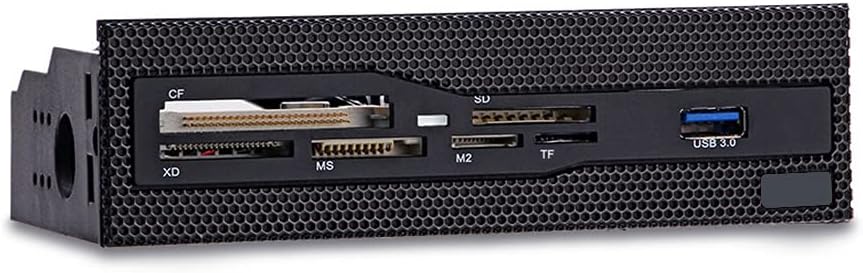
This dashboard delivers reliable USB 3.0 performance specifically designed for 5.25 inch drive bays. Its high rating reflects user satisfaction with build quality and straightforward functionality.
We may earn a commission when you buy through this link, at no additional cost to you.
The copper-plated card slots provide durability and stable connections during frequent card insertions. A durable grid panel design allows seamless integration with cases featuring front mesh panels.
Like other 5.25 options it requires a drive bay that may not exist in smaller modern cases. Without extra USB ports it focuses purely on card reading functionality.
Choose this dashboard for fast card access if your case supports 5.25 inch bays. It offers a balanced combination of speed and durability at a reasonable price.
USB 3.0 ensures high speed reads and writes essential for large media files.
Copper plating protects card contacts reducing wear over time.
We may earn a commission when you buy through this link, at no additional cost to you.
Vantec Link earns a perfect rating by supporting high capacity SDXC cards up to 2TB effectively. Its focus on large storage makes it suitable for professionals managing extensive media libraries.
We may earn a commission when you buy through this link, at no additional cost to you.
Compatibility extends to CompactFlash v6.0 and embedded eMMC ensuring broad industry standard coverage. USB 3.0 provides the necessary bandwidth for moving large files quickly.
The USB 20 pin header requirement means installation depends on motherboard support and may not work on all PCs. This limits accessibility for general home users.
This reader is ideal for power users needing reliability and support for cutting-edge memory card capacities. Its flawless rating indicates consistent performance under demanding workloads.
Handles SDXC cards up to 2TB ensuring future-proofing for expanding storage needs.
Consistent performance ratings suggest high quality manufacturing and strict quality control.
We may earn a commission when you buy through this link, at no additional cost to you.
This multifunction dashboard combines card reading with audio and storage ports for a comprehensive front panel solution. Its inclusion of speaker and microphone jacks enhances convenience for streamers and callers.
We may earn a commission when you buy through this link, at no additional cost to you.
The eSATA port allows fast external storage connections directly from the front panel without rear access. USB 3.0 speeds ensure quick data transfers for connected media cards.
Installation requires multiple cables including USB SATA and audio connectors which may complicate the build process. Users should ensure their motherboard has compatible headers before purchase.
Choose this dashboard if you need front access to audio and storage beyond just card reading. It serves well for users valuing a feature-rich front interface.
Front audio jacks eliminate cable clutter and improve accessibility for peripherals.
eSATA port provides high-speed storage connectivity ideal for external drives.
We may earn a commission when you buy through this link, at no additional cost to you.
The Akasa reader focuses on ease of use with dedicated adapter ports reducing the hassle of tiny card insertions. Its design fits standard 3.5 inch bays and includes a convenient additional USB port.
We may earn a commission when you buy through this link, at no additional cost to you.
Two front LEDs indicate power and card status offering clear visual feedback during operation. The dual bezel options allow users to match their PC case aesthetics easily.
It lacks explicit USB 3.0 claims which may limit speed for large file transfers compared to newer models. Power comes via internal connector which standardizes but requires careful cabling.
This unit is recommended for users needing simple reliable card access with extra USB connectivity. Its adapter-friendly design saves time when handling smaller cards often.
Dedicated slots for adapters simplify insertion of microSD and M2 cards without tools.
Additional front USB port provides convenient device connections without reaching behind PC.
We may earn a commission when you buy through this link, at no additional cost to you.
Sony internal readers are optimized for memory sticks used in Sony cameras ensuring reliable access without errors. This model includes two faceplates for customization and software for easy drive letter recognition.
We may earn a commission when you buy through this link, at no additional cost to you.
Support for 17 formats covers most common types needed for general photography and media storage. The sturdy build typical of Sony products ensures longevity in daily use environments.
It targets older operating systems like XP and Vista primarily which may not suit all current setups. The absence of USB 3.0 means slower speeds for modern high capacity cards.
Select this reader if you use Sony memory sticks or prefer trusted brand reliability. It remains a solid choice for legacy systems or casual home desktop use.
Designed specifically for Sony camera formats ensuring smooth compatibility and recognition.
Included black and ivory faceplates allow aesthetic matching with PC case design.
We may earn a commission when you buy through this link, at no additional cost to you.
This compact internal reader fits smaller 2.5 inch bays offering a clean minimalist approach to card reading. Its perfect rating indicates high customer satisfaction with build quality and simplicity.
We may earn a commission when you buy through this link, at no additional cost to you.
The high quality construction ensures durability while the included bezels provide flexibility for case aesthetics. It focuses on essential functionality without unnecessary complexity or extra ports.
Limited slot count and basic features mean it may not suit power users needing extensive compatibility. It serves best for simple personal use cases requiring occasional card access.
Choose this reader if you want a discreet reliable device for standard desktop setups. Its small footprint makes it ideal for compact PC builds or cases with limited bay space.
Fits in 2.5 inch bays saving space compared to larger 3.5 inch models.
Focused on essential card reading functionality without unnecessary bloat or cost.
We may earn a commission when you buy through this link, at no additional cost to you.
Selecting the right internal media card reader depends on your specific needs regarding speed, compatibility, and physical fit. Consider the following factors to ensure the device matches your desktop environment and workflow requirements.
The connection interface determines transfer speeds significantly. USB 3.0 offers speeds up to 5Gbps which is essential for modern large files. Older USB 2.0 models are limited to 480Mbps which may bottleneck high-speed cards.
Prioritize USB 3.0 if you work with high resolution videos or large photo libraries daily.
Check which memory card types the reader supports. Common formats include SD, microSD, CF, and Memory Stick. Ensure compatibility with cards used by your camera or devices to avoid adapter dependency.
Models supporting 22 or more formats offer greater versatility for mixed media environments.
Internal readers fit 3.5 inch or 5.25 inch drive bays. Confirm your PC case has an open bay matching the reader size. Some models include bezels to adapt to front panel slots.
Standard 3.5 inch readers are most common but smaller 2.5 inch options exist for compact cases.
Some readers include extra USB ports or audio jacks on the front panel. These features add value by reducing clutter and providing quick access to peripherals without reaching behind the case.
Evaluate if these extras justify the cost or if a dedicated card reader is sufficient.
Most units require internal connection via USB header and power cables. Simpler models may use plug-and-play headers. Ensure your motherboard has available headers before purchasing complex units.
Look for included mounting screws and cables to avoid additional purchases during setup.
Durable plastic or metal casings protect internal electronics from damage. Copper-plated slots enhance durability against wear. A solid build ensures longevity especially with frequent card changes.
Metal cases often look more premium and dissipate heat better than plastic alternatives.
Verify driver support for your specific OS. Most modern readers work with Windows and macOS out of the box. Legacy models may lack drivers for newer systems causing compatibility issues.
Choose universally compatible units to avoid driver installation headaches.
Prices vary widely based on features and brand. Basic models cost less while feature-rich units command higher prices. Warranty terms range from one year to lifetime support depending on the manufacturer.
Balance budget constraints with long-term reliability needs when making the final choice.
Installation requires powering down your PC and opening the case. Align the reader with the available drive bay and secure it with screws. Connect the USB header to the motherboard and the power cable from the power supply.
After closing the case, power on your system. The OS should automatically recognize the device. Insert memory cards into the designated slots and access them through File Manager for file transfers.
Regularly clean card slots with compressed air to prevent dust buildup. Insert cards gently to avoid damaging internal connectors. Avoid frequent hot-swapping of the device to extend its lifespan.
Most modern internal card readers are plug-and-play devices that use built-in OS drivers. You typically do not need to install additional software for Windows or macOS to recognize them. However some older specialized models might require specific drivers.
Internal card readers designed for desktop bays cannot fit standard laptops. Laptops usually rely on external USB card readers or built-in slots. Ensure your device is a desktop with available drive bays before purchasing.
USB 3.0 readers offer significantly faster data transfer speeds up to 5Gbps compared to 480Mbps on USB 2.0. This difference matters when transferring large video or photo files. USB 3.0 provides better future-proofing for large memory cards.
Most support Windows and macOS out of the box. Linux support depends on the specific chipset used in the reader. Always check manufacturer documentation for Linux compatibility before purchasing if you plan to use Linux.
Some models allow simultaneous access to multiple cards if slots are filled. This feature speeds up copying files between different card types. However performance may vary by model so verify specifications before buying.
Generally yes because internal USB connections avoid external hub interference and cable length issues. The direct motherboard connection ensures stable power and faster transfer rates. Internal units also reduce desk clutter significantly.
You can purchase external USB card readers as alternatives if no bays are free. Some users remove optical drives to free up 5.25 inch space for internal readers. Check your case documentation before buying.
Use compressed air to gently blow dust out of the slots periodically. Avoid using sharp objects that could damage the internal pins. Keeping cards clean also prevents dirt transfer when inserting into the reader.
The StarTech USB 3.0 model stands out for professionals needing speed and reliability, while budget buyers might prefer the MTG 22-in-1 option for its affordability and broad format support. Each device offers distinct advantages depending on your specific use case.
Prioritize connection speed and card compatibility to match your workflow requirements. A model with USB 3.0 and sufficient card slots ensures future-proofing against evolving memory standards.
Always check current prices and availability before purchasing as market conditions may change. Verify your case has the necessary drive bay space to avoid installation issues after buying the device.