
GIGABYTE B650 Eagle AX
4.6Editor score
12+2+2 Digital VRM Solution
Triple M.2 Slots Available
Wi-Fi 6E Connectivity
This guide compares the top 10 Gigabyte Motherboard models for performance, compatibility, and features to help you choose the right hardware for your build.
Choosing the right Gigabyte Motherboard is critical for any PC build since it connects every component and determines system stability. Whether you need high-end features or budget-friendly reliability, Gigabyte offers a wide range of options for both AMD and Intel platforms.
We evaluated ten top models based on power delivery, thermal design, connectivity options, and user feedback. Our analysis focuses on real-world performance traits like VRM efficiency, expansion slot availability, and wireless networking capabilities to ensure you get the best value.
Each pick below highlights specific strengths for different user needs from gaming to professional work. Please note that product availability and pricing can change rapidly, so always verify current listings before making your final purchasing decision online.
4.6Editor score

4.4Editor score

4.2Editor score
This table provides a side-by-side view of the key specifications for each model to help you quickly identify the best fit for your specific processor and performance requirements.



The B650 AORUS Elite AX stands out as a top contender for modern AMD builds with its support for Ryzen 9000 and 7000 series processors. It achieves a solid rating due to its balanced feature set including DDR5 memory support and advanced thermal solutions designed for sustained performance.
We may earn a commission when you buy through this link, at no additional cost to you.
Its Twin 14+2+1 Phase Power Design ensures stable power delivery even under heavy loads which is crucial for high-end Ryzen CPUs. The inclusion of PCIe 5.0 M.2 slots provides next-generation storage speeds while WIFI6E keeps network latency low for competitive gaming sessions.
While it offers significant premium features it does come at a higher price point compared to basic B650 boards. Some users might find the BIOS interface slightly complex but the included Q-Flash utility simplifies updates without needing a CPU installed.
This board is ideal for gamers and creators who want long-term support and reliability. If you are building with AM5 CPUs and need strong power delivery alongside modern connectivity this model delivers excellent performance and future-proofing.
The 14+2+1 phase VRM setup with 70A power stages ensures consistent performance during gaming and rendering tasks.
Fully covered MOSFET heatsinks and M.2 thermal guards prevent overheating even during extended high-load operations.
We may earn a commission when you buy through this link, at no additional cost to you.
The X870 AORUS Elite WIFI7 represents the latest evolution in Gigabyte AMD motherboards offering cutting-edge connectivity and power features. It supports the newest Ryzen 9000 series and provides a robust platform for enthusiasts seeking maximum bandwidth and speed.
We may earn a commission when you buy through this link, at no additional cost to you.
Its standout feature is the inclusion of WIFI7 and USB4 ports which offer significantly faster data transfer and wireless speeds than previous generations. The 16+2+2 phase power design ensures that even the most demanding processors receive clean stable power for optimal performance.
While the board is powerful it does come with a price tag that reflects its premium features. Additionally the ATX form factor might be too large for smaller compact chassis builds limiting some DIY enthusiasts.
Buyers looking for top-tier connectivity and maximum expansion options will find this board highly rewarding. It is particularly suitable for professionals who need fast storage access and low-latency wireless connections for their workloads.
WIFI7 and Dual USB4 ports ensure you are ready for future devices and ultra-fast data transfer needs.
Four M.2 slots allow for extensive storage arrays without needing additional PCIe adapters.
We may earn a commission when you buy through this link, at no additional cost to you.
The X870E AORUS PRO ICE offers the same powerful features as its Elite counterpart but with a sleek white design tailored for aesthetic builds. It supports high-end Ryzen processors and provides ample connectivity for modern setups.
We may earn a commission when you buy through this link, at no additional cost to you.
Its 80A Smart Power Stage design ensures efficient power delivery while the Sensor Panel Link allows for unique display integrations on compatible cases. The WIFI7 and USB4 capabilities make it a future-ready choice for demanding users.
Despite its strong performance the white color scheme can be tricky to match with other components. Additionally the price premium over standard black boards might not be justified for users who do not prioritize looks.
This board is perfect for enthusiasts building a clean white or monochrome theme PC. If you value appearance alongside top-tier performance this model delivers the best combination of style and substance.
The all-white PCB and heatsinks provide a striking look for custom loop or white theme builds.
Sensor Panel Link compatibility adds a unique touch for case integration and system monitoring.
We may earn a commission when you buy through this link, at no additional cost to you.
The Z890 AORUS Master is designed for Intel Core Ultra users who demand absolute maximum expansion and performance. It stands out with an incredible number of M.2 slots and ultra-fast networking capabilities suitable for workstation use.
We may earn a commission when you buy through this link, at no additional cost to you.
Its power design featuring 110A Smart Power Stages ensures that even high-wattage CPUs run cool and stable. The inclusion of Thunderbolt 4 and 10GbE LAN makes it a central hub for high-speed data transfer and network connectivity.
While the feature set is impressive the price is significantly higher than most other options. It may be overkill for casual gamers who do not need extensive storage arrays or 10GbE networking speeds.
This board is best suited for professional workstations or enthusiasts needing maximum I/O flexibility. If you require top-tier connectivity and storage options this model offers unmatched versatility for your Intel build.
Five M.2 slots provide extensive space for NVMe drives without sacrificing PCIe slots.
10GbE LAN and Thunderbolt 4 enable lightning-fast data transfers and network speeds.
We may earn a commission when you buy through this link, at no additional cost to you.
The B650 Eagle AX provides exceptional value for users building AMD systems without compromising on essential features. It delivers solid performance and reliability making it a top choice for budget-conscious gamers and creators.
We may earn a commission when you buy through this link, at no additional cost to you.
Its 12+2+2 Phase Digital VRM Solution ensures stable power delivery for Ryzen processors while the triple M.2 slots offer ample storage flexibility. The inclusion of Wi-Fi 6E ensures reliable wireless connectivity for modern gaming setups.
While it lacks some premium features like 2.5GbE LAN it still offers all the core necessities for a smooth build experience. The simpler design means fewer RGB options which may appeal to users wanting a clean look.
This board is perfect for builders looking to save money without sacrificing quality. If you need a reliable AM5 platform with good connectivity and expandability this model is a smart and practical choice.
You get core features like DDR5 and Wi-Fi 6E at a much lower price point than competitors.
Three M.2 slots allow you to add multiple fast drives without needing extra adapters.
We may earn a commission when you buy through this link, at no additional cost to you.
The B550 AORUS Elite AX V2 remains a strong option for users sticking with the AM4 platform and DDR4 memory. It offers robust power delivery and reliable connectivity for Ryzen 5000 series processors at a reasonable price.
We may earn a commission when you buy through this link, at no additional cost to you.
Its 12+2 Power Phase design and integrated I/O Shield make assembly easy and stable. The inclusion of 2.5GbE LAN and Wi-Fi 6 ensures fast network speeds even on older hardware configurations.
While DDR5 is becoming standard this board offers great value for those who already have DDR4 components or want to save money. However it lacks support for newer Ryzen 9000 series processors which limits future upgrades.
This board is ideal for budget builds or upgrades within the AM4 ecosystem. If you want reliable performance without paying premium prices for DDR5 this model provides excellent stability and features.
Perfect for maximizing value with Ryzen 5000 series CPUs on a mature platform.
Advanced VRM heatsink and M.2 thermal guard keep system temperatures low during intense workloads.
We may earn a commission when you buy through this link, at no additional cost to you.
The Z790 Eagle AX provides a solid foundation for Intel Core 14th generation processors with support for DDR5 memory and modern features. It balances cost and performance well making it accessible for mainstream users.
We may earn a commission when you buy through this link, at no additional cost to you.
Its Twin 12+1+1 Phase Digital VRM Solution ensures stable power delivery for gaming and productivity tasks. The board includes essential connectivity like Wi-Fi 6E and 2.5GbE LAN to keep your system online and fast.
While it lacks some high-end features like extensive USB-C ports it covers all basic needs efficiently. The price point makes it attractive for builders who want to upgrade to DDR5 without overspending on premium models.
This board is perfect for users building a standard gaming PC with Intel CPUs. If you need reliable performance and future-proof memory support this model offers a great balance of features and cost.
Full compatibility with Intel 12th, 13th, and 14th Gen Core processors ensures wide CPU choice.
Wi-Fi 6E and 2.5GbE LAN provide reliable and fast network connections for gaming and streaming.
We may earn a commission when you buy through this link, at no additional cost to you.
The Z790 AORUS Elite AX improves on the Eagle by offering stronger power delivery and more storage slots. It is designed for users who plan to push their Intel CPUs harder while still needing reliable everyday performance.
We may earn a commission when you buy through this link, at no additional cost to you.
Its 16+1+2 Phase Digital VRM Solution with 70A Power Stage allows for stable operation under high loads. The board includes four M.2 slots and USB-C ports which adds significant flexibility for modern peripherals and storage.
While it costs a bit more than the Eagle the added features make it worth it for enthusiasts. Some users might find the RGB lighting a bit overwhelming but it can be customized in the BIOS to suit preferences.
This board is ideal for users who want more headroom for overclocking and storage. If you need reliable power delivery and connectivity for high-end Intel CPUs this model is a smart upgrade over basic Z790 boards.
16+1+2 VRM phases ensure that high-wattage CPUs remain cool and stable during peak usage.
Four M.2 slots allow you to run multiple fast NVMe drives without sacrificing PCIe slots.
We may earn a commission when you buy through this link, at no additional cost to you.
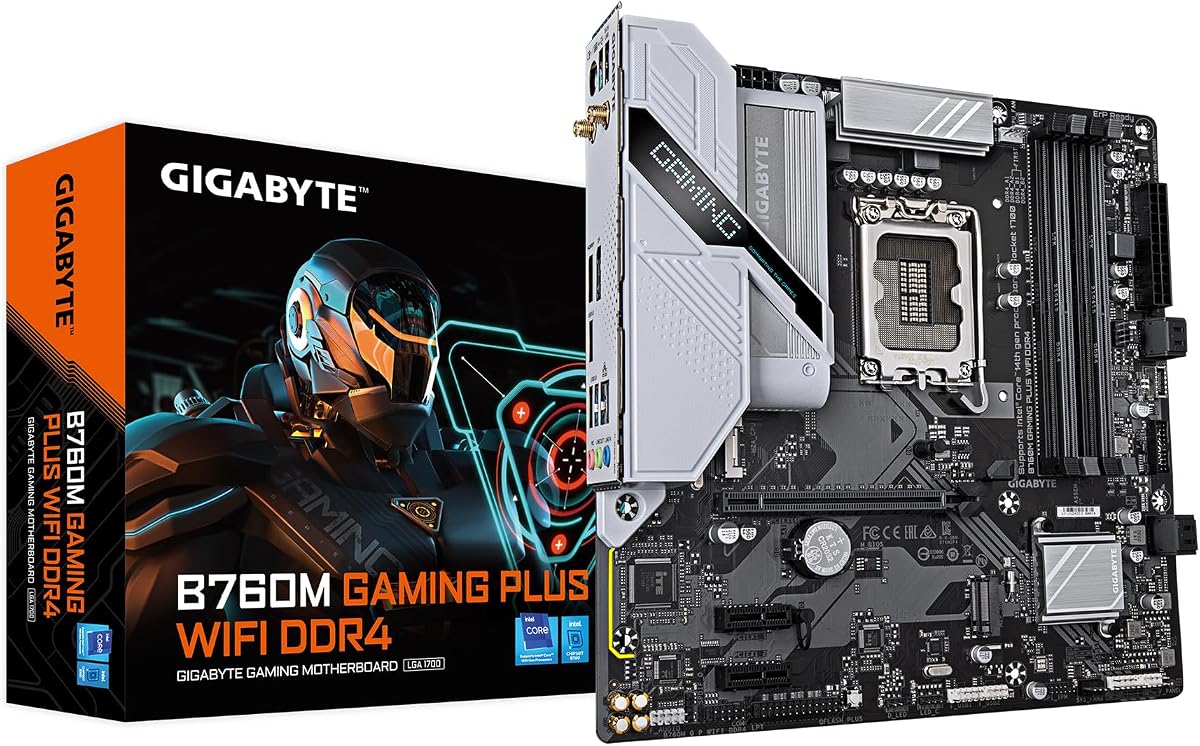
The B760M Gaming Plus WiFi offers a compact solution for users needing a smaller board without sacrificing modern connectivity. It is designed for M-ATX cases and supports Intel Core processors up to the 14th generation.
We may earn a commission when you buy through this link, at no additional cost to you.
Its Hybrid Digital 4+1+1 Power Phase design ensures steady delivery for most mainstream CPUs while the Wi-Fi 6 keeps connections stable. The inclusion of a front USB-C port simplifies cable management for modern PC cases.
While it is limited in expansion and power delivery compared to ATX boards it serves smaller builds well. The lower phase count means it is not ideal for heavy overclocking but works great for stock performance.
This board is perfect for users building a compact gaming rig or office PC. If you need a reliable small form factor option with decent connectivity this model is a practical and efficient choice.
M-ATX design fits smaller cases while maintaining core performance and connectivity features.
Front USB-C and Q-Flash Plus make assembly and BIOS updates quick and hassle free.
We may earn a commission when you buy through this link, at no additional cost to you.
The B550 Gaming X V2 is a simple and effective choice for budget-focused builds targeting older AMD processors. It provides all the basics needed for a stable system without extra costs for features you might not use.
We may earn a commission when you buy through this link, at no additional cost to you.
Its 10+3 Power Phase design ensures reliable power delivery for Ryzen 5000 series CPUs while the integrated I/O Shield simplifies assembly. The Q-Flash Plus utility allows BIOS updates even without a CPU installed which is a great safety net.
While it lacks built-in Wi-Fi the GbE LAN is stable and fast enough for most home users. The lower VRM count means it is best for stock clocks rather than heavy overclocking but it holds up well for gaming.
This board is ideal for first-time builders or budget gamers who want value. If you need a reliable AM4 platform without paying for unnecessary features this model is a practical and cost-effective option.
One of the most affordable ways to get DDR4 support and PCIe 4.0 for Ryzen builds.
Simple BIOS interface and Q-Flash Plus make system setup and updates very easy.
We may earn a commission when you buy through this link, at no additional cost to you.
Selecting the right motherboard involves matching the socket type with your processor and ensuring you have the features you need for performance and connectivity.
Ensure the motherboard socket matches your CPU model exactly. Gigabyte offers boards for AMD AM5 and AM4 as well as Intel LGA 1851 and 1700 sockets.
Double check the supported processor list before buying to avoid compatibility issues.
Chipsets determine overclocking support and I/O capabilities. For Intel Z-series boards allow full overclocking while B-series boards are for standard use.
AM5 chipsets like B650 and X670 offer future-proof PCIe 5.0 support for next-gen storage.
Voltage Regulator Modules supply clean power to your CPU. Higher phase counts ensure stability especially during overclocking or heavy workloads.
Look for boards with digital VRMs if you plan to push your CPU limits.
Decide between DDR4 and DDR5 memory. DDR5 offers faster speeds but DDR4 is more affordable for older platforms.
Check supported speeds and max capacity to ensure your RAM will perform correctly.
Count the M.2 slots needed for your NVMe SSDs. Many modern boards offer multiple slots for RAID or storage expansion.
Ensure you have enough slots for current and future storage needs.
Check for rear USB ports including USB-C and front headers. High-speed USB helps with peripherals and devices.
Wired LAN and Wi-Fi standards affect your network speed and stability.
Look for VRM heatsinks and M.2 thermal guards to keep temperatures low. Effective cooling ensures consistent performance during long sessions.
Good thermal design is essential for high-end processors.
Solid PCB layers and quality capacitors extend the board life. Gigabyte typically offers 3 to 5-year warranties on premium models.
Choose models with robust components for long-term reliability.
Install your CPU RAM and M.2 drives before mounting the motherboard in the case. This prevents damage and makes the process easier.
Use the Q-Flash utility to update your BIOS to the latest version for best stability. Keep an eye on thermal conditions during intense loads.
Regularly clean dust from heatsinks and fans to maintain airflow. Use the EZ-Latch feature to easily remove or install PCIe devices.
The B650 AORUS Elite AX is a top choice for Ryzen 7000 series processors because it offers strong power delivery and PCIe 5.0 support. It balances cost and features well for most gamers.
No AM5 boards only support DDR5 memory. You will need to purchase new DDR5 sticks to work with these newer motherboards.
Only Z-series Intel boards and select AM5/X chipsets allow full CPU overclocking. B-series boards are generally for standard performance.
Q-Flash Plus lets you update the BIOS using a USB stick without needing a CPU or RAM installed. This is helpful for resolving compatibility issues.
Models with 'AX' in the name typically include built-in Wi-Fi. Others may require adding a separate network card for wireless connectivity.
Check your case specs for support. ATX is standard while M-ATX and Mini-ITX are used for compact builds.
We have reviewed ten top models ranging from budget-friendly options to premium flagship boards. Each offers unique strengths suited for different processor types and user needs.
Prioritize socket compatibility and VRM quality to ensure stability and performance. Consider connectivity options like Wi-Fi and USB ports for your specific setup requirements.
Prices and availability change frequently so verify current listings before purchasing. Choose a model that fits your budget while meeting your long-term upgrade goals.