
Acer 13-in-1 Laptop Docking Station
4.5Editor score
Triple display expansion support
110W included power adapter
Security slot for anti-theft
This expert guide compares the top 10 docking stations with 2 HDMI ports for laptops, evaluating display support, connectivity options, and power delivery for
Finding a reliable docking station with 2 HDMI ports is essential for modern professionals who need to expand their workspace. These devices allow you to connect multiple monitors, peripherals, and network connections through a single cable, transforming your laptop into a full desktop workstation efficiently.
We have carefully selected and evaluated ten top-rated models based on their display capabilities, port variety, build quality, and compatibility with various operating systems. Our analysis focuses on real-world performance, ease of use, and the ability to handle demanding multitasking scenarios without compromising speed or stability.
Each product in this list highlights unique features tailored to different needs, from budget-friendly options to premium hubs with advanced charging and video outputs. Please note that product availability and specifications may change over time, so always verify the latest details before making your final purchase decision.
4.5Editor score

4.5Editor score

4.4Editor score
The following comparison table provides a side-by-side overview of the top 10 docking stations with 2 HDMI ports, highlighting key specifications such as video resolution support, power delivery capabilities, and available port types to help you quickly identify the best fit for your setup.


The Anker Laptop Docking Station Dual Monitor stands out as a top choice for professionals seeking reliable dual display capabilities. With a solid 4.5 rating from users, it delivers consistent performance across Windows and ChromeOS systems, making it a trusted companion for daily productivity tasks.
We may earn a commission when you buy through this link, at no additional cost to you.
This hub excels in providing stable 4K video output through two HDMI ports, allowing for seamless multitasking. The included 85W power delivery ensures your laptop remains charged while connected, and the Ethernet port adds crucial stability for network-dependent workflows without relying on Wi-Fi.
While it offers impressive connectivity, Mac users should note that macOS limitations restrict multi-monitor setups to mirroring rather than extending displays. Additionally, the lack of a secondary USB-C video port means flexibility is somewhat limited for those needing more than two external screens simultaneously.
Ultimately, this docking station is ideal for users who prioritize reliability and ease of use in a compact form factor. Whether you are working from home or traveling to client sites, the Anker hub provides a robust solution for expanding your laptop capabilities efficiently.
Users can connect two monitors simultaneously with crisp 4K resolution, enhancing workflow efficiency by allowing side-by-side application usage without sacrificing visual clarity.
The hub supports fast data transfer via USB-A and includes a dedicated Ethernet port, ensuring that both file sharing and internet connectivity remain stable during heavy usage.
We may earn a commission when you buy through this link, at no additional cost to you.
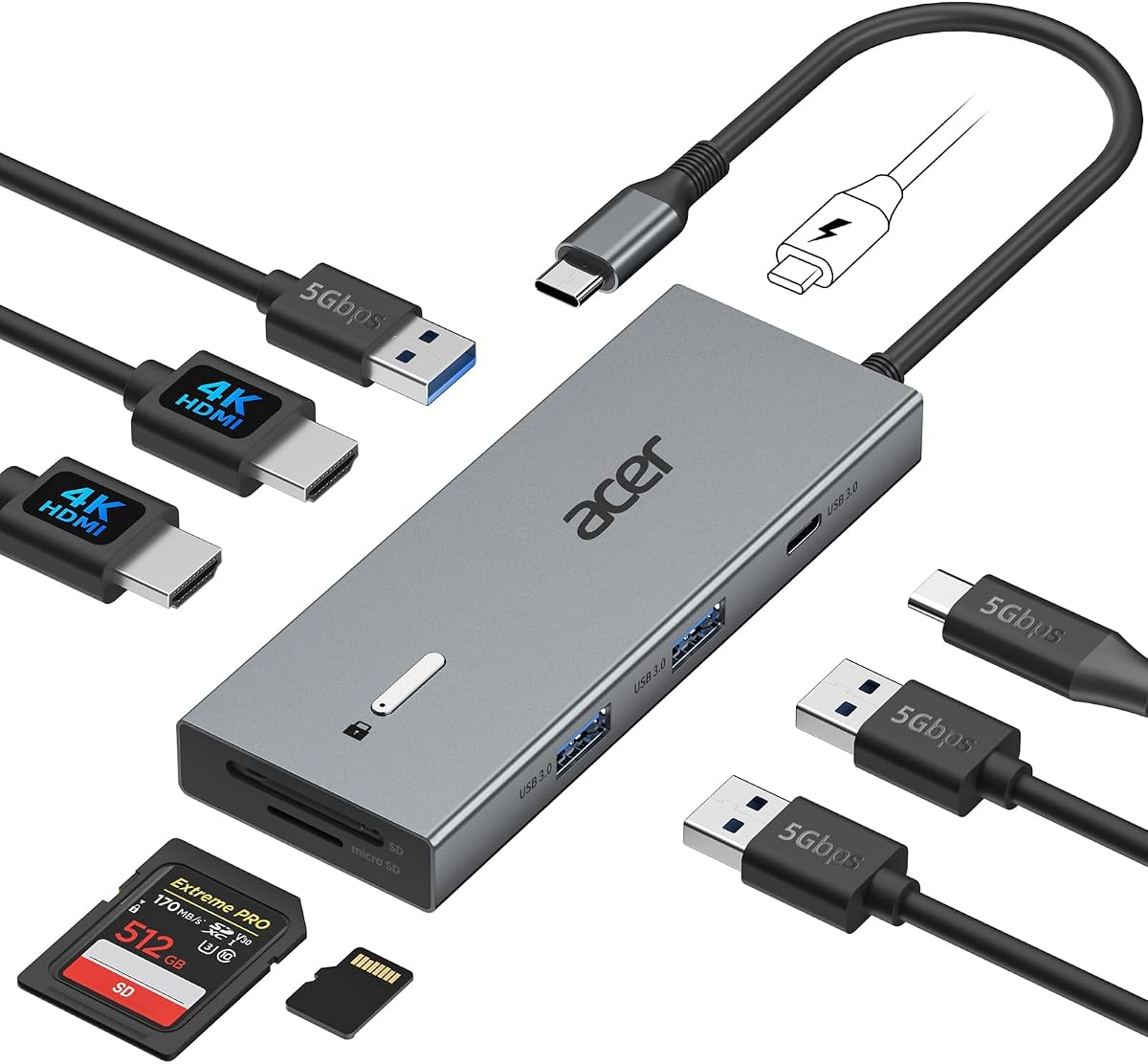
For users requiring maximum connectivity and display options, the Acer 13-in-1 Laptop Docking Station offers a premium solution with triple display support. Its robust 4.5 rating reflects strong performance in professional environments where multiple screens and stable power are non-negotiable requirements.
We may earn a commission when you buy through this link, at no additional cost to you.
This model stands out by including a dedicated 110W power adapter, ensuring your laptop receives sufficient power even when driving three external displays. The aluminum body helps dissipate heat effectively during prolonged use, and the integrated security slot adds a layer of physical protection in public or shared spaces.
Despite its high-end features, Mac users face limitations as the device only supports mirroring on macOS rather than extended desktops. Furthermore, the higher price tag may be prohibitive for casual users who do not need the extensive port variety or triple-monitor capabilities.
In summary, this docking station is an excellent choice for power users and professionals who need a comprehensive hub to manage complex workflows. The inclusion of essential accessories and robust build quality justifies the investment for those who demand top-tier performance and security.
With support for two HDMI ports and one DisplayPort, this dock enables a triple-monitor setup that can significantly boost productivity for developers, analysts, and designers.
The aluminum chassis ensures longevity and efficient cooling, while the Kensington security slot allows you to lock the device to your desk to prevent unauthorized removal.
We may earn a commission when you buy through this link, at no additional cost to you.
The Selore USB C Docking Station Dual Monitor proves that you do not need to spend a fortune to get reliable dual-display functionality. With a 4.4 rating, it is a popular choice for budget-conscious users who still want high-quality video output and fast charging capabilities.
We may earn a commission when you buy through this link, at no additional cost to you.
This adapter supports dual 4K resolution at 60Hz, providing sharp visuals for work or entertainment without breaking the bank. The 100W power delivery input ensures your laptop charges efficiently while in use, and the compact design makes it easy to carry in a laptop bag for on-the-go productivity.
However, the lack of an Ethernet port means wireless connectivity is the only option for networking, which might be a drawback for users requiring stable wired connections. Additionally, the build materials are more basic compared to premium models, which may affect long-term durability under heavy daily use.
Overall, this docking station is an excellent entry-level option for students or casual professionals who need essential multi-monitor support. It balances performance and cost effectively, delivering key features like high-res video and fast charging without unnecessary bells and whistles.
At a budget-friendly price, this hub allows users to extend their desktop across two screens, improving multitasking capabilities for tasks like coding or spreadsheet work.
The 100W charging support keeps your device powered up during long sessions, and the lightweight design ensures it adds minimal bulk to your travel kit.
We may earn a commission when you buy through this link, at no additional cost to you.
The Acer 9-in-1 Dock offers a practical balance of features for users seeking dual monitor support without excessive complexity. Its 4.2 rating indicates solid reliability, with a user-friendly design that includes a physical lock button for quick screen privacy management.
We may earn a commission when you buy through this link, at no additional cost to you.
This hub supports dual 4K@60Hz displays, ensuring smooth visuals for creative work or media consumption. The 100W power input keeps your laptop charged, and the variety of USB ports allows you to connect multiple peripherals simultaneously without the need for additional hubs.
One limitation is that macOS users are restricted to mirroring mode, which limits the utility for those on Apple devices who need extended displays. Also, while it covers most needs, the absence of certain card slots might be a drawback for users who rely heavily on external media storage.
For Windows users, this dock is a versatile tool for converting a laptop into a desktop workstation efficiently. The included lock button adds convenience for privacy-conscious professionals, making it a strong contender in the mid-range market.
The dedicated lock button allows you to instantly turn off all connected screens, protecting sensitive data during meetings or when leaving your desk temporarily.
With multiple USB ports and full 4K support, this hub connects various peripherals and monitors seamlessly, catering to diverse professional and personal needs.
We may earn a commission when you buy through this link, at no additional cost to you.
The Dell D3100 Dock is a trusted solution for businesses and individuals using Dell laptops with USB 3.0 ports. With a 4.2 rating, it provides stable performance and triple display support, making it a solid choice for users who may not have the latest USB-C hardware.
We may earn a commission when you buy through this link, at no additional cost to you.
This dock features both HDMI and DisplayPort outputs, allowing for flexible monitor configurations. The 65W power supply is sufficient for many business laptops, and the inclusion of USB 3.0 ports ensures fast data transfer for legacy peripherals that rely on traditional connections.
However, the reliance on USB 3.0 means it is less future-proof than newer USB-C hubs. Additionally, the 65W power delivery may not be adequate for high-performance gaming laptops that require higher wattage charging during intensive workloads.
Despite these limitations, the Dell D3100 remains a dependable option for corporate environments where stability and compatibility with existing hardware are prioritized. It delivers consistent performance and easy setup for users who need a straightforward docking solution.
Designed for laptops with USB 3.0 ports, this dock ensures that older devices can still benefit from modern docking capabilities without requiring hardware upgrades.
With HDMI, DisplayPort, and a headphone jack, this hub accommodates a wide range of multimedia setups, making it suitable for presentations and meetings.
We may earn a commission when you buy through this link, at no additional cost to you.
The Anker 7-in-1 Hub is designed for travelers who need a lightweight and efficient way to add dual monitors. With a 4.2 rating, it delivers reliable performance in a slim profile that fits easily into any carry-on bag without adding significant weight or bulk.
We may earn a commission when you buy through this link, at no additional cost to you.
This hub supports dual 1080p displays, which is sufficient for office work and general productivity. The 10Gbps USB-C port provides lightning-fast data transfer, and the 100W power input ensures your laptop stays charged even during heavy usage, making it a great companion for remote workers.
However, the lack of an Ethernet port means you are limited to Wi-Fi for internet connectivity. Additionally, the resolution is capped at 1080p, so users who require high-resolution video editing or gaming displays may find this hub too basic for their needs.
For professionals who prioritize portability over raw performance, this hub offers a streamlined solution for dual-screen setups. It combines essential features with a compact design, making it an ideal choice for frequent travelers and mobile office users.
The slim and lightweight design ensures that you can take your dual-screen setup anywhere without the burden of heavy hardware or excessive cables.
Despite its small size, this hub delivers fast USB-C data speeds and robust power delivery to keep your device running smoothly on the go.
We may earn a commission when you buy through this link, at no additional cost to you.
The MOKiN 13-in-1 Dock offers an extensive array of ports for users who need to connect multiple devices simultaneously. With a 4.3 rating, it is a versatile option for professionals who require both high-speed data transfer and dual-screen support in one hub.
We may earn a commission when you buy through this link, at no additional cost to you.
This docking station supports dual 4K displays and includes Gigabit Ethernet for stable internet connections. The screen lock button adds a unique privacy feature, allowing you to instantly turn off external screens, and the 100W power delivery ensures your laptop remains powered during long sessions.
However, the sheer number of ports can lead to cable clutter, and the setup might be overwhelming for users who prefer minimalism. Additionally, Mac users should be aware of limitations regarding dual display modes, as macOS restricts extended desktop usage on this hardware.
For Windows users with complex setup requirements, this dock provides a comprehensive solution that covers almost all connectivity needs. The combination of high-quality video support and unique privacy features makes it stand out among other budget-friendly options.
With multiple USB ports, Ethernet, and dual HDMI outputs, this hub allows you to connect all your peripherals and monitors in one centralized location.
The dedicated screen lock button gives you instant control over external displays, enhancing security and privacy in shared or public workspaces.
We may earn a commission when you buy through this link, at no additional cost to you.
The Selore 10-in-1 Dual HDMI provides exceptional flexibility with triple display support through multiple video ports. With a 4.5 rating, it is highly regarded for its ability to connect two HDMI monitors along with a DisplayPort or VGA, making it a versatile choice for multi-screen workstations.
We may earn a commission when you buy through this link, at no additional cost to you.
A standout feature is the dedicated monitor control button, which allows you to switch display modes or turn off screens instantly. The 100W power input ensures your laptop stays charged, and the Gigabit Ethernet port offers a reliable wired internet connection for consistent performance.
One limitation is that macOS users will only get mirroring across all connected monitors rather than extending them. Additionally, managing the multiple cables required for a triple setup can be cumbersome, requiring careful cable management to keep the workspace tidy and functional.
For Windows users who need a highly adaptable solution, this hub offers excellent value. It bridges the gap between budget hubs and premium docks by providing extensive connectivity and unique control features at an accessible price point.
With HDMI, DP, and VGA options, this hub allows you to connect almost any type of monitor or projector, ensuring compatibility with your existing hardware.
The dedicated monitor control button simplifies your workflow, letting you quickly toggle between display modes or power off screens with a single click.
We may earn a commission when you buy through this link, at no additional cost to you.
The Anker 13-in-1 Triple Display delivers desktop-level performance with the ability to connect three external monitors. With a 4.0 rating, it is a robust solution for power users who need extensive screen real estate for complex tasks like video editing or financial analysis.
We may earn a commission when you buy through this link, at no additional cost to you.
This dock includes a 135W power adapter, ensuring that even high-performance laptops receive enough power to run multiple displays without draining the battery. The vertical design saves valuable desk space, and the three USB-C ports provide fast data transfer and flexible charging options for peripherals.
However, the higher price point and the limitation to mirroring on macOS make it less ideal for casual users or Mac owners. Additionally, the vertical orientation might not suit everyone's desk setup preference, potentially affecting how cables are managed in tight spaces.
For those who need maximum display capacity, this hub is a compelling option. It combines strong power delivery with extensive connectivity, making it a powerful tool for professionals who demand a full desktop experience from their laptop.
With triple display support and extensive ports, this hub transforms your laptop into a full-fledged workstation capable of handling demanding professional workflows.
The vertical form factor saves space on your desk, allowing you to keep your workspace organized while still having access to all the ports you need.
We may earn a commission when you buy through this link, at no additional cost to you.
This generic model represents the basic end of the market for docking stations with 2 HDMI ports. While it may be affordable and easy to find, the lack of detailed specifications and brand reputation suggests it is best suited for very casual use where advanced features are not required.
We may earn a commission when you buy through this link, at no additional cost to you.
Typically, such hubs offer basic connectivity options like USB-A ports and standard HDMI support. They are generally plug-and-play but may lack the power delivery, speed, or reliability of more established brands, potentially leading to inconsistent performance or connectivity issues.
One major concern is the limited compatibility and potential lack of support if issues arise. Without a clear brand name or customer service, troubleshooting can be difficult, and the build quality may not hold up to regular daily use over an extended period.
While this option might work for infrequent or temporary setups, it is generally recommended to choose a more established brand for critical tasks. Investing in a reliable hub can save time and frustration in the long run by ensuring consistent and stable performance.
This hub offers essential connections for simple tasks, but lacks the advanced features needed for high-performance or professional environments.
Before purchasing, consider the reliability and support options available, as generic models may not offer the same level of quality or warranty as branded alternatives.
We may earn a commission when you buy through this link, at no additional cost to you.
Selecting the right docking station involves understanding your specific display and connectivity needs. This guide breaks down the critical factors to consider before making a purchase.
Ensure the docking station supports the resolution and refresh rate of your monitors. Many hubs support 4K@30Hz or 4K@60Hz, but this often depends on your laptop's graphics capabilities and the HDMI version supported by the hub.
Always check that the hub can handle your desired resolution without compromising performance.
Power delivery is essential for keeping your laptop charged while connected to multiple devices. Look for a dock that supports at least 65W, though 85W to 100W is preferable for larger laptops or intensive workloads.
A higher wattage ensures your battery does not drain even when the hub is under heavy use.
Most modern docking stations require a Thunderbolt 3/4 or a full-featured USB-C port with DP Alt Mode. If your laptop only has a data or charging-only USB-C port, the hub will not work for video output.
Verify your laptop's specifications to confirm compatibility before purchasing a USB-C dock.
While most docks work well with Windows, macOS often limits multi-monitor setups to mirroring. If you need extended displays on a Mac, ensure the hub supports the necessary protocols or consider an alternative solution.
Always check compatibility notes in the product description to avoid surprises with your specific OS.
For stable internet connections, a dock with a Gigabit Ethernet port is ideal. This is particularly useful for video conferencing or large file transfers where Wi-Fi might be unreliable or slow.
Even if you primarily use Wi-Fi, having a wired option adds an extra layer of reliability for your setup.
A well-constructed dock made of aluminum or high-quality plastic will dissipate heat better during prolonged use. This ensures the hardware remains stable and reduces the risk of thermal throttling or connection drops.
Durable materials also improve the overall lifespan of the device, making it a better long-term investment.
Consider whether you need extra USB ports, SD card readers, or audio jacks. A hub with more versatility allows you to connect various peripherals without needing additional adapters.
A comprehensive port layout can streamline your workflow and reduce the need for dongles or other devices.
While budget options can be cost-effective, they may lack durability or advanced features. Assess whether the features offered justify the price by comparing them against your daily usage requirements.
Investing a bit more in a reliable brand can prevent issues and improve the overall user experience.
To begin, ensure your laptop has a compatible Thunderbolt or full-featured USB-C port that supports display output. Connect the docking station to your laptop using the included USB-C cable, then plug your HDMI monitors into the available ports on the dock.
Next, connect the power adapter to the docking station to ensure stable power delivery. This helps prevent battery drain and maintains consistent performance during long work sessions. Once everything is connected, your operating system should automatically recognize the new displays.
Regularly check your cables for wear and tear to avoid connection issues. Keep the docking station in a well-ventilated area to prevent overheating, and avoid moving it while connected to active peripherals to ensure longevity and reliability.
No, they require laptops with Thunderbolt 3/4 or full-featured USB-C ports that support DisplayPort Alt Mode. Older or budget laptops with data-only USB-C ports cannot output video through these docks. Always check your laptop's specifications before purchasing.
Most hubs support only mirroring on macOS, meaning both monitors show the same image. Extended desktop modes generally require specific hardware or software workarounds that may not be supported by all devices. Check compatibility notes for Apple devices.
Most modern hubs support 4K resolution, but refresh rates vary between 30Hz and 60Hz depending on the laptop's graphics capabilities. Ensure both your laptop and monitors are compatible with the desired resolution for smooth performance.
Some hubs require a separate power adapter to deliver sufficient charging power to your laptop, while others come with one included. Using a high-wattage adapter ensures stable performance and keeps your laptop charged during heavy use.
Generally, a hub with 2 HDMI ports supports only two external monitors. Some advanced models include a DisplayPort to add a third screen, but this depends on your laptop's support for multi-stream transport technology.
Yes, most modern hubs are plug-and-play and do not require driver installations for basic functionality. However, some advanced features may benefit from specific drivers or system updates for optimal performance.
We have reviewed ten top options ranging from budget-friendly choices to premium hubs. The Anker 8-in-1 offers the best overall balance, while the Acer 13-in-1 excels for those needing triple display support.
When choosing, prioritize power delivery and resolution support to match your specific workflow. Consider whether you need Ethernet or extra USB ports to ensure the dock meets all your connectivity needs efficiently.
Always verify current prices and specifications before purchasing, as details may change over time. With the right docking station, you can transform your laptop into a powerful workstation tailored to your professional needs.