
MEKO Stylus Pen for Touchscreen
4.6Editor score
Includes protective cap
Dual rubber tips
No battery required
Discover the top 10 fine point stylus options for iPad and Android devices. This guide compares precision, battery life, and compatibility features.
Finding the right fine point stylus can transform your digital experience across tablets and smartphones. These tools offer precision writing and drawing capabilities that fingers simply cannot match on glass screens.
We evaluated ten highly rated models based on tip accuracy, build quality, and universal compatibility. Our analysis focuses on passive and active options suitable for students artists and professionals.
Each pick highlights specific strengths like battery life or replaceable tips. Prices and availability change often so verify current details before making your final purchase decision today.
4.6Editor score

4.5Editor score

4.2Editor score
The following comparison table presents key specifications and details for all ten selected stylus models to help you decide quickly.




The Stylus Pen for Touchscreen iPad stands out with its 2026 upgraded 3-in-1 design that offers remarkable versatility for daily digital tasks.
We may earn a commission when you buy through this link, at no additional cost to you.
Its transparent disc tip provides clear visibility of the contact point ensuring high accuracy for writing and drawing on any capacitive touchscreen device.
While it lacks advanced smart features the 180 degree flexible angle prevents lag and makes it suitable for extended use sessions without interruption.
This model is ideal for students and professionals needing a reliable tool that works across multiple devices including iPhones and Android tablets.
Works seamlessly with iPad iPhone and Android devices without requiring any drivers or pairing.
Switch between rubber and disc tips in seconds to adapt to different screen activities.
We may earn a commission when you buy through this link, at no additional cost to you.
MEKO offers a compelling budget option with its upgraded 3-in-1 stylus that delivers solid performance for writing drawing and gaming.
We may earn a commission when you buy through this link, at no additional cost to you.
The transparent disc tip ensures precise contact visibility making it easy to see exactly where your mark is being made on the screen.
Rubber tips of different sizes allow for versatile use while the protective cap helps maintain tip integrity when not in use.
This is a great choice for families or students who need multiple reliable styluses without spending much money on active digital pens.
Includes multiple styluses and extra replacement tips for extended usability.
Soft rubber tips protect screens from scratches and reduce fingerprints effectively.
We may earn a commission when you buy through this link, at no additional cost to you.
This model mimics the Apple Pencil experience with magnetic adsorption and quick charging features that appeal to dedicated iPad users.
We may earn a commission when you buy through this link, at no additional cost to you.
The one touch switch allows instant activation and deactivation saving time and battery life during casual daily usage sessions.
With 9-10 hours of continuous use and a 40 minute full charge cycle it keeps creative workflows flowing without frequent interruptions.
Although it works best with specific iPad models it offers a premium feel and functionality that rivals much more expensive branded options.
Attaches securely to the side of your iPad to prevent loss and ensure easy access.
Provides over nine hours of active use on a single quick charge cycle.
We may earn a commission when you buy through this link, at no additional cost to you.
This active stylus provides a digital pen experience with a 1.5mm tip designed for realistic writing and drawing feelings on touchscreens.
We may earn a commission when you buy through this link, at no additional cost to you.
It powers on within one second without needing Bluetooth connections and automatically turns off after 30 minutes to conserve battery life.
The micro USB charging port allows for about 10-12 hours of continuous use making it suitable for all-day creative projects.
Ideal for artists who want active features without the high cost of premium brand name styluses available on the market.
Offers active digital pen functionality for smoother strokes on capacitive screens.
Auto power off prevents battery drain when left unused for short periods.
We may earn a commission when you buy through this link, at no additional cost to you.
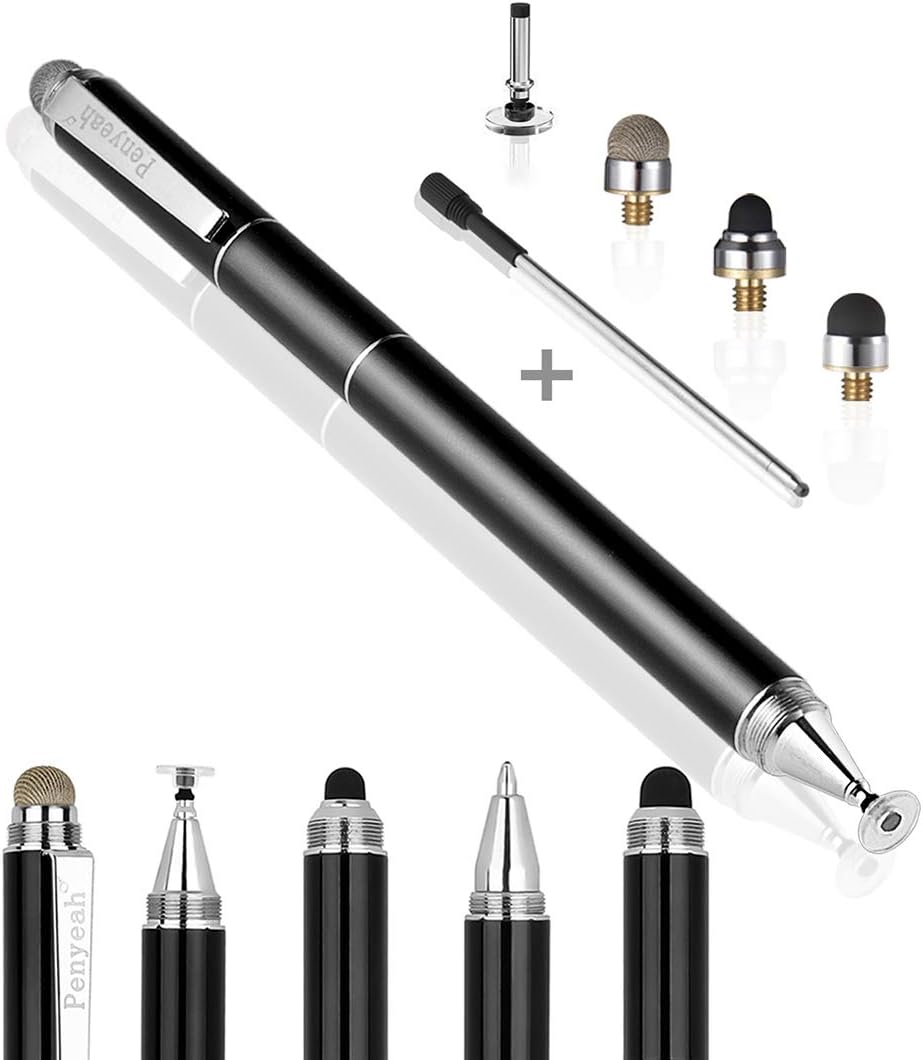
The Penyeah Stylus Pen features a unique 4-in-1 design including different tips and even a ball point pen for physical writing needs.
We may earn a commission when you buy through this link, at no additional cost to you.
Constructed from high grade metal it offers a solid and corrosion resistant feel that enhances durability for daily professional use.
The precision disc tip allows for better flexibility and accuracy while the mesh fiber tip glides easily across touchscreens.
This all-in-one tool is perfect for travelers or professionals who want a single device covering digital and analog writing tasks.
Durable metal construction ensures longevity and provides a comfortable premium grip.
Swap between disc mesh and rubber tips plus ink pen for total versatility.
We may earn a commission when you buy through this link, at no additional cost to you.
Designed for artists and journalists this active stylus offers a 1.5mm tip for smooth writing and drawing without Bluetooth pairing.
We may earn a commission when you buy through this link, at no additional cost to you.
The upgraded compatibility chip now supports newer iPad series including 2018 and 2019 versions expanding its range of compatible devices.
A built-in buffer unit at the tip design provides accuracy and control against tablets and cellphones screens for realistic pen feel.
Users should use standard chargers to avoid damaging the internal chip ensuring long-term reliable performance over time.
Buffer unit at tip gives you more accuracy and control against touch screens.
Provides 8 hours of active use with a full 60 minute charge cycle.
We may earn a commission when you buy through this link, at no additional cost to you.
This bundle includes six vibrant stylus pens allowing families or teams to keep one at office home or in bags easily.
We may earn a commission when you buy through this link, at no additional cost to you.
Each pen features a high-sensitivity durable rubber tip that glides smoothly without lag for detailed work on laptops or tablets.
The built-in clip makes it convenient to attach to notebooks or pockets ensuring the stylus is always within reach when needed.
It is an ideal solution for schools or offices where multiple users need reliable styluses without managing complex battery setups.
Six pens cover multiple users or devices making it cost-effective for groups.
Built-in clips allow easy attachment to bags or notebooks for portability.
We may earn a commission when you buy through this link, at no additional cost to you.
The MEKO 4-pack includes four pens with transparent disc tips and aluminum barrels for comfortable grip during extended use sessions.
We may earn a commission when you buy through this link, at no additional cost to you.
It comes with 12 replacement tips to ensure you never run out of options for writing sketching or digital signing on screens.
The transparent disc tip improves accuracy by allowing you to see exactly where the contact point is on the screen surface.
With a 90-day replacement service and 24-hour support this set offers excellent reliability and value for users.
Aluminum barrel adds a comfortable grip for extended use sessions.
Includes 12 replacement tips for long-term use without frequent purchases.
We may earn a commission when you buy through this link, at no additional cost to you.
This bulk set includes 10 dual-tip stylus pens plus 20 replacement nibs offering exceptional cost-effectiveness for personal or office use.
We may earn a commission when you buy through this link, at no additional cost to you.
Crafted with a solid alloy metal body each stylus measures 5.31 inches in length for a balanced comfortable grip and long-lasting durability.
Dual rubber tips of different diameters allow for both precise writing and easy scrolling navigation on capacitive touchscreen devices.
Vibrant mixed colors help distinguish pens for different users or scenarios making it perfect for home classroom or office use.
Crafted with a solid alloy metal body for long-lasting durability for daily use.
10 pens plus 20 nibs provide sufficient supply for long-term daily use.
We may earn a commission when you buy through this link, at no additional cost to you.
This stylus set features sleek aluminum bodies with dual premium silicone rubber tips for smooth responsive performance across writing and drawing tasks.
We may earn a commission when you buy through this link, at no additional cost to you.
Anti-scratch design safeguards your device from fingerprints smudges and scratches keeping your screen pristine during daily usage.
Both ends are easy to replace without any tools ensuring effortless functionality and extended lifespan for personal or shared use.
It delivers exceptional accuracy for families or friends needing multiple styluses without complex setup or charging requirements.
Crafted with a sleek aluminum body blending functionality and elegance.
Both ends are easy to replace without any tools for effortless functionality.
We may earn a commission when you buy through this link, at no additional cost to you.
Selecting the right stylus depends on specific needs such as device compatibility tip type and whether you require active or passive features.
Passive styluses are capacitive tools that work without batteries and pair only using the screen surface to simulate a finger touch. Active styluses include internal electronics and batteries that allow for features like pressure sensitivity and palm rejection but require charging.
Choose passive for budget and simplicity while active suits detailed drawing and professional design work.
Tip materials range from rubber to mesh and transparent disc styles. Rubber tips are soft and screen friendly while disc tips allow you to see exactly where you are writing for high precision.
Ensure the tip size matches your needs for writing small text versus larger navigation gestures.
Check if the stylus supports your specific operating system and device model. Some styluses work universally on all capacitive screens while others are optimized for iPad or Android environments.
Always verify compatibility with your device before purchase to avoid functionality issues.
Aluminum or metal bodies provide durability and a premium feel compared to basic plastic housings. A comfortable grip reduces hand fatigue during extended writing sessions.
Prioritize models with ergonomic designs if you plan to use the stylus for long periods.
Active styluses need regular charging and the method matters USB-C is modern while micro USB is older. Look for models with long battery life if you need all-day usage without recharging.
Ensure the charging method fits your current accessories to keep the workflow smooth.
Tips wear out over time especially with daily use. Models that come with spare tips allow you to replace them without buying a whole new stylus saving money long term.
Check how easy it is to swap tips before purchasing to ensure convenience.
Some styluses include extra features like clips pockets or magnetic attachments to keep them handy. Others may include extra nibs for different use cases like art or writing.
Decide which extras add real value to your workflow versus those that are unnecessary.
Basic capacitive styluses are very affordable while advanced active pens cost more. Consider how often you will use the stylus to justify the investment.
A higher price often brings better build quality and longer lifespan.
To use a capacitive stylus simply touch the tip to the screen surface like a pen. For active styluses ensure the battery is charged and the pen is powered on.
Clean the tip regularly with a soft cloth to remove dust and oil buildup that can affect sensitivity. Avoid using harsh chemicals that might damage the tip material.
Store your stylus in a protective case or sleeve when not in use to prevent scratches or damage. For active models check the battery level periodically to avoid unexpected shutdowns.
Most passive fine point styluses work on any capacitive touchscreen including iPads Android tablets and smartphones. Active styluses may require specific device support so check compatibility before buying.
Rubber tips are soft and provide a gentle touch on screens while disc tips are transparent allowing you to see exactly where you are writing for higher precision.
Active styluses typically charge via USB ports. Look for a charging cable in the box and connect the stylus to a power source until the light indicates a full charge.
Passive styluses do not need batteries as they work by simulating finger touch. Active styluses contain batteries to support advanced features like pressure sensitivity and palm rejection.
Yes many models come with spare tips and allow easy replacement. Check the product details to confirm if tips are replaceable and how to install them properly.
Ensure the screen is clean and not covered by a thick protector. For active styluses verify the battery is charged. Rebooting the device can also fix temporary connectivity issues.
The Stylus Pen for Touchscreen iPad and MEKO options stand out as versatile and affordable choices for most users.
Prioritize compatibility tip material and whether you need active features before making your final decision.
Always check current prices and availability as deals change frequently on online marketplaces.