
Quick Release Desk Mount
4.7Editor score
Quick release clamping
All-metal materials
Fits multiple joysticks
Discover the top Joystick Hotas Mounts for flight simulation. This guide compares stability, compatibility, and ergonomics to help you build the perfect
Flight simulation enthusiasts know that a solid cockpit setup transforms a good experience into an immersive one. Joystick Hotas Mounts are essential for securing your controls at the perfect height and angle. Without a reliable mount, your gear can wobble or take up valuable desk space during intense sessions.
We analyzed ten top-rated options based on stability, adjustability, and build quality. Each mount was evaluated for its ability to support popular hardware like Logitech and Thrustmaster systems. Our goal is to help you find a solution that fits your desk and workflow seamlessly.
Every pick in this list highlights specific strengths such as quick release mechanisms or heavy-duty metal construction. Prices and availability can change frequently so always verify details before purchasing. These selections represent the best current choices for serious sim pilots seeking precision and comfort.
4.7Editor score

4.6Editor score
4.3Editor score
This comparison table provides a side-by-side look at the key specifications for each mount to help you decide which features matter most for your specific flight simulation needs and desk configuration.


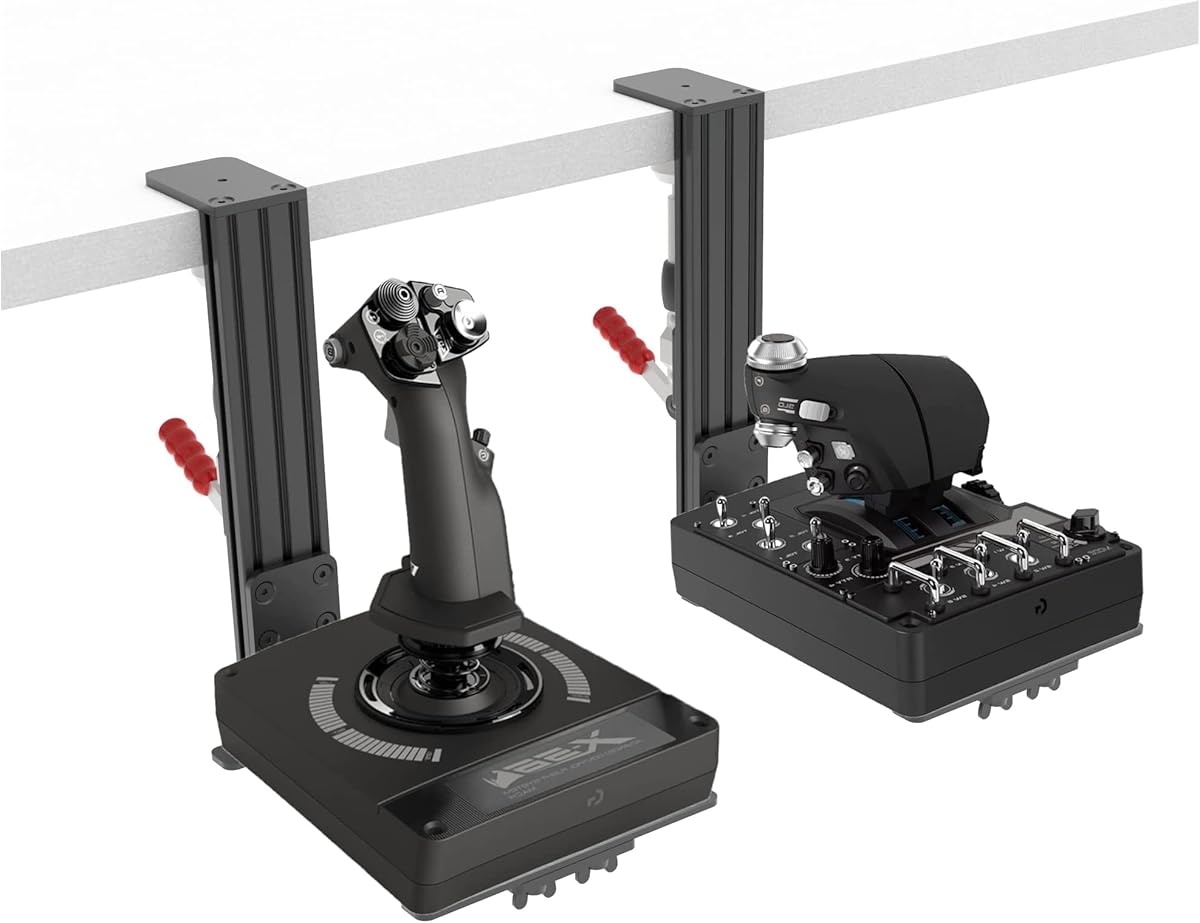
The Meza Mount-HOTAS Desk Mount Set of 2 stands out as the top choice for serious flight simulation enthusiasts who need robust support for their controls. With a high rating from users, this kit offers a heavy-duty metal construction that ensures your joystick and throttle remain steady even during intense combat maneuvers. It is specifically tailored for systems like the Thrustmaster Warthog and WinWing Orion 2 making it a perfect match for high-end setups.
We may earn a commission when you buy through this link, at no additional cost to you.
This mount set excels in stability and adjustability which are critical factors for immersion and ergonomic comfort during long sessions. The reinforced structure with aluminum profile support columns provides strong load-bearing performance that prevents any unwanted wobble. You can adjust the height and position of the brackets to place your controls at an optimal level which helps reduce strain on your arms and back while flying.
While the build quality is exceptional there is a trade-off in terms of cost and initial setup effort compared to simpler clamp options. The price point is higher but reflects the durable materials and specialized design intended for heavier equipment. Assembly requires a bit of hands-on work to ensure everything is secure but the result is a reliable cockpit layout that enhances your simulation experience.
If you own a heavy HOTAS system and prioritize stability over budget this mount is the clear recommendation. It transforms your desk into a proper cockpit station by lifting your gear off the surface and keeping it accessible. Users will appreciate the reduced clutter and improved control access which makes a noticeable difference in gameplay quality and realism.
The rigid metal structure ensures your controls do not shift or shake during aggressive banking or rapid throttle changes.
Adjustable brackets allow you to customize the height and reach to fit your sitting posture and desk height perfectly.
We may earn a commission when you buy through this link, at no additional cost to you.
The Quick Release Desk Mount offers an excellent entry point for pilots who want to elevate their joystick without breaking the bank. Boasting a high user rating it combines affordability with solid performance through its all-metal build and versatile compatibility. This single unit is designed to work with a wide variety of popular joysticks including those from Winwing and Logitech which makes it a flexible choice for different setups.
We may earn a commission when you buy through this link, at no additional cost to you.
What makes this mount particularly appealing is its quick release clamping design that allows for tool-free installation and easy removal. The aluminum alloy main body provides durability while the included silicone anti-slip stickers ensure the mount stays put on your desk. It holds your joystick securely so you can operate without worrying about shaking which significantly enhances your gaming immersion and focus during play.
The main limitation is that this is a single mount meaning you will need to purchase two if you want separate mounts for your joystick and throttle. Additionally the clamp supports desk thickness up to 2.36 inches which may not fit very thick desks. Despite these constraints the value it provides for the price makes it a smart option for those starting their cockpit build.
For budget-conscious gamers who still demand quality and stability this mount is the ideal pick. It frees up valuable desktop space and places your control in a natural hand-down position for smoother simulation control. The ease of setup means you can get to flying faster without dealing with complicated assembly steps or expensive hardware.
High-quality metal materials deliver durability and stability at a price point that is accessible to most hobbyists.
No tools are needed to clamp or unclamp the mount making it easy to share your desk or store away quickly.
We may earn a commission when you buy through this link, at no additional cost to you.
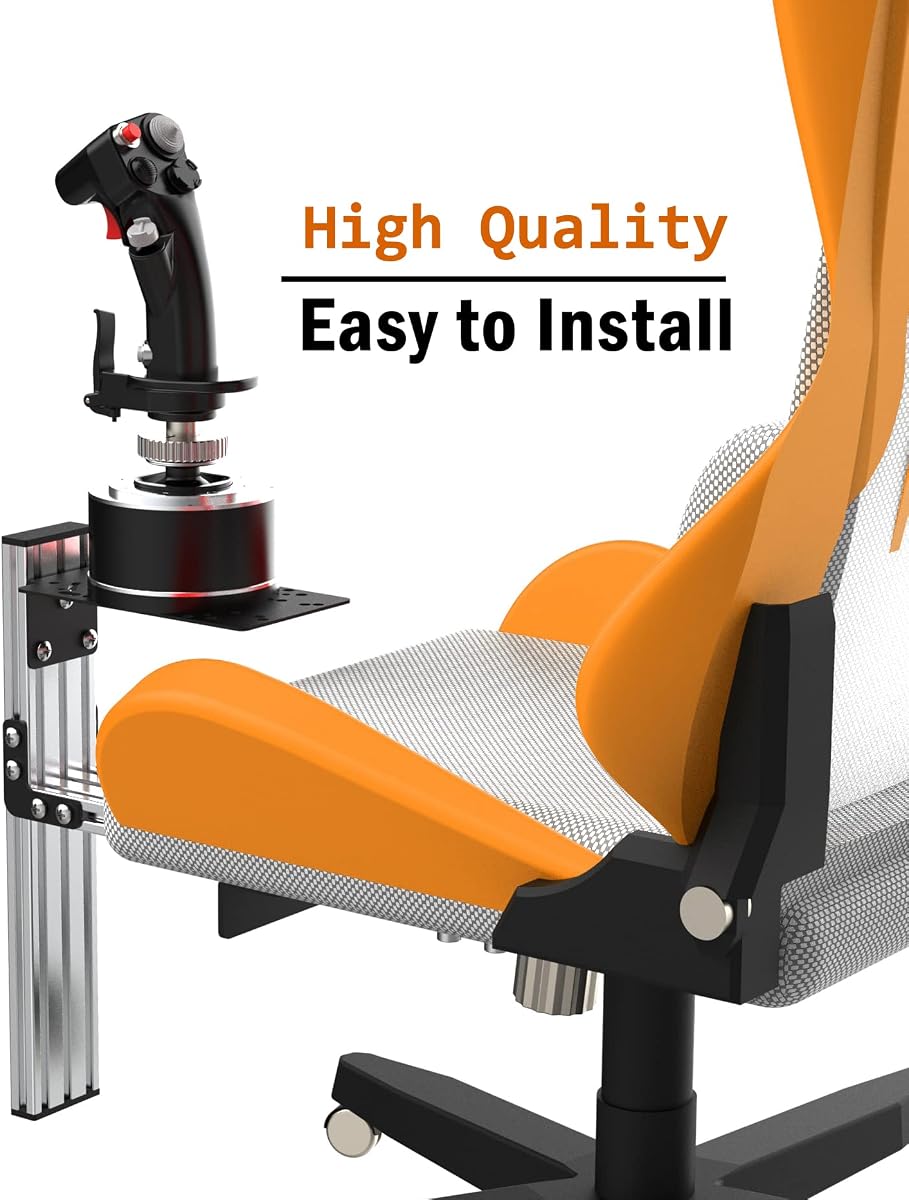
The Fosiya SIM Fighting Joystick Center Chair Mount brings a unique perspective to cockpit setup by placing your stick directly at the center of your seat rather than on the desk. This premium approach is supported by a high rating and heavy-duty M8 screws that provide a clamping force capable of holding up to 300kg. It is compatible with a wide range of sticks including the T-Flight Hotas 4 and Warthog making it versatile for many pilots.
We may earn a commission when you buy through this link, at no additional cost to you.
This mount excels in customization and stability offering vertical height and lateral adjustments that let you dial in the perfect position for your body. The non-slip flange nut fixing system ensures the mount does not damage your chair while maintaining a firm grip. Having your joystick centered between your legs can improve immersion and reduce arm fatigue by bringing the control closer to your core.
Installation is more involved than a simple desk clamp and may require modifications or a very sturdy chair frame to support the weight effectively. The complexity might deter those looking for a plug-and-play solution but the resulting cockpit feel is unmatched. It is a significant investment that transforms how you interact with your simulation gear during long sessions.
If you want the most immersive cockpit experience possible and have a chair that can support this setup this mount is the top recommendation. It elevates your flight simulation from a desk hobby to a full-scale simulator build. The ability to adjust the position finely ensures comfort and precision which are essential for competitive or realistic flight training.
Placing the joystick between your legs mimics a real aircraft cockpit and improves your sense of presence and control.
M8 screws and a secure fastening system ensure your stick stays fixed even during aggressive maneuvers or rapid inputs.
We may earn a commission when you buy through this link, at no additional cost to you.
The Hikig 2 Set Desk Mount is a versatile option designed to support almost all flight game hand-control devices. With a solid rating it offers a strong 91N.m force clamp that secures your gear firmly to the desk edge. It is compatible with popular systems like the Logitech X56 and Thrustmaster T.16000M making it a safe choice for many standard setups.
We may earn a commission when you buy through this link, at no additional cost to you.
This mount provides easy installation and adjustable height and position settings that allow you to tailor the ergonomics to your needs. The design aims to make your cockpit setup more comfortable by lifting controls off the desktop and reducing clutter. It is a practical addition to your battle station that helps prepare you for realistic simulation gaming experiences.
While the compatibility is broad some users may notice slight wobble under heavy use which can be distracting during precise maneuvers. The build quality is functional but may not feel as robust as higher-end metal alternatives. For those on a budget who need a quick solution it works well but those seeking maximum rigidity might look elsewhere.
If you need a reliable 2-pack that handles a wide range of devices without breaking the bank this mount is a solid choice. It offers a good balance of features and price for general flight simulation use. The ease of setup means you can get your cockpit ready quickly and focus more on flying than assembling gear.
Supports a vast array of controllers including X56 Warthog and VKB models ensuring it fits your current gear.
Installation is straightforward with adjustable clamps that let you position your controls without hassle.
We may earn a commission when you buy through this link, at no additional cost to you.
The RACGTING 2-Pack Foldable HOTAS Desk Mount focuses on providing cockpit immersion through a natural hands-down layout. It features a durable aluminum clamp system that locks firmly onto your desk for rock-solid stability during every session. The foldable design allows you to transition from a cockpit to a clean desk in seconds which is ideal for shared spaces.
We may earn a commission when you buy through this link, at no additional cost to you.
Customizing your setup is straightforward with adjustable height and reach options that support desk thickness from 0.2 to 5.7 inches. This flexibility helps create a more ergonomic experience that reduces strain during long flight sessions. It is designed to work seamlessly with leading systems like Logitech and Thrustmaster ensuring your existing gear integrates well.
The build quality and stability are excellent but the assembly process can be a bit tricky for first-time users. Clear instructions are vital to ensure the mounts are installed correctly to avoid any stability issues. Once set up however the result is a secure and professional-looking cockpit layout that enhances your gaming environment.
If you value storage flexibility and desk cleanliness this foldable mount is the perfect solution. It allows you to enjoy serious simulation without dedicating permanent space to your controls. The adjustable features ensure that you can find a comfortable position that supports your gameplay style and desk setup effectively.
Removable and foldable mounts keep your desk organized when not in use for shared or office environments.
Durable aluminum clamps provide a firm lock on your desk to ensure your controls stay steady during play.
We may earn a commission when you buy through this link, at no additional cost to you.
The DIWANGUS Foldable HOTAS Desk Mount offers a 2-pack solution that gives your joystick and throttle separate positions at the desk edge. It features a wide compatibility list including Logitech X52 and Thrustmaster Warthog systems making it suitable for most standard setups. Each mount arrives 90% preassembled which minimizes building and lets you focus on flying.
We may earn a commission when you buy through this link, at no additional cost to you.
This mount system is designed to reclaim your space after flying by allowing you to remove and fold the mounts for storage. It fits flat desk edges from 0.4 to 7 inches thick which covers almost any standard table or desk. Independent adjustments for height and front to back reach help you find a natural position that reduces awkward reaching.
While the setup is quick there may be a need to tighten hardware after initial installation to ensure maximum stability. The build quality is solid and the wide compatibility ensures it works with your existing gear. For shared desks or home offices this foldable design provides a practical way to enjoy simulation without permanent clutter.
If you need a versatile mount that can be easily stored when not in use this option is a great fit. It balances ease of use with performance to provide a stable platform for your controls. The adjustable features help you optimize your cockpit layout for comfort and efficiency during your sessions.
Most assembly is done for you and the foldable design makes it easy to clear your desk after gaming.
Accommodates desk edges up to 7 inches thick making it versatile for different furniture types and thicknesses.
We may earn a commission when you buy through this link, at no additional cost to you.
The Reashy Hotas Mount combines lightweight aluminum with exquisite craftsmanship to create a sturdy and durable desk mount. It is designed for desktop thickness within 0.2 to 5.7 inches and features an enlarged rotary knob clamp that allows for easy installation and disassembly. The pre-assembly saves you time and effort so you can start using it quickly.
We may earn a commission when you buy through this link, at no additional cost to you.
This mount provides a rock-solid experience with anti-slip pads and a high pitch clamp design that ensures secure holding. The adjustable bracket height and distance allow you to find a proper position for your joystick which enhances your ultimate game experience. It supports popular joysticks including Logitech X56 and Thrustmaster T.16000M which covers most common setups.
The aluminum construction is strong but the clamp mechanism may feel stiff initially requiring some force to tighten properly. While it fits most standard desks the limited thickness range might exclude very thick or unusual table edges. Despite these minor trade-offs the mount delivers reliable performance and a clean look for your simulation station.
If you want a well-built mount that balances weight and durability this is a strong contender. The ease of installation and adjustability make it a user-friendly choice for many pilots. It helps create a comfortable operating environment that reduces desk clutter and improves your focus on the simulation.
Pre-assembled design and rotary knobs let you set up and adjust your mount quickly without tools.
Lightweight yet sturdy materials ensure the mount holds your stick firmly without adding bulk to your desk.
We may earn a commission when you buy through this link, at no additional cost to you.
The SILVIP 2 Set HOTAS Desk Mount offers a versatile solution that is compatible with PC Windows Xbox and PlayStation platforms. This 2-pack desk mount clamp is designed to improve your gaming experience by creating a comfortable operating environment for flight simulation enthusiasts. It removes the need to place your joystick on the desktop which helps keep your setup organized and ergonomic.
We may earn a commission when you buy through this link, at no additional cost to you.
The mount is compatible with a wide range of controllers including Thrustmaster Sol-R series and VKB Gladiator NXT models. The product description and image instructions are designed to be clear to help you assemble it correctly. It is a practical way to create a cockpit-style layout on your desk for better immersion and control access.
Assembly is required and may require a certain level of hands-on ability which could be a challenge for some users. The note about X56 support indicates that some users may need to check compatibility or wait for updates. Despite this it is a well thought out product that simplifies transportation costs while still offering a solid solution.
If you want to elevate your flight simulation setup and have the patience for assembly this mount is a great option. It helps improve your comfort and control accessibility during long gaming sessions. The wide platform compatibility ensures it works with your current hardware regardless of your console or PC choice.
Supports multiple gaming platforms ensuring it works whether you play on PC Xbox or PlayStation.
Lifts your controls off the desktop to create more space and a more comfortable ergonomic setup for flight.
We may earn a commission when you buy through this link, at no additional cost to you.
The 2PCS Hotas Mount has earned a perfect customer rating which speaks to its effectiveness in securing your flight controls. It features an upgraded dual-clamp design that firmly secures the stand from the top ensuring outstanding stability during gameplay. This unit is compatible with a range of models including Logitech X52 and Thrustmaster TCA series which covers many standard setups.
We may earn a commission when you buy through this link, at no additional cost to you.
The stand supports vertical height adjustment so you can tailor the position to your ergonomic needs. The anti-slip pads can be attached for even better grip which helps keep your gear steady. It is a compact solution that lifts your joystick and throttle off the desktop freeing up space for other accessories.
The main limitation is the desk edge thickness limit of 6 cm or 2.36 inches which means it will not fit thicker tables. You must check compatibility before purchase to ensure it works with your specific gear as other models are not supported. Despite this it is a very stable option for those with compatible equipment and desks.
If you have a standard desk thickness and want a secure and adjustable mount this is a top choice. The high rating suggests that users find it reliable and easy to use for daily simulation. The dual clamp design provides the peace of mind needed for aggressive flying maneuvers.
The dual clamp design ensures your mount stays fixed on the desk edge without shifting or slipping.
Height can be adjusted vertically to find the most comfortable position for your hands and arms.
We may earn a commission when you buy through this link, at no additional cost to you.
The Hikig 2 Pack Desk Mount offers a robust solution with a push-pull quick clamp that ensures fast loading and unloading. It is designed to support almost all flight game hand-control devices and boasts a high holding capacity that keeps equipment stable. The dual-handed system allows it to be positioned for both left and right-handed users which increases its versatility.
We may earn a commission when you buy through this link, at no additional cost to you.
This mount features non-slip feet to protect your desk surface and ensure a better grip during intense sessions. The ergonomic design lets you adjust the bracket vertically to suit different table thicknesses and heights. It aims to offer the best position to make you feel as if you were sitting in a real cockpit for a realistic experience.
The high capacity and quick clamp are strong points but the instructions could be clearer for assembly. Some users might need to adjust the clamp to get it right which adds a small step to setup. Overall it provides a safe and stable fastening system that is easy to remove when not needed.
If you value a secure setup that accommodates a wide range of controls this mount is a reliable choice. The quick clamp and adjustable features make it a practical option for regular use. It helps create a professional cockpit atmosphere by keeping your controls in the correct position for immersion.
The push-pull system allows you to attach or remove your mount quickly without tools.
Supports nearly all major flight controllers including VKB VPC and Logitech models.
We may earn a commission when you buy through this link, at no additional cost to you.
Selecting the right mount requires understanding several factors that impact your stability and comfort.
Ensure the mount supports your specific joystick model such as X56 or Warthog. Check the product descriptions to confirm it lists your gear as compatible before purchasing.
Matching your gear to the mount is essential for a secure fit and long-term reliability.
Metal mounts like aluminum or steel generally offer more stability than plastic. Look for reinforced structures that reduce wobble during intense gameplay sessions.
Metal construction ensures your controls stay steady under heavy use.
Most clamps have a maximum desk thickness limit often around 2.36 to 5.7 inches. Measure your desk edge to ensure the clamp can grip it securely without slipping.
Verify desk edge size to guarantee a tight and safe installation.
Height and reach adjustments help you find an ergonomic position that reduces strain. Look for mounts that allow independent movement for both joystick and throttle.
Adjustable brackets improve comfort during long simulation sessions.
Decide between desk clamps and chair mounts based on your preferred setup. Desk mounts free up space while chair mounts offer a different immersive experience.
Choose a style that fits your available space and gaming preference.
Some mounts come preassembled which saves time compared to those requiring extensive tools. Quick release mechanisms can make storage and setup easier for shared desks.
Consider assembly requirements to minimize effort before flying.
Look for anti-slip pads or dual-clamp designs that enhance grip. A stable mount prevents your controls from shifting during aggressive maneuvers.
Stability features are key for consistent performance in-game.
Foldable designs allow you to remove the mount from your desk when not in use. This is useful for shared spaces or limited room setups.
Foldable options help keep your workspace organized.
Start by measuring your desk edge thickness to ensure it falls within the clamp range. This step prevents the mount from slipping or damaging the surface during use.
Attach the mount securely and adjust the height and position to match your comfort. Ensure the joystick is centered and balanced so it does not tip over.
Regularly check the screws and clamps to maintain stability. Wipe down the mount to remove dust and avoid putting excessive weight on it when not in use.
Most mounts work with standard wooden or solid desks. However you must check the thickness limit listed in the product description. Thick or glass desks may not support the clamp securely.
Several mounts in this list support Logitech X56 but always check the compatibility details. Some budget options may require updates or are specific to other models.
Some mounts arrive 90 percent preassembled while others require more steps. Always review the product description to know what tools or time you will need.
Many 2-pack sets include a dedicated mount for your throttle. Ensure you buy a set that supports both joystick and throttle if you have two devices.
Tighten the clamps firmly and use anti-slip pads if included. Make sure your desk edge is clean and stable to avoid movement during flight.
Foldable models allow you to remove and store the mount easily. This helps keep your desk free for other tasks when not in use.
Look for mounts with high holding capacity and metal construction. Heavy-duty options like the Meza Mount are designed for heavier systems.
Most include non-slip pads to protect your desk. However always tighten the clamp properly to prevent scratches or marks over time.
We have reviewed ten top options for Joystick Hotas Mounts that cater to different needs and budgets. From the sturdy Meza Mount to the affordable Quick Release Desk Mount there is a choice for every pilot.
When selecting a mount prioritize compatibility with your specific gear and the stability it offers. Adjustability and build quality are also critical factors for a comfortable experience.
Prices and stock levels can change so always check the latest information before purchasing. This guide aims to help you build a cockpit that enhances your immersion and performance in flight simulation.