
Lenovo Smartcard Wired Keyboard II-US
4.4Editor score
Affordable security solution
Wired USB connectivity
Standard US layout
This guide compares ten top-rated keyboards with built-in smart card readers for secure authentication, exploring security standards, ergonomic design, and
In today's digital landscape, securing access to sensitive data is paramount for organizations and individuals alike. A keyboard with a smart card reader integrates secure authentication directly into your typing experience, streamlining workflows while maintaining high security standards without extra hardware clutter.
We have carefully evaluated ten leading models available in the market to help you find the perfect match for your security needs. Our comparison focuses on build quality, reader compatibility, ergonomic comfort, and additional features that enhance productivity in professional environments requiring robust access control measures.
Each selection in this list highlights specific strengths tailored to different use cases, from government compliance to general enterprise security. Please note that product availability and pricing can fluctuate frequently, so we recommend verifying current details directly with the retailer before making your final purchasing decision.
4.4Editor score
4.6Editor score

4.1Editor score
The following table provides a side-by-side comparison of the ten top-ranked keyboards with integrated smart card readers. Review these specifications to quickly identify which model offers the specific features and compliance standards you require for your secure computing environment.


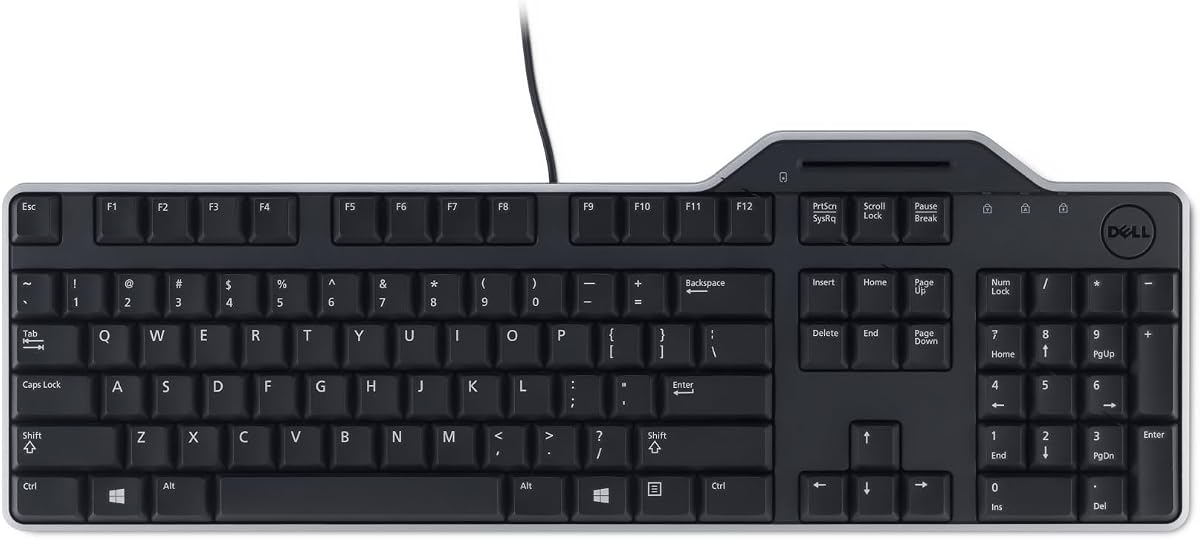
The Dell KB813 stands out as a highly rated option for organizations needing reliable secure input. With a 4.6-star rating, this keyboard integrates a smart card reader directly into the chassis, eliminating the need for external devices and reducing clutter on secure workstations.
We may earn a commission when you buy through this link, at no additional cost to you.
Its spill-resistant design ensures longevity in busy office environments where accidental liquid spills can occur. The ergonomic layout includes a detachable palm rest, providing comfort during long typing sessions while maintaining a professional aesthetic suitable for corporate settings.
While it offers robust connectivity and security, the wired USB connection limits placement flexibility compared to wireless options. However, for secure systems requiring stable and fast data transfers, this wired approach ensures consistent performance without battery dependencies.
This keyboard is ideal for IT managers seeking a dependable, secure solution for general office use. The combination of durability, ergonomic comfort, and integrated security makes it a top recommendation for environments prioritizing data protection and user comfort.
The integrated smartcard reader allows for seamless authentication, improving workflow efficiency for users who frequently log into secure systems or access restricted data.
Built to withstand spills and designed with low-profile keys, this keyboard balances ruggedness with the typing comfort needed for all-day productivity.
We may earn a commission when you buy through this link, at no additional cost to you.
The Adesso TruForm AKB-150SB is designed specifically for government and enterprise environments requiring strict adherence to sourcing regulations. As a TAA compliant device, it ensures eligibility for GSA sales and contracts, making it a critical choice for public sector procurement.
We may earn a commission when you buy through this link, at no additional cost to you.
Beyond compliance, this keyboard offers a split ergonomic design that promotes natural hand positioning to reduce strain during extended use. The built-in smart card reader supports multiple international standards, ensuring broad compatibility with secure web applications and ID systems.
The inclusion of an integrated palm rest and multimedia hotkeys adds significant value for productivity-focused workflows. However, the split design and additional features contribute to a larger desk footprint and a higher cost compared to standard security keyboards.
Ideal for federal agencies and large enterprises, this model delivers on both regulatory requirements and user comfort. Its comprehensive feature set justifies the investment for organizations prioritizing compliance and employee ergonomics alongside secure access control.
Meeting U.S. Trade Agreement Act specifications ensures this device can be sourced by government agencies without legal or procurement hurdles.
The split key zones and sloped shape encourage a neutral wrist position, potentially reducing the risk of repetitive strain injuries over time.
We may earn a commission when you buy through this link, at no additional cost to you.
The Cherry KC 1000 is engineered for high-security environments such as healthcare and government agencies requiring strict compliance. Its FIPS 201 and EMV 2000 approvals ensure it meets rigorous standards for secure authentication and data protection in sensitive sectors.
We may earn a commission when you buy through this link, at no additional cost to you.
This wired security keyboard features a low-profile smart card contacting unit that supports one-handed operation, streamlining the login process. It supports various protocols including T=0 and T=1, ensuring compatibility with a wide range of international smartcard systems.
While highly secure and cross-platform compatible with Windows, macOS, and Linux, the specialized design may not suit general office needs. Its thin profile saves space, but the focus on security over general multimedia features limits its versatility for casual users.
For users needing a compact, high-security solution, the KC 1000 is an excellent choice. Its robust certifications and support for international standards make it a reliable tool for protecting sensitive data in regulated industries.
Approvals like FIPS 201 and EMV 2000 Level 1 ensure this keyboard meets federal and banking standards for secure access and transaction processing.
Driver support extends across multiple operating systems, allowing organizations to deploy this security keyboard uniformly across diverse IT environments.
We may earn a commission when you buy through this link, at no additional cost to you.
The Adesso EasyTouch 130SB brings the satisfying feel of mechanical switches to secure authentication, rated for fifty million keystrokes for longevity. The integrated smart card reader ensures secure logon, while the large print keycaps offer enhanced visibility for users with visual impairments or those working in low light.
We may earn a commission when you buy through this link, at no additional cost to you.
A unique feature is the dedicated Copilot AI hotkey, providing instant access to Microsoft's coding and creative assistance. This positions the keyboard not just as a security tool but as a productivity enhancer for modern software development and creative workflows.
While the mechanical switches offer tactile feedback, they are not completely silent, which might be a consideration in quiet offices. However, the durability and specialized features like large keycaps make it stand out for users needing both security and accessibility.
This keyboard is perfect for developers or technical users who value tactile feedback and accessibility features alongside security. The combination of mechanical quality and smart security integration offers a unique value proposition in a crowded market.
The 2X large print size keycaps provide excellent contrast and visibility, making this keyboard highly suitable for users requiring enhanced character legibility.
With a dedicated hotkey for Microsoft Copilot, this model bridges the gap between secure hardware and modern AI-driven productivity workflows.
We may earn a commission when you buy through this link, at no additional cost to you.
This Dell Smartcard USB keyboard is a straightforward, highly rated solution for standard secure office tasks. With a 4.7 rating, it is praised for its reliability and ease of use, offering fast data transfers via USB without the need for batteries or charging.
We may earn a commission when you buy through this link, at no additional cost to you.
The design focuses on comfort and durability, featuring a detachable palm rest and low-profile keys for a quiet typing experience. Its spill-resistant construction adds an extra layer of protection for hardware longevity in busy workspaces where accidents can happen.
While it lacks advanced multimedia or ergonomic split features, it delivers exactly what is needed for secure access. The full-size layout ensures all standard keys are available, making it suitable for data entry tasks alongside secure logins.
Ideal for offices looking for a no-fuss, dependable security keyboard, this model balances comfort and function well. Its high rating suggests consistent satisfaction among users who prioritize reliability and ergonomic basics.
By focusing on core functionality like wired connectivity and spill resistance, this keyboard ensures consistent performance without complex setup requirements.
The detachable palm rest and quiet keys cater to users who need a comfortable, distraction-free typing environment for daily office work.
We may earn a commission when you buy through this link, at no additional cost to you.
The Kensington KB201C is a simple solutions keyboard tailored for secure environments needing CAC and PIV card support. It meets TAA standards for federal sourcing and ensures secure access via FIPS-201 and PC/SC compliance, making it suitable for government institutions.
We may earn a commission when you buy through this link, at no additional cost to you.
Its quiet-click design minimizes noise, allowing focus in shared office spaces without disturbing colleagues. A three-year limited warranty provides peace of mind regarding product longevity and manufacturer support for organizational procurement.
While it offers essential security and compliance, user ratings are lower compared to other models, possibly indicating average typing feel or build quality. However, for organizations prioritizing regulatory compliance and warranty protection, it remains a valid option.
Best suited for federal contractors and agencies, this keyboard simplifies secure access with standard compatibility. It delivers the required certification features reliably, ensuring compliance without unnecessary complexity or cost.
TAA compliance ensures the device meets federal sourcing standards, simplifying procurement for government institutions requiring compliant IT equipment.
The quiet-click mechanism reduces acoustic noise, helping maintain focus and professionalism in shared open-office or government environments.
We may earn a commission when you buy through this link, at no additional cost to you.
The Lenovo Smartcard Wired Keyboard II is a straightforward, no-frills option for basic secure access needs. With a 4.4 rating, it offers reliable wired USB connectivity and standard US English layout, making it compatible with existing IT infrastructure without requiring software installation.
We may earn a commission when you buy through this link, at no additional cost to you.
Its compact package dimensions suggest a focus on space efficiency, suitable for smaller desks or deployment in kiosks. The lightweight design ensures easy shipping and handling, which can be beneficial for large-scale procurement and deployment projects.
However, the limited feature set means it lacks advanced ergonomic or multimedia enhancements found in higher-end models. This simplicity keeps costs down, making it an attractive choice for budget-conscious deployments where core functionality is the priority.
Ideal for basic enterprise or educational settings, this keyboard provides essential security features without complexity. Its reliability and ease of integration make it a solid choice for organizations needing simple secure access solutions.
This keyboard balances necessary security features with an affordable price point, making it ideal for large deployments where budget is a key factor.
The standard US layout and wired connection ensure immediate plug-and-play functionality across most Windows and compatible operating systems.
We may earn a commission when you buy through this link, at no additional cost to you.
The HP USB Business Slim offers a professional aesthetic tailored for corporate environments requiring secure logon. Its membrane keyswitches provide a smooth and quiet typing experience, while the built-in spill drain adds practical protection against accidental liquid damage.
We may earn a commission when you buy through this link, at no additional cost to you.
LED key light indicators help users confirm active functions at a glance, improving workflow efficiency. The slim profile saves desk space, making it suitable for offices where aesthetics and space efficiency are as important as functionality.
While the six-foot cable is standard, users may prefer longer options for complex setups. Despite this, the combination of security and spill protection offers a robust balance for general business applications requiring durability.
This model is best for companies seeking a professional, reliable keyboard for secure access. The slim design and practical spill features make it a functional choice for modern business workspaces.
The built-in spill drain ensures that liquid damage is minimized, extending the lifespan of the hardware in busy office environments.
The slim business design blends seamlessly into corporate workspaces, providing security features without compromising the visual appeal of the desk.
We may earn a commission when you buy through this link, at no additional cost to you.
The Cherry Secure Board 1.0 is an intelligent security keyboard capable of reading both contact and contactless cards or tags. Its secure mode offers authentication and encryption, particularly beneficial for thin client environments where centralized security is critical.
We may earn a commission when you buy through this link, at no additional cost to you.
Supporting RF/NFC interface expands its utility beyond standard smartcards, allowing for greater flexibility in access control systems. It is CCID compatible and follows ISO standards, ensuring broad interoperability with existing security infrastructure across different industries.
While it offers advanced security features, the setup may be more complex than basic plug-and-play models. The higher price reflects these advanced capabilities, making it best suited for specialized security needs rather than general office use.
Ideal for organizations needing contactless and contactless access options, this board provides robust security. Its approval and compliance make it a trusted choice for high-security enterprise and government deployments.
By supporting RF/NFC interfaces, this keyboard allows for flexible authentication methods, accommodating various types of access cards and tags.
The secure mode with encryption is specifically designed for thin clients, ensuring data protection in centralized and virtualized computing environments.
We may earn a commission when you buy through this link, at no additional cost to you.
The NEW OEM Dell KB813t provides an original Dell solution for users needing a reliable replacement or new setup. Unopened and new, this keyboard offers the same essential features as other Dell models, including a built-in smart card reader for secure access.
We may earn a commission when you buy through this link, at no additional cost to you.
As an OEM product, it ensures compatibility with Dell systems and corporate procurement channels. The standard English layout and USB connectivity make it a drop-in replacement for existing setups requiring secure authentication without needing driver updates or configuration changes.
While packaging is sealed, specific warranty details may differ from retail versions. However, the trusted Dell brand and consistent hardware design offer confidence in performance for IT departments managing large fleets of devices.
Best for system integrators or businesses looking for consistent hardware, this OEM model offers value and reliability. Its features align with standard enterprise needs, making it a safe choice for secure computing environments.
Choosing OEM hardware ensures consistency with existing system configurations, simplifying deployment and maintenance for IT administrators.
The included smart card reader ensures that secure access protocols are maintained, even in replacement scenarios for aging hardware.
We may earn a commission when you buy through this link, at no additional cost to you.
Selecting the right keyboard with a smart card reader involves evaluating security standards, ergonomics, and compatibility with your existing infrastructure. This guide outlines the critical factors to consider to ensure you invest in a device that meets your organization's unique requirements.
Verify that the keyboard supports necessary standards like FIPS 201, PC/SC, or ISO 7816 depending on your industry. Regulatory bodies often require specific certifications for secure authentication, so checking compliance details ensures legal and operational validity.
Prioritize models that explicitly state adherence to relevant federal or industry standards to avoid future procurement or compliance issues.
Determine whether you need a contact-based reader for traditional smartcards or an RF/NFC interface for contactless tags. Some advanced models support both, offering flexibility for organizations transitioning to modern access control systems.
Choose an interface that matches your existing card infrastructure to prevent the need for replacing all access cards.
Ensure the keyboard provides drivers or plug-and-play support for your specific operating system, such as Windows, macOS, or Linux. Cross-platform compatibility is vital for diverse IT environments to maintain uniform security protocols across different devices.
Check product descriptions for explicit OS support to avoid driver conflicts during deployment.
Look for features like detachable palm rests, split layouts, or low-profile keys to support comfortable typing during long shifts. Proper ergonomics reduce physical strain and improve productivity, which is essential for office and security desk roles.
Test or review ergonomic specifications to ensure the physical design aligns with the daily usage duration of your users.
Decide between wired and wireless connections based on your security needs. Wired USB connections offer stable data transfer and eliminate battery concerns, which is often preferred in highly secure environments where wireless signals might be restricted.
Wired options typically provide faster, more consistent performance for critical authentication tasks.
Consider keyboards with spill-resistant designs or durable construction to withstand office accidents and heavy use. Features like spill drains or reinforced materials extend the lifespan of the device, reducing long-term replacement costs.
Opt for robust construction if the device will be used in high-traffic or industrial settings.
Evaluate extra features like multimedia hotkeys, AI assistant keys, or large print keycaps that enhance usability. These additions can streamline workflows, especially for users with visual impairments or those needing quick access to digital tools.
Weigh these features against your budget to ensure you get value without unnecessary complexity.
Balance the upfront cost with the expected lifespan and warranty terms. Some models offer longer warranties, which can provide peace of mind and protect against hardware failure in critical security setups.
Investing slightly more in a model with strong warranty support often saves money on repairs or replacements later.
To set up your keyboard, simply connect the USB cable to your computer and insert your smart card into the built-in reader. Install any necessary drivers if prompted by your operating system to enable the security functions immediately.
Maintain optimal performance by keeping the card reader slot clean from dust and debris. Use a soft brush or compressed air occasionally to clear the contacts, ensuring smooth card insertion and reading without damage.
For spill resistance, ensure the drainage channels are clear and wipe up liquids immediately using a dry cloth. Avoid using harsh chemicals on the keys or body to prevent wearing down the labels or affecting the mechanical components.
Most modern keyboards use CCID standards that allow for plug-and-play functionality on Windows, macOS, and Linux without extra drivers. However, specific smart card middleware or vendor software might still be required for advanced authentication protocols or enterprise integration.
Yes, these keyboards typically support generic USB standards and operate independently of the host computer brand. They are designed to work with any system that recognizes standard USB HID and smart card device classes, regardless of the manufacturer.
First check the physical connection and try a different USB port. If the issue persists, update your smart card reader drivers or middleware. Many keyboards allow you to use standard keys even if the reader fails, though authentication features won't function.
Many models support macOS with standard CCID drivers, but you should verify the specific product's compatibility list. Some enterprise-focused models may require specific configuration or drivers that are primarily optimized for Windows environments.
Built-in readers enhance security by reducing the attack surface of external USB dongles and simplifying user workflows. They often support encrypted authentication, making it difficult for malicious software to intercept credentials during the logon process.
Yes, since the smart card reader is integrated into the keyboard, you would replace the entire unit if the reader fails. Ensure you purchase a model that supports your existing smart card type to avoid needing new authentication cards.
Yes, most smart card keyboards function in VDI setups if the host computer passes the smart card device through to the virtual machine. Your IT administrator may need to configure USB passthrough to ensure the reader is recognized within the virtual session.
Each keyboard typically houses one built-in reader, so you would need multiple units or a hub to support multiple simultaneous cards. Some systems allow card switching within the same session, so check your middleware capabilities for shared hardware usage.
In conclusion, the Dell KB813, Adesso TruForm, and Lenovo Smartcard Wired Keyboard represent excellent choices across different user needs. Each model balances security standards with comfort and usability, ensuring you can select a device that fits your specific environment and budget.
When making your decision, prioritize the security compliance requirements of your organization first. Then, consider ergonomic factors like layout and spill resistance to ensure the device supports your daily workflow efficiently without compromising physical comfort.
Finally, remember that product availability and pricing can change quickly in the market. We recommend checking the latest details and reviews before finalizing your purchase to ensure you get the best value and current features for your secure computing needs.