
Skylight Calendar – 15" Touchscreen Digital Calendar & Chore Chart, White
4.4Editor score
Large 15 inch touchscreen display
Interactive chore chart with rewards
Seamless sync with major calendars
Modern families need smart tools to manage busy schedules and household responsibilities efficiently. A digital chore chart offers an interactive way to track tasks, sync calendars, and motivate children through gamification without paper clutter.
We evaluated ten leading models based on screen quality, sync capabilities, chore tracking features, and ease of use. Each product was selected for its ability to serve as a central family command center for organizing daily life.
This list showcases top-rated options ranging from compact desktop units to large wall-mounted displays. Keep in mind that prices and availability may change over time, so verify current details before purchasing your preferred model.
4.4Editor score

4.4Editor score

4.2Editor score
As an Amazon Associate we earn from qualifying purchases.
Here is a side-by-side overview of all ten featured models, highlighting their key specifications to help you find the right fit for your family size and organizational needs.
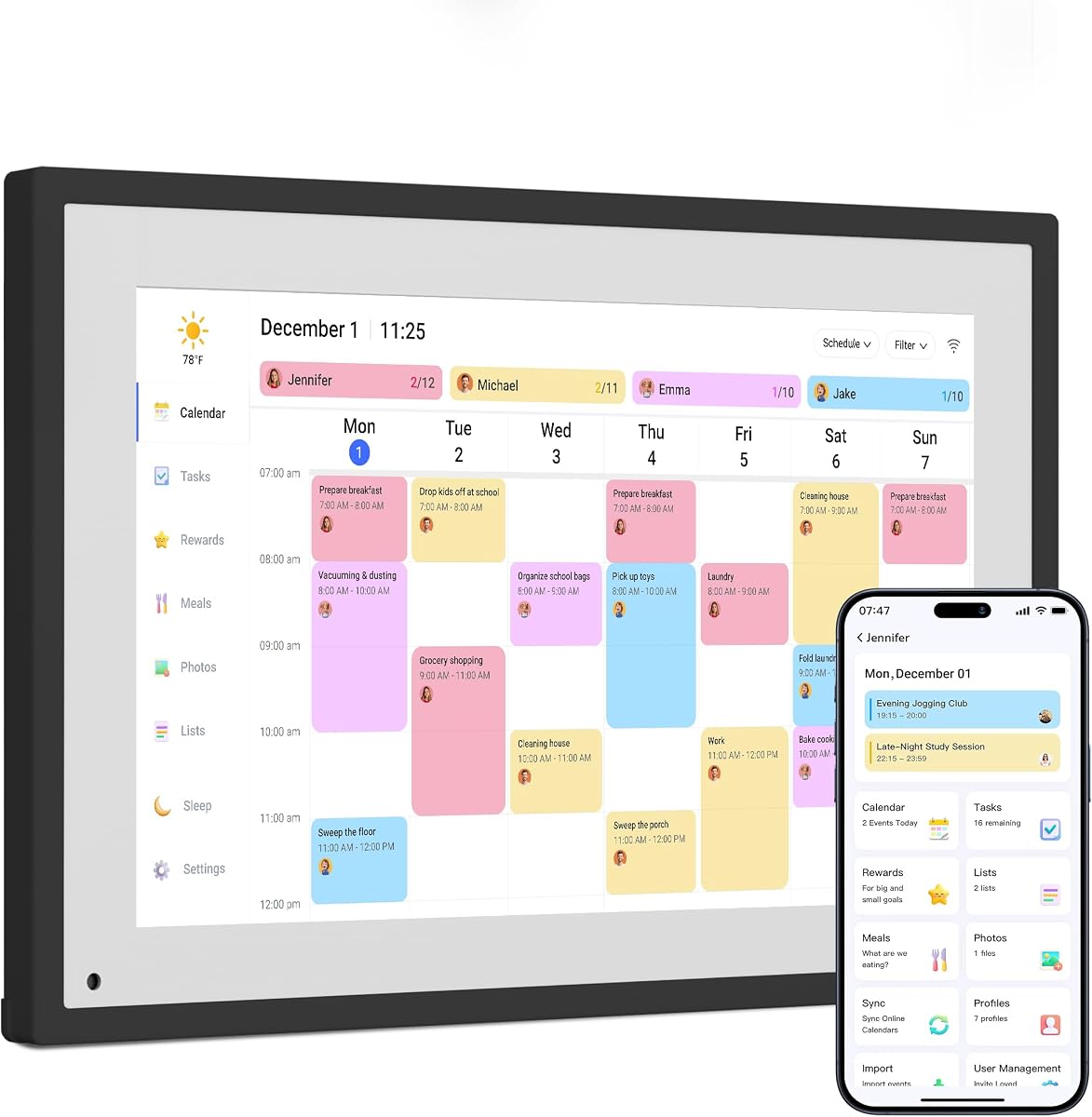





This device combines a large 15.6-inch screen with comprehensive family organization tools. It holds a 4.4 rating and stands out for its robust chore and reward system designed for kids.
We may earn a commission when you buy through this link, at no additional cost to you.
The real-time sync ensures everyone sees updates instantly on Google and iCloud calendars. The built-in reward system turns chores into a fun game, fostering responsibility and independence among children.
While the cost is higher than smaller models, the subscription-free nature saves money long term. The lack of a premium monthly plan keeps the value proposition strong for busy households.
This is ideal for families needing a central command center with clear visibility. If you want a large screen with no hidden costs and strong chore features, this is the top choice.
The device merges meal planning, calendars, and chore charts into one sleek display for total household coordination.
Kids earn reward points by checking off tasks on the touchscreen, making daily routines engaging and productive.
We may earn a commission when you buy through this link, at no additional cost to you.
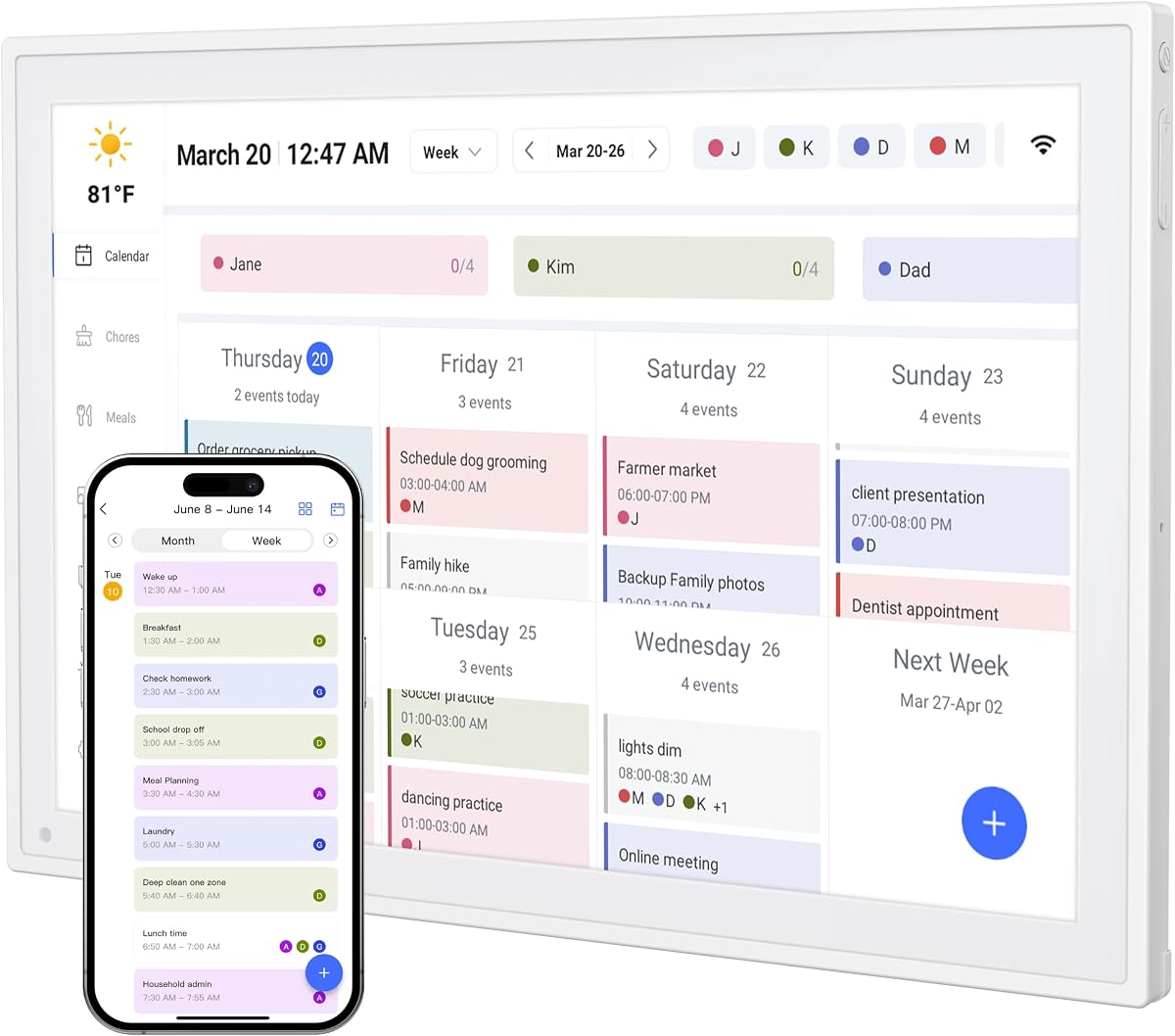
Skylight offers a premium 15.4-inch touchscreen hub for organizing family schedules and chores. It has a 4.4 rating and is known for its distinctive Disney Mode and sleek design.
We may earn a commission when you buy through this link, at no additional cost to you.
The Disney Mode features 16 iconic characters to encourage teamwork with animations and avatars. The sync capability ensures all family members see schedule updates directly on the device or via the app.
While the base plan is solid, some features like Magic Import require a subscription. However, the overall user experience is smooth and the large screen is easy to read.
Families who want a stylish wall hub with unique gamification options should consider this. It suits those who value premium design and interactive characters for kids.
Exclusive characters and animations help make chore completion exciting for younger family members.
The modern look fits seamlessly into kitchens or offices without looking like standard tech.
We may earn a commission when you buy through this link, at no additional cost to you.
This model provides essential digital planning tools at a very affordable price point. It has a 4.2 rating and offers Full HD clarity for viewing schedules and meal plans.
We may earn a commission when you buy through this link, at no additional cost to you.
It displays main course titles clearly to avoid clutter. The photo frame mode allows you to relive memories when the device is idle without needing extra apps.
The lack of subscription fees for core functions makes it a great entry-level option. However, it lacks some advanced features like AI enhancements found in more expensive models.
Ideal for families wanting basic digital organization without high costs. If you need a functional display for tasks and meals on a budget, this is a solid pick.
All core features like chores and meal plans are available without any monthly payment requirements.
The device can be mounted on walls or placed on desks for flexible placement in any room.
We may earn a commission when you buy through this link, at no additional cost to you.
This unit is a dual-purpose smart calendar and photo frame with a 4.5 rating. It simplifies family scheduling with color-coded tasks assigned to each member.
We may earn a commission when you buy through this link, at no additional cost to you.
The All-In-One design organizes every schedule intuitively. When not in use, it showcases family photos on a crystal-clear screen adding elegance to decor.
While it lacks wall mount support which limits placement options, the color coding helps avoid schedule confusion. It is simple enough for all ages to manage daily tasks.
Best for users who want a desk top organizer with photo capabilities. If you prefer color coding over complex gamification, this model works well.
Assigning unique colors to family members ensures quick visual identification of tasks and events.
The device doubles as a beautiful digital frame when not being used for planning or chores.
We may earn a commission when you buy through this link, at no additional cost to you.
This model features a crystal-clear 10.1-inch touchscreen for tracking chores and dinner plans. It holds a 4.5 rating and focuses on making scheduling simpler for everyone.
We may earn a commission when you buy through this link, at no additional cost to you.
The interactive chore chart motivates members to develop healthy habits. It also syncs with multiple personal calendars via a mobile app for easy management from anywhere.
The Auto-Sync feature reduces setup time significantly. While the screen is smaller than wall mounts, it is perfect for a desk or nightstand.
Suitable for families who need simple interactive planning. If you want a friendly interface that encourages habit building without complexity, this is a good option.
Linking calendars takes minutes via Wi-Fi so you can start organizing immediately after unboxing.
Displaying family dinner plans helps eliminate daily confusion about what is being served for meals.
We may earn a commission when you buy through this link, at no additional cost to you.
This smart calendar merges appointments and chores into one intuitive 10.1-inch display. It has a 4.4 rating and uses dual-band Wi-Fi for instant updates across devices.
We may earn a commission when you buy through this link, at no additional cost to you.
The interactive chore chart lets kids check off tasks to build independence. Custom colors ensure no plans overlap while meal planners help reduce daily stress.
It transforms into a photo frame automatically when idle so you stay connected to memories. The compact design fits easily on kitchen counters or desks.
Perfect for households wanting a single source of truth for tasks. If you need a balance of features and size this model delivers efficiently.
Dual-band Wi-Fi ensures that schedule changes happen instantly across all family devices.
Children take charge of responsibilities by tapping the screen to complete tasks and earn rewards.
We may earn a commission when you buy through this link, at no additional cost to you.
A smart organizer that includes grocery lists and digital photos with zero hidden fees. It has a 4.4 rating and lets kids race to earn stars for completing tasks.
We may earn a commission when you buy through this link, at no additional cost to you.
The weekly meal manager displays menus and generates grocery lists automatically. This reduces last-minute takeout and helps plan calm dinners for the whole house.
Setup is plug-and-play with real-time syncing for calendars. However the photo frame features are more basic than larger premium models.
Great for parents who want a no-cost monthly model. If you need a clean interface for tasks and meals without subscriptions this fits well.
Recipe uploads generate shopping lists automatically so you save time during your weekly trip.
Kids are motivated by stars and rewards that turn chores into a fun competitive game.
We may earn a commission when you buy through this link, at no additional cost to you.
This model offers a 15.6-inch 1080P touchscreen with 64GB storage for media. It holds a 4.4 rating and supports color-coded schedules via the AiMOR app.
We may earn a commission when you buy through this link, at no additional cost to you.
The interactive star reward chart helps children build responsibility by self-tracking progress. You can customize widgets like weather and planners to fit your needs.
The auto dimming brightness sensor ensures comfortable viewing day or night. With 64GB storage you can keep thousands of photos locally without needing a cloud account.
Ideal for families needing high storage and a large screen. If you want a detailed display with flexible widgets this model delivers power.
The 1080P screen provides crisp visuals for text and images ensuring readability from any distance.
Drag-and-drop functionality lets you arrange tools exactly how your family prefers to view them.
We may earn a commission when you buy through this link, at no additional cost to you.
This command center combines shared calendars and tracking with a perfect 5.0 rating. It features a 10.1-inch HD touchscreen that helps you see who is doing what.
We may earn a commission when you buy through this link, at no additional cost to you.
Instant sync with major providers ensures everyone stays updated. Customizable reward charts encourage kids to complete tasks and build responsibility through positive reinforcement.
Real-time weather forecasts help you plan your day better. It supports wall mounting or desktop placement for ultimate flexibility in your home setup.
Excellent for families wanting high reliability. If you need a highly rated organizer that supports flexible tasks this is a great pick.
Parents can set up fun charts to motivate kids to finish chores without nagging.
Real-time forecasts provide helpful local info so you never forget an umbrella or coat.
We may earn a commission when you buy through this link, at no additional cost to you.
Turn any shelf into a command center with this 10.1-inch IPS touchscreen. It has a 4.2 rating and supports color-coded schedules so everyone knows their tasks.
We may earn a commission when you buy through this link, at no additional cost to you.
Silent vibration alerts wake you for early appointments without noise. The meal planner helps you save recipes and organize ingredients in one spot.
It comes with an adjustable stand for landscape or portrait use. This flexibility makes it ideal for desks nightstands or kitchen counters.
Great for those needing a small footprint organizer. If you want a simple device that fits in tight spaces this option works well.
The built-in motor wakes you silently without disturbing partners sleeping nearby.
An adjustable stand lets you switch between portrait and landscape modes easily.
We may earn a commission when you buy through this link, at no additional cost to you.
Selecting the right model involves evaluating screen size, connectivity features, and budget. Consider these factors to find a device that suits your household.
Larger screens like 15.6 inches offer better visibility from a distance for busy kitchens. Smaller 10.1-inch models are more versatile for desks or smaller spaces.
Aim for at least Full HD resolution to ensure text and photos look crisp.
Many models offer basic features without any monthly payment requirements which saves money over time. Some premium models include optional plans for extra features like advanced photo tools.
Check if core tools like chore charts and syncing are included in the base price.
Ensure the device supports major platforms like Google, iCloud, and Outlook so everyone can view updates. Real-time sync is vital for keeping everyone on the same page.
Verify that changes made on the device update immediately on your phone or computer.
Interactive reward systems like stars and badges motivate children to complete tasks without nagging. Look for tools that let you assign specific tasks and track progress easily.
Some models allow custom points for specific habits to build long-term responsibility.
Integrated meal planners help you reduce daily stress about dinner menus and grocery lists. Look for units that let you input recipes or display titles clearly.
A good meal tool should simplify grocery shopping without requiring extra apps.
Most devices double as digital frames to display cherished memories when not in use as a planner. Check for storage capacity options for local or cloud photo management.
Ensure the slideshow is automatic and easy to set up for hands-free enjoyment.
Wall mounting provides a central family hub but desktop models offer flexibility to move as needed. Verify if the unit comes with mounting hardware and a stand included.
Choose a device that fits your physical space whether it is a wall or a countertop.
Reliable support helps you resolve setup issues quickly when you first connect the device. Look for units with at least a one-year replacement warranty for peace of mind.
A good support team ensures that your organization tool stays working for the long term.
Start by connecting the device to your home Wi-Fi network to enable syncing. Link your Google or iCloud accounts so all family members can access the shared schedule.
Assign colors and tasks to each person using the interface. Encourage kids to mark tasks as done daily to build consistent habits and responsibility.
Keep the screen clean with a soft dry cloth to avoid scratches. Adjust brightness settings or use sleep modes to save energy and reduce eye strain at night.
Most models offer full functionality without any monthly fees. Some premium units have optional plans for extra features but core planning and chore tools are usually free.
Yes most devices support syncing with Google iCloud and Outlook. This allows everyone to see their personal events on one central screen.
Many models allow you to customize stars or points for different tasks. This helps tailor motivation to each child's needs.
Displays range from 10.1 inches for desktop use to 15.6 inches for wall mounts. Larger screens offer better visibility in busy rooms.
Yes most units transition to photo frame mode when idle. You can upload memories via an app to enjoy a slideshow.
Many models include stands for desk or counter use. Wall mounting is often optional and some units are designed primarily for desk placement.
The 15.6-inch calendar with no subscription fees stands out for its balance of size and value. The Skylight model offers premium features and a unique Disney Mode for younger kids.
Prioritize models with clear reward systems to help children build independence. Sync speed and display clarity are also key factors to ensure daily utility.
Remember to check current availability and pricing since these details can change over time. Choose the device that best fits your household habits and physical space.