
Laptop Monitor Light Bar with Clip USB LED Task Lamp No Screen Glare
4.6Editor score
Asymmetrical optical design
USB powered with memory
Space-saving clip-on mount
Finding the right lighting for your workspace is crucial for comfort and productivity. A laptop monitor light bar provides focused illumination without cluttering your desk or causing screen glare. These devices are designed to sit atop your screen, casting light directly onto your keyboard and workspace.
We compared ten top-rated models based on optical design, brightness control, and ease of use. Each product was evaluated for its ability to reduce eye strain during long work sessions. Our list includes options for budget-conscious buyers and those seeking premium features like auto-dimming or RGB lighting.
Each pick highlights key strengths and ideal use cases to help you decide. Whether you need a portable option for travel or a robust solution for home offices, this guide covers it all. Keep in mind that availability and features may change over time, so check current listings for the latest updates.
4.6Editor score

4.6Editor score

4.7Editor score
As an Amazon Associate we earn from qualifying purchases.
This side-by-side comparison highlights the core specifications of each model to help you quickly identify the right fit for your needs. We focus on mounting style, light output, color temperature options, and special features like auto-dimming or RGB effects.

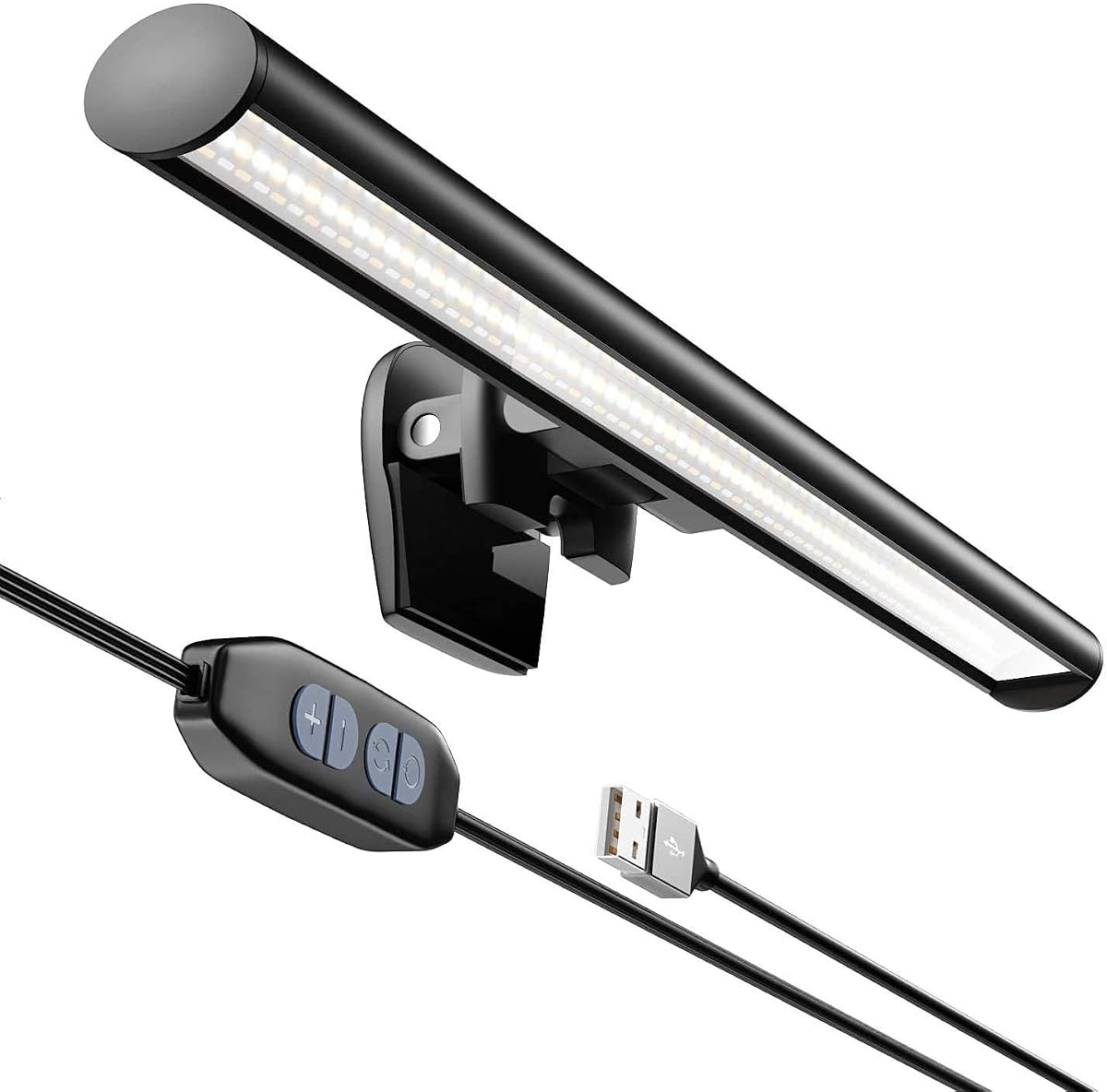





This model stands out as a highly affordable option that does not compromise on essential features. With a 4.6 rating, users appreciate its ability to provide clear task lighting without obstructing your view. The asymmetrical design ensures that light hits your desk, not your screen, which is a key feature for eye comfort.
We may earn a commission when you buy through this link, at no additional cost to you.
The clip-on installation is straightforward, requiring no tools or screws. It fits most monitor thicknesses comfortably, securing itself without damaging your device. You can choose from three color temperatures and ten brightness levels, allowing you to tailor the lighting to your specific needs. The memory function saves your preferred settings, so you do not have to reset them every time you plug it in.
While it lacks advanced sensors like auto-dimming, the manual controls are responsive and intuitive. The USB power source makes it easy to connect to various devices, including power banks for travel. The only trade-off is that it does not offer the premium build materials found in higher-end models, but it delivers solid performance for the price.
Ideal for students or remote workers with tight budgets, this light bar provides excellent value. If you need a reliable, glare-free lighting solution that keeps your desk clutter-free, this is a top recommendation. It effectively reduces eye strain during long hours of work or study.
The optical design directs light downward, eliminating reflections on your screen that often cause eye strain.
Powered via USB, this light bar can be used with laptops, chargers, or power banks for maximum flexibility.
We may earn a commission when you buy through this link, at no additional cost to you.
The Wodgreat monitor lamp is designed with eye care in mind, featuring 54 LED beads for even illumination. It holds a 4.3 rating, reflecting its solid performance in reducing glare and providing a soft light source. Users often praise its ability to free up desk space while keeping the workspace well-lit for productivity.
We may earn a commission when you buy through this link, at no additional cost to you.
Installation is hassle-free with a clip-on design that fits most monitors. The light does not block your laptop camera, making it a great choice for video calls. You can adjust brightness and color temperature to suit different tasks, whether you are reading, working, or relaxing. The matte black frame adds a touch of elegance to your setup.
One notable feature is the memory function, which recalls your last settings. However, some users might find the control interface a bit basic compared to more premium models. The USB power ensures versatility, but the cable length is fixed at 75cm, which is sufficient for most desks but might limit some setups.
If you want a stylish and functional light bar without breaking the bank, this model is worth considering. It offers a good balance of features and affordability. It is particularly suitable for users who prioritize camera visibility and desk space efficiency.
The unique fixing structure ensures the light stays stable without blocking your webcam during video calls.
With a flicker-free design and adjustable warmth, this light helps reduce eye strain during long sessions.
We may earn a commission when you buy through this link, at no additional cost to you.
CATPOWER offers a versatile solution for those who move between different workspaces. With a 4.5 rating, this light bar is praised for its flexibility and durability. The design allows you to adjust the lighting angle easily, ensuring that the light reaches exactly where you need it most.
We may earn a commission when you buy through this link, at no additional cost to you.
The flicker-free design is a major benefit for reducing eye fatigue during prolonged computer use. The materials used are high-quality, ensuring that the light bar can withstand daily wear and tear. It is lightweight and easy to carry, making it perfect for travel or switching between home and office desks.
Connectivity is handled via USB, allowing you to plug it into laptops or power banks. The range of color temperatures and brightness levels helps customize the environment for various activities. While it does not have advanced smart features like auto-dimming, it delivers consistent and reliable lighting.
This model is ideal for digital nomads or students who need a reliable lighting source on the go. Its portability and ease of use make it a strong contender in the budget category. If you need a lamp that adapts to your changing environment, this is a great choice.
The slim profile and lightweight build make it easy to pack and use in different locations.
Choose from multiple brightness and color settings to match your specific task requirements.
We may earn a commission when you buy through this link, at no additional cost to you.
The Quntis monitor lamp is a standout choice for professionals who prioritize eye health and color accuracy. With a 4.6 rating, it offers advanced features like auto-dimming and a high Color Rendering Index. The asymmetrical optical design ensures that your screen remains free of reflections, keeping your focus on the task at hand.
We may earn a commission when you buy through this link, at no additional cost to you.
One of the most impressive features is the built-in ambient light sensor that adjusts brightness automatically. This helps prevent visual fatigue by ensuring consistent lighting conditions throughout the day. The Ra98 CRI ensures that colors are represented accurately, which is vital for designers and creators. The stepless dimming allows for precise control over the light output.
While the price is higher than basic models, the investment pays off in comfort and functionality. The touch controls are intuitive, though some users may find them sensitive. The build quality is solid, providing a stable mount on most monitors. It truly enhances the workspace experience by reducing glare and strain.
This lamp is ideal for anyone spending long hours in front of a screen. Whether you are working on detailed tasks or simply reading, the lighting quality is exceptional. It combines practical technology with a clean design that fits well in any office setting.
The ambient light sensor adjusts brightness to prevent eye strain caused by sudden light changes.
With a CRI of 98, colors appear natural and vibrant, perfect for design and photography work.
We may earn a commission when you buy through this link, at no additional cost to you.
This 11.8-inch light bar is designed to cover larger desks and wide monitor setups effectively. With a 4.2 rating, it provides significant brightness coverage that reduces dark spots on your workspace. The ultrawide design ensures that light is distributed evenly across your keyboard and desk, enhancing visibility without glare.
We may earn a commission when you buy through this link, at no additional cost to you.
The counterweight clip design ensures that the bar stays securely in place on your monitor. It fits various screen types, including curved ones, without damaging the bezel. The mechanical ON/OFF switch is simple and reliable, though it may lack the precision of touch controls. The built-in memory function helps you maintain your preferred lighting settings.
While it does not offer the advanced color customization of higher-end models, it focuses on delivering bright, uniform light. The USB power ensures easy connectivity. Users often appreciate the wider spread of light, which is particularly useful for multi-tasking setups. It is a practical solution for those with larger workstations.
If you need a light bar that covers a broad area, this model is worth the consideration. It provides a solid foundation for a well-lit workspace without requiring complex setup. It is an excellent choice for gamers or office workers with wide desks.
The 11.8-inch width ensures even lighting across large desks, reducing shadows.
The counterweight clip holds the light firmly without slipping, even on curved screens.
We may earn a commission when you buy through this link, at no additional cost to you.
This light bar offers a unique combination of brightness and control modes to suit different scenarios. With a 4.5 rating, users appreciate its robust performance and ease of use. The 45-degree angled optical structure directs light precisely where needed, avoiding reflections on the screen and reducing eye strain.
We may earn a commission when you buy through this link, at no additional cost to you.
The dual control modes allow you to adjust settings easily without touching the bar directly. You can toggle between color temperatures ranging from warm to cool white, helping you adapt to different times of the day. The mount is designed to fit various monitor types, including those with irregular rear bezels. It stays firmly in place, freeing up desk space.
The light output reaches up to 800 lux, which is bright enough for detailed work. The physical control button is located on the side for convenient access. While it lacks some advanced features like auto-dimming, the solid build and effective lighting make it a reliable option for any home office setup.
Ideal for users who want a sturdy and efficient lighting solution, this bar delivers consistent results. It is particularly useful for those who switch between reading and gaming. The bright, even illumination helps keep your workspace comfortable and productive.
Switch between warm and cool light to match your mood and activity level easily.
Delivers up to 800 lux for a well-lit workspace that minimizes eye fatigue.
We may earn a commission when you buy through this link, at no additional cost to you.
This light bar is specifically designed to illuminate your keyboard area, making it a great choice for typing. With a 4.5 rating, it combines portability with effective lighting. The reflector design improves the lighting effect while avoiding dazzle that might reflect on the screen. It is lightweight and fits easily on most monitors.
We may earn a commission when you buy through this link, at no additional cost to you.
The counterweight fixture allows for easy installation without tools. You can adjust the angle to optimize the illuminating area based on your needs. The USB power ensures it can be used with various devices, making it convenient for travel. The 4-key controller allows you to regulate brightness and color temperature according to your needs.
While the materials are basic, they are durable enough for daily use. The focus on keyboard illumination helps reduce strain when typing in low light. It is an affordable option for users who want focused lighting without cluttering their desk. The packaging makes it a suitable gift for relatives or friends.
If you need a portable and focused lighting solution, this bar is a solid option. It serves well for students and remote workers who value simplicity and effectiveness. The targeted lighting ensures that your workspace is functional without unnecessary bulk.
The internal reflector improves light distribution, ensuring even coverage on your desk.
By focusing on the keyboard, it minimizes screen glare and protects your vision.
We may earn a commission when you buy through this link, at no additional cost to you.
The YEELIGHT monitor light bar features a premium full-metal body that ensures durability and heat conduction. With a 4.4 rating, it offers excellent eye care with RG0 safety certification. The design minimizes screen glare and provides stable, flicker-free light. The retractable clip adapts to most monitor thicknesses securely.
We may earn a commission when you buy through this link, at no additional cost to you.
One of its standout features is the ultra-high CRI Ra95, which ensures true color fidelity. This makes it perfect for professionals who need accurate color representation. The stepless dimming and color temperature adjustment allow for precise customization. The touch controls are intuitive and make adjustments easy during use.
The low-profile design avoids webcam obstruction, which is a thoughtful detail for video call users. The full-metal body not only looks elegant but also helps dissipate heat effectively. While the price is higher, the build quality and features justify the investment. It provides a sleek addition to any modern workspace.
Ideal for designers and content creators, this light bar offers the precision needed for creative work. It also suits gamers and office workers who value comfort and aesthetics. If you want a reliable, high-performance light bar, this is a top recommendation.
RG0 certification ensures minimal blue light hazard, protecting your eyes from long-term damage.
The full-metal body offers durability and effective heat dissipation for long-lasting use.
We may earn a commission when you buy through this link, at no additional cost to you.
OOWOLF offers a unique dual-light design that includes both front and rear lights for comprehensive eye care. With a 4.5 rating, this model focuses on reducing pressure from dark surroundings. The rear ambient lights help lower eye strain, while the front light provides task illumination. The high CRI ensures color restoration and visual accuracy.
We may earn a commission when you buy through this link, at no additional cost to you.
The dual-light system is a key differentiator, offering the highest level of lighting comfort. The memory function saves your color and brightness settings, making daily use seamless. It has passed rigorous quality tests and includes a silicone mount base for easy installation. The Type-C power line ensures compatibility with modern devices.
While the setup might seem slightly more complex due to the dual lights, the benefits are worth the effort. The filter for blue light helps prevent myopia and protect your eyes over time. The packaging makes it a practical gift. It is designed to serve both home and office environments effectively.
This light bar is ideal for those who want advanced eye care features. If you often work in dim environments, the rear ambient lights are particularly beneficial. The high-quality construction and certification reports give confidence in its safety and longevity.
Rear lights reduce pressure on the eyes by illuminating the surroundings around the screen.
Passed over 10,000 tests and holds multiple safety certifications for reliable performance.
We may earn a commission when you buy through this link, at no additional cost to you.
This model is designed for large ultrawide curved monitors, offering a custom-built fit. With a 4.7 rating, it delivers up to 1400 lux of brightness for professional workflows. The RGB backlight adds a creative ambiance that is perfect for gaming or movies. The foldable dual light bar allows for flexible lighting angles.
We may earn a commission when you buy through this link, at no additional cost to you.
The patented clamps accommodate a wide range of screen thicknesses. The asymmetrical optical design directs light onto your desk without glare. The precision light sensor adjusts brightness automatically based on ambient light. This ensures uninterrupted workflow efficiency throughout the day. The reinforced clamp provides a secure grip without damaging your screen.
While the price is premium, the features are unmatched for large screen setups. The USB-C cable is angled to leave room for webcams, keeping your setup clean. The 15 RGB modes allow for creativity and immersion. It is a top choice for those with curved monitors who need high performance.
Ideal for gamers and professionals with wide setups, this light bar offers versatility and power. The dual lighting creates a soft contrast for the screen, reducing eye strain. It combines functionality with style, making it a standout product in the category.
Choose from 15 RGB modes to enhance your gaming or movie-watching experience.
Delivers up to 1400 lux for a bright, evenly lit workspace.
We may earn a commission when you buy through this link, at no additional cost to you.
Selecting the right monitor light bar involves considering several factors to ensure it meets your specific needs. Here are the key aspects to evaluate before making a purchase.
Look for an asymmetrical optical design that directs light downward onto your desk. This prevents glare on your screen and reduces reflections that cause eye strain. A good light bar should illuminate your workspace without casting light directly into your eyes.
Ensure the design minimizes reflections to maintain screen clarity and comfort during use.
Check the maximum brightness level, measured in lux. A bar that offers stepless or wide-ranging dimming is ideal for adjusting light to different times of day. Stepless dimming allows for smoother transitions and precise control.
Choose a model with versatile brightness control to adapt to your environment easily.
Warm light helps you relax, while cool light enhances focus. Models with adjustable color temperatures let you switch between modes based on your task. Some premium models offer a broader range of Kelvin temperatures.
Opt for adjustable color temperature to suit reading, work, and relaxation needs.
The mount should be secure and easy to install without tools. Check the clamp size to ensure it fits your monitor thickness. A counterweight clip helps stabilize the bar without damaging the screen.
Verify compatibility with your monitor size to ensure a stable and safe installation.
Most bars are USB-powered, which is convenient for laptops and power banks. Ensure the cable length is sufficient for your setup. Some models include power adapters, while others rely on USB.
Select a power source that fits your workspace connectivity options.
Auto-dimming sensors, memory functions, and RGB lighting add convenience and style. These features enhance the user experience by automating adjustments or offering custom ambiance. Evaluate which features add value to your workflow.
Prioritize features that align with your daily usage patterns and preferences.
A higher CRI ensures colors appear accurate and vibrant. This is crucial for creative work like graphic design or photo editing. Models with CRI above 95 are generally preferred for color-critical tasks.
Choose a high CRI value if accurate color representation is important for your work.
Materials like metal or durable ABS affect longevity and heat dissipation. Metal bodies often look sleeker and dissipate heat better. Consider the warranty and customer support for additional peace of mind.
Invest in a model with solid construction to ensure it lasts over time.
Install the light bar by attaching the clip securely to the top center of your monitor. Ensure the light is directed downward toward your desk to avoid screen glare. Adjust the angle so the beam covers your keyboard and workspace evenly.
Plug the USB cable into your laptop, power bank, or USB adapter. Turn on the light using the control button. Use the touch or physical controls to adjust brightness and color temperature based on your needs.
Clean the bar occasionally with a soft, dry cloth to remove dust. Avoid using harsh chemicals that might damage the surface. Check the clamp regularly to ensure it remains tight and does not slip.
A monitor light bar provides focused task lighting without taking up desk space. It reduces eye strain by illuminating your keyboard and workspace while preventing screen glare. This makes it ideal for long hours of work or study.
They use an asymmetrical optical design to direct light downward onto your desk. This prevents the light from hitting the screen directly, which eliminates reflections and keeps your view clear and comfortable.
Many modern light bars are designed to fit both flat and curved monitors. Look for models with adjustable clamps that can adapt to the curvature. Ensure the product description specifies compatibility with curved screens before purchasing.
Most bars are USB-powered and do not include a dedicated power adapter. You can plug them into your laptop or a USB wall adapter. Some models may include a power brick, so check the package details.
High-quality bars are flicker-free and often meet blue light safety standards. This helps reduce eye fatigue and strain during extended use. Look for certifications like RG0 to ensure eye safety.
LED bars generally last over 35,000 hours, which equates to years of daily use. The durability depends on the build quality and usage habits. Regular cleaning and proper mounting help maintain performance.
Most models offer adjustable color temperatures ranging from warm to cool. You can switch between modes to match your activity, whether you are working or relaxing. Some bars even have preset modes for quick changes.
Yes, most bars are designed for tool-free installation. You simply clip them onto the monitor top and adjust the angle. The process takes only a few minutes and does not require technical skills.
We have reviewed ten top models that cater to different needs and budgets. Whether you need basic task lighting or advanced features like RGB, there is a pick for everyone. The Quntis and YEELIGHT models offer premium features for professionals.
When choosing, prioritize optical design and brightness control to ensure comfort. A good light bar should be easy to install and fit your specific monitor. Consider additional features like auto-dimming if they align with your workflow.
Always check current listings for the latest availability and details. While prices may vary, focusing on key specs will help you find a reliable bar. Investing in proper lighting protects your eyes and improves productivity.